

What This Automation Does
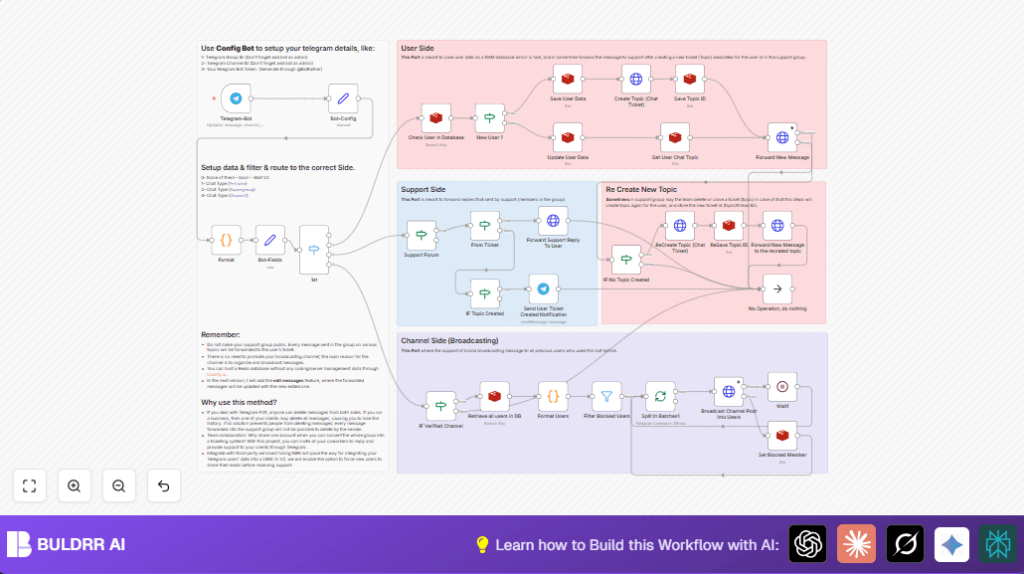
This workflow manages Telegram support messages by creating and organizing tickets for every user question automatically.
It stops messages from getting lost or deleted in the support group.
User messages are saved and forwarded into separate forum topics, making chat easy to follow.
Replies from team members get sent back to users without extra work.
Broadcasts from a Telegram channel reach all users who talked to support.
It also handles cases where ticket topics close or delete, recreating them.
Tools and Services Used
- Telegram Bot API: Receives user messages.
- Redis Database: Stores user info, ticket topics, and block status.
- n8n Automation Platform: Runs the workflow using Telegram and Redis nodes.
Beginner Step-by-Step: How to Use This Workflow in n8n
1. Import the Workflow
- Download the workflow JSON file using the Download button on this page.
- Open the n8n editor and select “Import from File”.
- Choose the downloaded JSON file to load the workflow.
2. Configure Credentials and IDs
- Open the Bot-Config node.
- Paste your Telegram Bot API Key.
- Enter the Support Group ID where tickets will be created.
- Enter the Broadcast Channel ID used for announcements.
- Set your Redis credentials in the nodes that connect to the Redis database.
3. Test the Workflow
- Send a message to your Telegram Bot from a private chat.
- Check if a ticket (forum topic) is created in your Support Group.
- Make sure messages forward correctly to the ticket.
- Send replies from Support Group and verify they reach your private chat.
4. Activate the Workflow
- After testing, activate the workflow in n8n to run continuously.
- Ensure the Telegram Bot webhook URL is set to n8n’s URL for live updates.
- If using self-host n8n, keep your server running.
Input → Processing → Output
Inputs
- User messages sent to Telegram Bot in private chat.
- Support team messages in Telegram Support Group.
- Broadcast messages posted in Telegram Channel.
Processing Steps
- Format and clean incoming user messages.
- Check Redis database if user exists.
- Create new forum topic (ticket) for new users.
- Forward user messages to appropriate forum topic.
- Forward support team replies back to users.
- Save and update user and ticket info in Redis.
- Handle topic recreation if deleted or missing.
- Broadcast channel messages to all non-blocked users in batches.
Output
- Support tickets created as forum topics for each user.
- User messages organized in ticket threads.
- Support replies returned to user chats.
- Announcements sent to all active users.
- Redis database keeps user and ticket status updated.
Handling Edge Cases and Failures
If the Telegram forum topic for a ticket is deleted, the workflow detects this when forwarding messages fails.
It automatically recreates the topic using the Telegram API and updates Redis.
This avoids losing any messages or conversations.
If Redis connections fail or keys are missing, the workflow stops updates.
The user should check Redis credentials and connection separately to fix.
If the bot lacks admin rights or permissions in the support group, message forwarding fails.
Make sure the bot is an admin with rights to create topics and manage messages.
Customization Ideas
- Change Support Group or Bot IDs in Bot-Config for your own setup.
- Edit HTTP nodes “Create Topic” and “ReCreate Topic” to rename tickets or add user info.
- Add handling for message edits to sync changes later.
- Adjust batch size in “Split In Batches1” node to manage Telegram rate limits.
- Add more user fields to store in Redis for richer user profiles.
Summary
→ Organizes Telegram support messages into tickets.
→ Prevents message loss by saving them in forum topics.
→ Forwards team replies back to users automatically.
→ Broadcasts announcements to all interacting users.
→ Handles errors by recreating closed ticket threads.
→ Saves user and ticket data in Redis for tracking.
→ Saves time and improves support team efficiency.
