

What This Automation Does
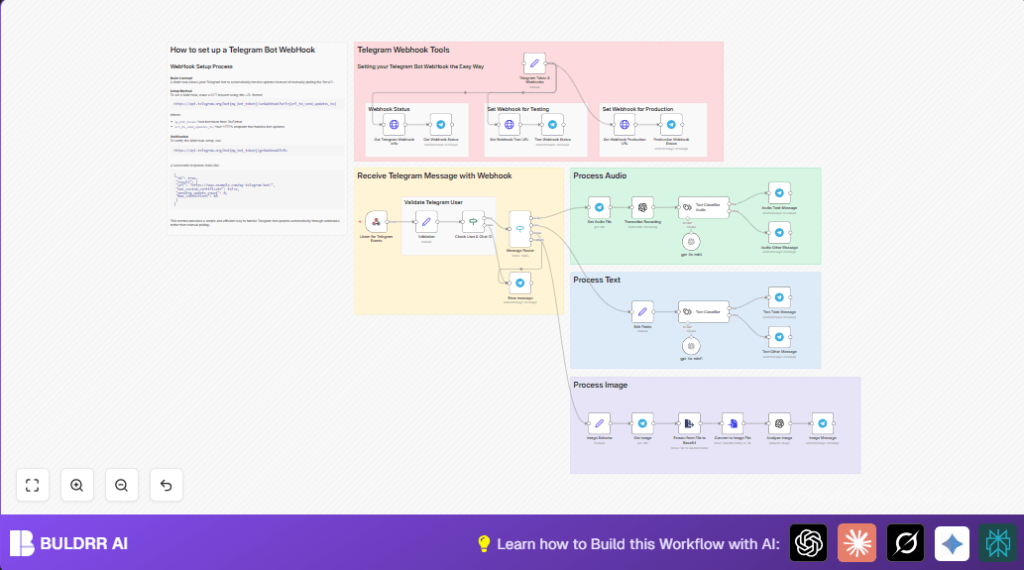
This workflow watches Telegram messages and handles text, audio, and image inputs automatically.
It sorts messages by type, transcribes voice notes with AI, classifies texts as tasks or simple chats, and analyzes image content.
The program replies in Telegram based on message type and classification.
This helps users save time and answer messages faster without missing important tasks.
Tools and Services Used
- Telegram Bot API: Receives user messages.
- n8n: Automates workflow orchestration.
- OpenAI API: Transcribes audio to text and classifies messages.
- HTTPS Webhook Endpoint: Receives Telegram updates securely.
Beginner Step-by-Step: How to Use This Workflow in n8n
Import Workflow
- Download the workflow file using the Download button on this page.
- Open n8n editor and choose the “Import from File” option.
- Select the downloaded workflow file and load it.
Setup Credentials and Configurations
- Add Telegram Bot API credentials inside the relevant nodes.
- Enter OpenAI API Key in all nodes that require AI services.
- Update any user IDs, chat IDs, emails, or paths as needed in the validation and messaging nodes.
Test Workflow
- Send sample messages (text, audio, image) from authorized Telegram users.
- Check that transcriptions and classifications happen correctly.
- Confirm Telegram replies are sent as expected.
Activate for Production
- Make the Webhook node active in n8n.
- Run the workflow and monitor logs for errors.
- Ensure the webhook URL is set correctly in Telegram Bot API.
For reliable uptime, consider self-host n8n on a server.
Inputs → Processing Steps → Outputs
Inputs
- Incoming Telegram messages containing text, voice audio, or images.
Processing Steps
- Validation: Checks if the sender is in allowed user list.
- Routing: Switches message flow based on message type (text, audio, or image).
- Audio Handling: Downloads voice note, transcribes speech to text via OpenAI, then classifies text as task or general.
- Text Handling: Extracts message text, classifies it similarly.
- Image Handling: Downloads image file, converts it to base64, analyzes image content with OpenAI.
- Unknown Messages: Detects unsupported types and sends generic reply.
Outputs
- Telegram reply messages confirming tasks or providing feedback.
- Classifications stored or sent for further action.
Edge Cases and Failures
- Webhook not receiving updates: Verify webhook URL uses HTTPS and Telegram returns ok: true.
- Messages from unauthorized users get blocked by validation.
- Audio transcription can fail if voice file is not properly downloaded or binary property is wrong.
- Unknown message types trigger generic error replies.
Customization Ideas
- Change validation list for allowed users by editing the Set node “Validation”.
- Add handling for other message types like videos or documents by expanding Switch node “Message Router”.
- Tune OpenAI node parameters like model or prompt for improved accuracy.
- Personalize Telegram replies by editing message text in nodes like “Text Task Message”.
- Add logging nodes to save processed data to a database or spreadsheet.
Pre-Production Checklist
- Confirm that Telegram bot token is correct and active.
- Test that webhook URLs respond properly on HTTPS.
- Send test messages of all supported types from authorized users.
- Check AI classification and transcription outputs.
- Verify replies are sent correctly according to message type.
Deployment Guide
Turn on the Webhook node to activate.
Keep an eye on workflow error logs.
Use self-host n8n on a server for constant uptime.
Regularly review logs to improve classification and validation.
Summary
✓ Saves hours of manually sorting Telegram messages.
✓ Automatically transcribes voice notes and classifies message intent.
✓ Replies instantly with task confirmations or feedback.
✓ Supports text, audio, and image message types.
✓ Improves team productivity and customer response speed.
https://api.telegram.org/bot{token}/setWebhook?url={your-webhook-URL}Use above URL in HTTP Request nodes “Set Webhook Test URL” and “Set Webhook Production URL” replacing {token} and {your-webhook-URL} accordingly.
