
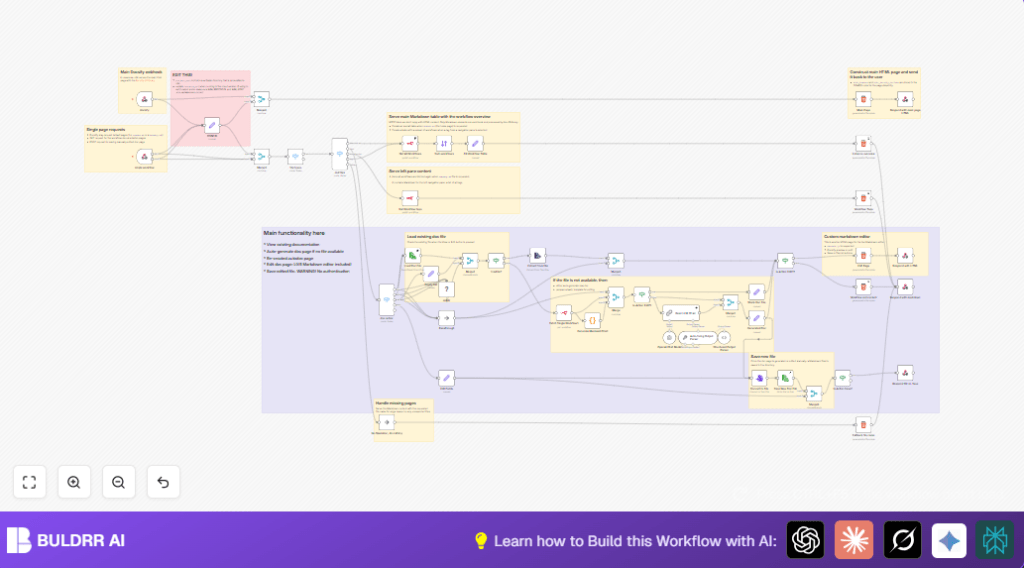

What This Workflow Does
This workflow helps you keep your n8n workflows documentation always fresh and easy to read.
It solves the problem of slow, error-prone manual updates by making docs automatically from real workflow data.
When you ask for a doc, it shows a live HTML page with all workflows listed and their details in tables.
You can see or edit markdown files with diagrams showing workflow steps and connections.
Changes you make save directly on the system.
This saves time and keeps docs in sync all the time.
Who Should Use This Workflow
This is best for people managing many n8n workflows that change often.
Anyone who wants to avoid writing docs from scratch and keep teams clear on workflow setup.
If you want live docs with visuals and quick online editing, this fits well.
Tools and Services Used
- n8n API: Gets workflow info like names, tags, and nodes.
- Docsify JS Library: Shows markdown docs as a nice website.
- Mermaid.js: Draws workflow diagrams inside markdown.
- OpenAI GPT-4 Turbo: Generates automated doc text describing workflows.
- ReadWriteFile node: Reads and saves markdown files locally.
- Webhook nodes: Receive requests to show or edit docs online.
Beginner step-by-step: How to build this in n8n
Step 1: Import the Workflow
- Download the workflow file using the Download button on this page.
- In the n8n editor, click “Import from File” and select the downloaded file.
Step 2: Set up Credentials and Variables
- Add your n8n API credentials in the Get All Workflows and Get Workflow tags nodes.
- Add your OpenAI API key in the Basic LLM Chain and related AI nodes.
- Check the CONFIG node and update
project_pathto the folder where markdown docs will be saved. - Verify
instance_urluses correct protocol and hostname from your environment variablesN8N_PROTOCOLandN8N_HOST.
Step 3: Test the Workflow
- Trigger the webhook URLs via the browser, Postman, or curl to check responses.
- Ensure docs load or generate without errors.
Step 4: Activate for Production
- Enable the workflow in n8n.
- Start using the webhook URLs in your environment to view or edit docs live.
If self-host n8n, file path write access must be set correctly.
Refer to self-host n8n for help.
Inputs, Processing, and Outputs
Inputs
- HTTP requests via Webhook node with query params like file name and action (view, edit, save, recreate).
- n8n API access to get workflows and tags data.
- Existing markdown files read from local disk.
Processing Steps
- Identify requested file type using Switch node.
- Fetch all workflows and tags from the API.
- Generate or load markdown doc files. If missing, auto-create with OpenAI doc text and Mermaid diagrams via Code node.
- Render Docsify main page or editor page HTML templates including Mermaid.js and Docsify scripts.
- Save any edited markdown files back to disk using readWriteFile node.
Outputs
- Interactive Docsify HTML pages showing all workflows docs.
- Editable markdown files with live preview and real Mermaid diagrams.
- Auto-generated markdown documentation files for new workflows.
- Webhook responses with HTML or raw markdown based on request.
Edge Cases and Failures
- If markdown file requested is missing, a new doc is auto-generated.
- API failures can happen due to bad credentials or wrong URLs; double check n8nApi creds and
instance_url. - Markdown render might break if Docsify or Mermaid scripts are missing or malformed in CONFIG node HTML headers.
- Editing without authentication allows anyone saving docs which may be a security risk; add auth nodes to protect.
Customization Ideas
- Change the docs folder path by editing
project_pathin the CONFIG node. - Use different Docsify themes by replacing CSS URLs inside
HTML_headers. - Alter Mermaid diagram style or script configurations for different layouts or animations.
- Add user authentication before editing and saving docs for better security.
- Edit prompts or templates in OpenAI nodes to generate documentation with different style or detail.
Summary and Results
✓ Automatically updates markdown docs from live n8n workflow data.
✓ Shows interactive HTML docs with Mermaid workflow diagrams.
✓ Allows editing and saving docs directly in the browser.
✓ Saves hours on manual documentation maintenance weekly.
✓ Keeps team members better informed and onboarded faster.
→ Provides a single system combining workflow data, AI doc generation, visualization, and editing.
