

What This Automation Does
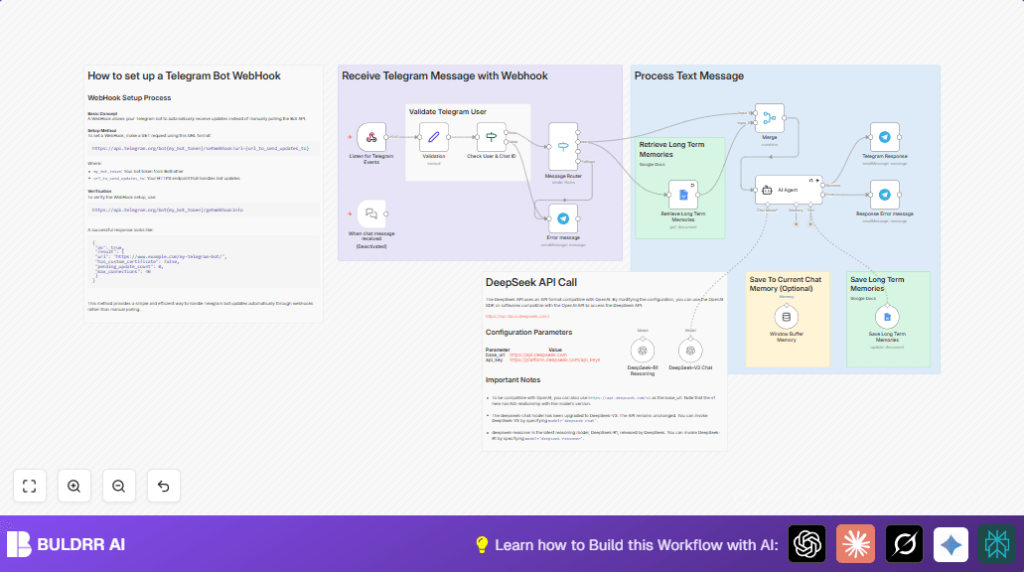
This workflow connects Telegram, DeepSeek AI, and Google Docs to create a chat bot that remembers user details and chats long term.
It solves the problem of answering repeated questions and losing chat memory.
The bot takes messages, understands user context, and replies using past conversation history.
This means less work writing replies and friendlier chats for users.
The workflow uses a Telegram webhook to get messages instantly and checks if the sender is a known user.
It sorts messages by type like text, voice, or images.
Text messages go to an AI node that talks using DeepSeek models and can use past memories stored in Google Docs.
The bot updates long-term memories after each talk and sends the reply back to Telegram.
Tools and Services Used
- Telegram Bot API: Receives user messages.
- n8n Webhook node: Catches Telegram messages in real-time.
- Set node: Holds user info for validation.
- If node: Checks user identity to allow or block message flow.
- Switch node: Routes message types (text, voice, image).
- LangChain AI Agent node (DeepSeek): Processes text with AI, understands context and responds.
- Google Docs node: Reads stored past chat and user data.
- Google Docs Tool node: Adds new memories to Google Docs.
- Telegram node: Sends chat replies back to users.
Linking the self-host n8n option is good to run the webhook server safely with HTTPS.
Who Should Use This Workflow
This is for users running Telegram groups or small businesses who want an AI chat helper that:
- Remembers past chats and user details.
- Handles different input types (text, voice, image).
- Reduces time spent answering similar questions.
- Allows personalized AI replies without losing context.
The user does not need deep coding knowledge but should have some familiarity with n8n and bot credentials.
Input, Processing, and Output
Inputs
- Telegram messages from users via webhook.
- User details: first name, last name, and Telegram ID stored in a Set node.
Processing
- Validate users to allow only known people.
- Check message types to send each to the right handler.
- For text messages, use AI to generate replies with context from long-term memories.
- Read and write user memory data to Google Docs.
Output
- Send AI-generated replies to the Telegram chat.
- Send error messages to unknown users.
Beginner Step-by-Step: How To Use This Workflow in n8n
Step 1: Import the Workflow
- Click the Download button on this page to get the workflow file.
- Open n8n editor.
- Choose “Import from File” and select the downloaded file.
Step 2: Configure Credentials
- Add your Telegram Bot API credentials.
- Add Google Docs OAuth2 credentials.
- Set the DeepSeek API Key in the LangChain AI Agent node.
Step 3: Update User Details and IDs
- In the Set node named “Validation,” enter the known user’s first name, last name, and Telegram ID.
- Make sure the Google Docs document URL is correct in the Google Docs nodes.
- If needed, update Telegram chat IDs or other references.
Step 4: Test the Workflow
- Send a test message from the authorized Telegram user.
- Check if the bot replies with AI-generated text.
- Try sending a message from an unauthorized user and confirm error handling.
Step 5: Activate the Workflow
- Turn the workflow’s active toggle on.
- Monitor for any errors using the n8n execution panel.
Following these steps gets the bot running in production with context-aware replies.
Customization Ideas
- Modify user validation to allow more users by changing the Set node and If node logic.
- Add voice-to-text transcription nodes, connecting voice messages to text handlers.
- Switch Google Docs memory storage to a database like Airtable or MongoDB for large scale.
- Change the AI Agent’s system prompt to include company language or personality.
- Integrate image recognition APIs to analyze pictures sent in chat.
Troubleshooting
Webhook Not Receiving Telegram Messages
This might happen if the webhook URL is not set with HTTPS or if Telegram rejects the URL.
Check the Webhook node URL and Telegram bot settings.
User Validation Keeps Failing
Make sure the user names and Telegram IDs exactly match the stored values.
Check case sensitivity carefully.
Memory Not Loading or Saving
Verify the Google Docs document URL is accessible and OAuth2 credentials have permission.
Check that the tokens are valid and the document is not moved or deleted.
Pre-Production Checklist
- Confirm Telegram webhook registration returns { “ok”: true, “result”: true }.
- Test messages from known and unknown users through the validation node.
- Check message routing sends text properly to AI Agent.
- Perform read and write tests on Google Docs memory.
- Test full flow with AI reply and Telegram response.
Deployment Guide
Activate the workflow in n8n.
Watch executions for errors or message drops.
Keep the Telegram webhook URL public and HTTPS.
Set alerts in n8n if you want notifications about failures.
Consider self-host n8n for better control and uptime.
Summary
✓ Saves hours of manual answering in Telegram chats.
✓ Keeps chat context over long time using Google Docs.
✓ Provides personalized AI replies through DeepSeek models.
✓ Validates users to allow trusted conversations only.
✓ Handles multiple message types with flexible routing.
→ The user gets a ready-to-use AI assistant on Telegram that feels like a real helper, remembering past talks and preferences.
