
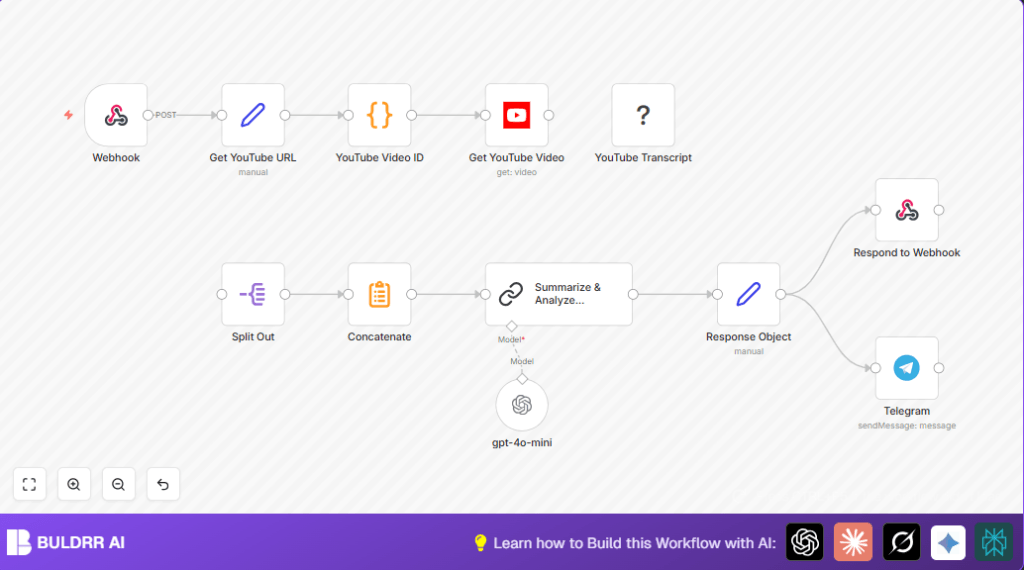

What This Automation Does
This workflow gets a YouTube video URL and makes a full summary for easy reading.
It solves the problem of spending too much time watching and writing notes.
The outcome is a clear summary sent to Telegram and a quick reply to the request.
The workflow takes a video link.
It finds the video ID.
Then it gets the title and description.
Next, it gets the video transcript.
It breaks it into parts so the AI can read it well.
After that, it joins the parts to make one long text.
This full transcript text goes to the AI node which writes a proper summary.
The summary uses headers, bullets, bold words, even tables for clear facts.
The workflow then builds a nice object with the summary, video info, and an empty topic list.
Finally, it sends a quick reply and also messages the summary to Telegram.
Tools and Services Used
- YouTube API: Gets video details by video ID.
- YouTube Transcript Node: Fetches automatic video transcript.
- Langchain OpenAI LLM Node: Writes a structured and detailed summary.
- Telegram Bot API: Sends summary notifications.
- Webhook: Receives incoming video URLs to start the workflow.
Beginner Step-by-Step: How to Use This Workflow in n8n
1. Import the Workflow
- Download the ready workflow file by clicking the Download button on this page.
- Inside your n8n editor, click the menu and select “Import from File.”
- Choose the downloaded file to add it.
2. Configure Credentials and Settings
- Add your YouTube API Key in the YouTube node credentials.
- Enter the Telegram Bot API Token and set the chat/channel ID in the Telegram node.
- Check the Webhook node URL is publicly accessible.
- If there are any IDs, emails, folders, or tables in the workflow, update them to your own.
- Look at the Code node for the video ID extraction regex. Copy it if needed.
- Review the AI prompt inside the Langchain Chain LLM node. Copy the prompt text easily with this code snippet:
const extractYoutubeId = (url) => {
  const pattern = /(?:youtube\.com\/(?:[^\/]+\/.+\/|(?:v|e(?:mbed)?)\/|.*[?&]v=)|youtu\.be\/)([^"&?\/\s]{11})/;
  const match = url.match(pattern);
  return match ? match[1] : null;
};

const youtubeUrl = items[0].json.youtubeUrl;

return [{ json: { videoId: extractYoutubeId(youtubeUrl) } }];
3. Test and Activate
- Send a POST request with JSON body like
{ "youtubeUrl": "https://youtube.com/watch?v=..." }to the webhook URL. - Check the output for the summary and Telegram message arrival.
- If all works, toggle the workflow to active mode to run in production.
This lets beginners quickly add the workflow without building from the start.
Activate and let it run flows automatically.
For self hosting n8n, this resource helps set up the server.
Inputs, Processing Steps, and Outputs
Inputs
- A YouTube URL sent via POST to the Webhook node.
Processing Steps
- The Set node organizes the received URL.
- The Code node extracts the video ID from the URL.
- The YouTube node fetches video metadata.
- The YouTube Transcript node obtains the video transcript.
- The Split Out node breaks the transcript into parts.
- The Summarize node concatenates all parts.
- The Langchain Chain LLM node generates a structured markdown summary.
- The Set node assembles the final response object.
- The Respond to Webhook node replies with the summary JSON.
- The Telegram node sends the summary message to a Telegram channel.
Outputs
- A JSON object containing the video title, description, URL, and detailed AI-generated summary.
- A message sent to Telegram with video title and URL for team updates.
Edge Cases and Troubleshooting
Sometimes, transcripts are missing or empty.
This will cause summary failure.
Check if YouTube autogenerated transcripts exist first.
The Code node may fail extracting video ID if URL is malformed.
Test and fix regex if you get null IDs.
Telegram messages won’t send if bot API keys or chat IDs are wrong.
Double check Telegram bot setup and permissions.
Customization Ideas
- Change the text message in the Telegram node to include more video information.
- Add language filters in the YouTube Transcript node to pick transcript languages.
- Swap the Telegram node with Slack node to send to Slack channels instead.
- Add more AI nodes after the summary for keyword or sentiment analysis.
Deployment Guide
Turn on the workflow inside n8n by activating the Webhook node.
Run n8n on cloud or self hosting.
Here is a useful link for self-host n8n.
Use n8n’s execution logs to watch workflow runs for errors.
Test often to keep integration with YouTube and Telegram working well.
Summary
✓ Workflow makes video content understanding quicker.
✓ Saves many hours by automating transcript reading and summary writing.
✓ Sends key video info to team over Telegram instantly.
✓ Simple steps to configure and use in n8n.
✓ Works with standard YouTube URLs and OpenAI summarization.
