
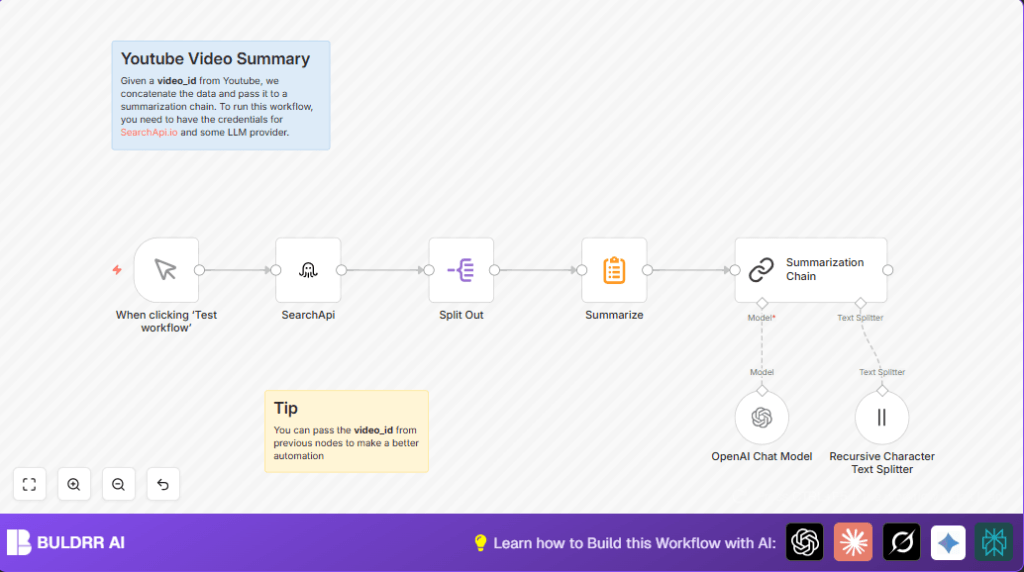

What This Automation Does
This workflow gets a Youtube video transcript and makes a short summary fast.
It helps save time by not watching the full long video or reading long text.
Users get a clear, short summary to understand the main points quickly.
The workflow fetches, breaks, and summarizes text chunks with AI models.
It works from video ID input to outputting a neat summary ready to use.
Who Should Use This Workflow
Marketers, content creators, researchers, or anyone who needs quick Youtube video insights.
It fits users who struggle with long videos and want concise takeaways fast.
No advanced tech skills needed to run this in n8n once set up.
Tools and Services Used
- SearchApi.io: Gets Youtube video transcripts by video ID.
- OpenAI Chat Model (GPT-4o-mini): Summarizes text chunks smartly.
- n8n Automation Platform: Runs and connects all the nodes in workflow.
- Recursive Character Text Splitter: Breaks transcript text into small pieces for AI.
Workflow Inputs, Processing, and Outputs
Inputs
- Youtube video ID (like “aigDyaxGsRo”) to identify the video.
- API keys for SearchApi.io and OpenAI for transcript and AI summarization access.
Processing Steps
- Fetch full transcript using the SearchApi node.
- Extract transcript text with the Split Out node.
- Join transcript fragments together with the Summarize node.
- Split the combined transcript into 6000 character chunks using Recursive Character Text Splitter.
- Use the GPT-4o-mini model in the OpenAI Chat Model node to summarize chunks.
- Combine AI results in the Summarization Chain node for a final summary.
Output
The final output is a short, clear summary of the full Youtube video transcript.
This summary is easy to read and highlights key points efficiently.
Beginner Step-by-Step: How to Use This Workflow in n8n
Step 1: Import Workflow
- Download the workflow file from the Download button on this page.
- In the n8n editor, go to “Import from File” and upload the downloaded workflow.
Step 2: Configure Credentials
- Add your SearchApi.io API Key and OpenAI API Key in n8n credentials settings.
- Make sure the keys are valid and active.
Step 3: Update Video ID
- Find the SearchApi node and update the
video_idfield if needed. - You can replace the sample ID with the Youtube video you want summarized.
Step 4: Test the Workflow
- Click “Execute Workflow” to run the process and see the summary output.
- Check for errors in any node and fix if necessary.
Step 5: Activate for Production
- Toggle the workflow active to use it on demand inside n8n.
- You can manually trigger it whenever a new summary is needed.
- For extended control, consider using self-host n8n for running workflows on your own server.
Customization Ideas
- Use expressions in the SearchApi node to input video IDs dynamically from other workflow nodes or triggers.
- Change the chunk size in the Recursive Character Text Splitter to fit different AI model limits.
- Select a different GPT or AI model for different summary quality and pricing in the OpenAI Chat Model node.
- Add nodes after Summarization Chain for saving results to Google Sheets, sending by email, or posting to Slack for easier sharing.
Troubleshooting Common Problems
- Problem: No transcripts appear from SearchApi.
Cause: Wrong video ID or missing API Key.
Fix: Check video ID carefully and confirm SearchApi API Key. - Problem: Reached OpenAI API usage limit.
Cause: Too many calls made fast.
Fix: Check OpenAI quota and add delay nodes to reduce call frequency. - Problem: Error in Summarization Chain.
Cause: Input or node connections are wrong.
Fix: Double check all node connections, AI model selection, and chunking mode set to advanced.
Pre-Production Checklist
- Confirm SearchApi.io and OpenAI API Keys are correctly set in n8n.
- Try manual trigger and check transcript data retrieval.
- Verify Split Out node cleanly extracts the ‘transcripts’ field.
- Run workflow in parts to make sure summarization works well.
- Test with different Youtube video IDs to ensure flexibility.
Deployment Guide
After testing, switch the workflow to active mode in n8n to run anytime.
Use the manual trigger to start summarizations when needed.
Watch execution logs for errors or API limits.
Use self-host n8n for better control if wanted.
Summary of Workflow Benefits
✓ Save hours not watching long Youtube videos.
✓ Get clear summary text fast from video transcripts.
✓ Use simple manual trigger to start workflow anytime.
✓ Adjust for any video by changing video ID.
✓ Integrate with other systems by extending workflow.
✓ Improve accuracy over manual note-taking.
