
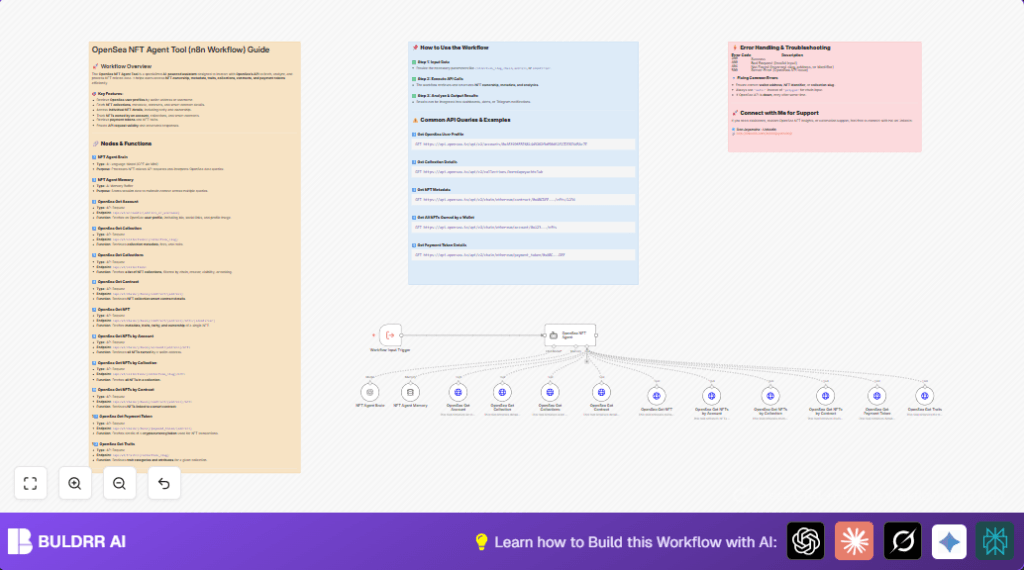

What This Workflow Does
This workflow connects to OpenSea API to get detailed NFT data fast.
It ends the need for slow manual searching.
It returns user profiles, NFT details, collections, ownership, and payment tokens.
You get structured, accurate data for smart NFT decisions.
Tools and Services Used
- n8n: Automation tool to build and run the workflow.
- OpenAI GPT-4o-mini: AI language model that understands NFT queries.
- OpenSea API: Data source for NFT info, collections, accounts, and traits.
Inputs, Processing, and Output
Inputs
- User query text about NFTs.
- Session ID for keeping conversation memory.
Processing Steps
- Input goes into ExecuteWorkflowTrigger node.
- Query text is understood by NFT Agent Brain using OpenAI.
- Conversation context is managed by NFT Agent Memory node.
- OpenSea NFT Agent node chooses proper OpenSea API calls.
- HTTP request nodes call OpenSea endpoints for accounts, collections, NFTs, contracts, traits, and payment tokens.
Output
The workflow outputs clear, structured NFT data.
This data helps decide buying, selling, or tracking NFTs efficiently.
Who Should Use This Workflow
This is for anyone who tracks NFTs deeply.
If you spend hours hunting data on OpenSea, this saves time.
Non-technical users can get answers fast without messing API requests.
This helps NFT collectors, traders, and analysts.
Beginner Step-by-Step: How to Use This Workflow in n8n Production
Step 1: Import Workflow
- Download the workflow file from this page.
- Open your n8n editor.
- Use the Import from File option to load the workflow.
Step 2: Configure Credentials
- Add your OpenAI API Key under credentials in n8n.
- Add your OpenSea API Key with HTTP Header Authentication.
Step 3: Update Variables If Needed
- If node inputs need wallet addresses, collection slugs, or chain names, update them to your targets.
- Change emails, IDs, or tokens in nodes where applicable.
Step 4: Test the Workflow
- Run test queries via the ExecuteWorkflowTrigger node input.
- Confirm correct NFT data is returned without errors.
Step 5: Activate for Production
- Once tested, activate the workflow toggle in n8n.
- Connect triggers like webhook or messaging platform to start real use.
This setup does not explain building from zero but helps beginners use the workflow fast.
Possible Failures and Edge Cases
- 400 Bad Request: Wrong chain names or invalid addresses.
Check for “matic” instead of “polygon”. - 404 Not Found: Non-existing collection slugs or wallet addresses.
Verify spelling and existence first. - 500 Server Errors: OpenSea API down or overloaded.
Retry later or add retry steps.
Customization Ideas
- Add more OpenSea endpoints by duplicating HTTP nodes and changing URLs.
- Switch to higher or lower OpenAI models for cost or accuracy.
- Edit pagination limits on NFT lists to fetch more or fewer items.
- Add code nodes for error parsing and retry flows.
- Save data to databases or spreadsheets using more nodes for tracking.
Deployment Tips
Run the workflow in n8n after activating.
Use webhooks or app integrations like Telegram to trigger queries.
Watch the execution logs in n8n UI to check API calls.
For longer-term use, consider self-host n8n on a stable server for control and uptime.
Summary of Benefits
✓ Saves hours weekly by automating OpenSea data search.
✓ Reduces input errors by auto-handling chain names and parameters.
✓ Returns clear, detailed NFT info for better trading decisions.
✓ Keeps conversation memory for smooth multiple queries.
✓ Easy to import and quickly configure for production use.
Example Workflow Input Prompt
You can copy this example prompt to test after import:
Retrieve OpenSea profile for user 0xA5f49655E6814d9262fb656d92f17D7874d5Ac7EThis prompt instructs the workflow to fetch the OpenSea account details for the given wallet address.
