
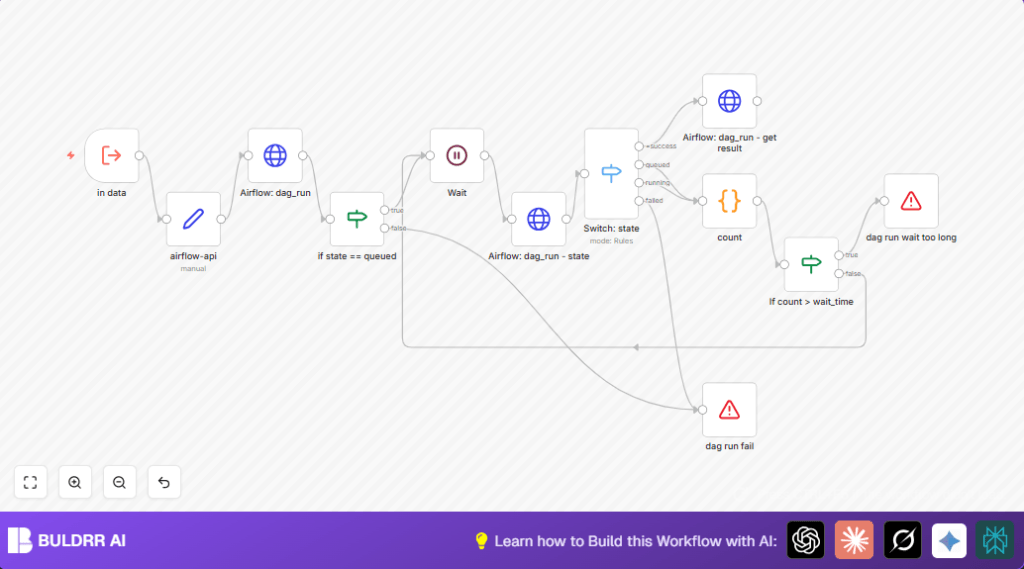

What this workflow does
This workflow triggers Airflow DAG runs and watches their progress automatically within n8n.
It solves the problem of manual monitoring by checking DAG states regularly, handling waits, and reporting failures or results.
The result: users get timely alerts about DAG success or failure and can grab task outputs without manual refreshes.
Inputs, Processing, and Outputs
Inputs
- dag_id: The unique identifier for the Airflow DAG to run.
- task_id: The specific task inside the DAG whose result to fetch.
- conf: JSON configuration to pass to the DAG run.
- wait: Time in seconds between checking the DAG run status.
- wait_time: Maximum total wait time in seconds before stopping.
Processing Steps
- Trigger the DAG run via Airflow REST API using HTTP POST with basic authentication.
- Periodically poll the DAG run status by sending HTTP GET requests.
- Use a decision node to branch logic based on DAG run state: success, queued, running, or failed.
- If queued or running, wait for a set interval and increment a retry counter.
- Stop and alert if the DAG fails or if the wait time is exceeded.
- Upon success, request the task’s return value via Airflow’s XCom API.
Outputs
- DAG run execution status: success or failure.
- Extracted task output from the DAG run when successful.
- Errors raised on timeout or DAG failure to stop workflow safely.
Who should use this workflow
This workflow is for anyone managing Airflow DAGs who wants to save time monitoring runs.
It helps data engineers or platform teams who must ensure workflows complete without manual checking.
You should use it if your DAG runs often stall or fail and cause delays.
Tools and services used
- Apache Airflow REST API: To trigger and monitor DAG runs and fetch XCom data.
- n8n Automation Platform: To orchestrate the workflow using HTTP Request, Switch, If, Wait, and Code nodes.
- HTTP Basic Authentication: Secures API calls to Airflow.
- self-host n8n: Optionally used for running n8n on a personal or company server.
Beginner step-by-step: How to use this workflow in n8n production
1. Import the workflow into n8n
- Download the workflow file using the Download button on this page.
- Open the n8n editor.
- Click “Import from File” and upload the downloaded workflow.
2. Configure credentials and parameters
- Add or update your Airflow HTTP Basic Auth credentials in n8n Credentials section.
- Update DAG ID and task ID values to the ones you want to trigger and monitor.
- Adjust the wait and wait_time fields to set monitoring intervals and maximum timeout as needed.
3. Test and activate workflow
- Run the workflow once using test input to verify that it triggers a DAG and monitors it correctly.
- View execution logs to confirm success or troubleshoot.
- Activate the workflow by toggling the active status bar on the top right.
You are now ready to automate Airflow DAG triggering and monitoring without manual intervention.
Use this workflow as a building block to add alerts or chain multiple DAGs later.
Customization ideas
- Change Airflow API base URL in the Set node named
airflow-api. - Modify wait and max wait times in Execute Workflow Trigger node inputs to tune polling frequency.
- Adjust DAG ID and task ID inputs to switch between different DAGs and tasks being monitored.
- Add alerting nodes, like email or Slack, connected to failure paths to notify teams automatically.
- Extend the state Switch node to handle other DAG or task states if needed.
Handling edge cases and failures
If API authentication fails, check Airflow username/password in n8n HTTP Basic Auth credentials.
When DAG stays queued too long, increase the maximum wait_time input for longer monitoring.
Failure to get task result means task likely has no XCom output; update DAG code to push return values.
The workflow tracks retry counts in a Code node to ensure it doesn’t wait forever.
Error nodes stop execution clearly with descriptive messages on fail or timeout.
Summary
✓ Automatically starts Airflow DAG runs without manual triggering.
✓ Polls DAG run status repeatedly, handling queued and running phases.
✓ Stops the workflow on failures or after timeouts with clear errors.
✓ Retrieves task results to use in workflows or reports.
🎯 Saves hours of manual work checking Airflow runs.
