
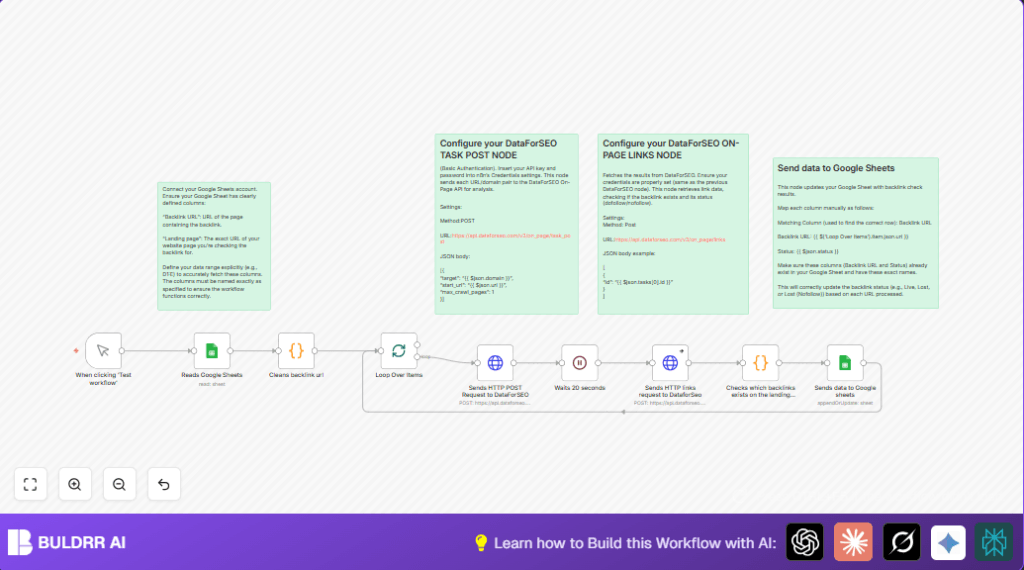

What this workflow does
This workflow checks if backlinks to your website are still active and “dofollow.”
It reads backlink URLs, crawls each URL, and looks for your landing page links.
If a backlink is lost or marked “nofollow,” it updates a Google Sheet with this status.
This saves time by automating backlink health checks and keeping data fresh.
Tools and services used
- n8n: Automation platform to run the workflow.
- Google Sheets: Stores backlink URLs and landing page data.
- DataForSEO API: Crawls URLs and retrieves backlink link status.
How the workflow works (Inputs → Processing → Output)
Inputs
- Backlink URLs and landing page links from Google Sheets.
Processing Steps
- Extract domain names from backlink URLs.
- Send crawl requests to DataForSEO API.
- Wait 20 seconds for crawling.
- Request backlink status results from the API.
- Check if backlink exists and whether it is dofollow.
- Classify backlink status as “Live,” “Lost,” or “Lost (Nofollow)”.
Output
- Backlink status updated in the same Google Sheet automatically.
Who should use this workflow
If backlink checking wastes time or causes errors, this workflow helps.
Marketers checking hundreds of backlinks will save hours.
It gives clear, fast backlink health info so users can fix SEO issues.
Beginner step-by-step: How to use this workflow in n8n production
Import workflow
- Download the workflow file using the “Download” button on this page.
- Inside the n8n editor, click the menu and choose “Import from File.”
- Select the downloaded workflow file to import it.
Configure credentials and settings
- Add Google Sheets OAuth2 credentials in n8n.
- Add DataForSEO API Key and Password using HTTP Basic Authentication in n8n credentials.
- Update Google Sheet ID, sheet name, and range if different from defaults (range D1:E).
- Check the Code node has correct column names matching your sheet like “Backlink URL” and “Landing page.”
Test and activate workflow
- Run the workflow once manually using the Manual Trigger to confirm it works.
- Check Google Sheet updates backlink statuses correctly.
- Activate the workflow to run on-demand or set a schedule by adding a CRON trigger.
Key nodes and code snippets
The Code node extracts domain with this JavaScript:
return items.map(item => {
  let url = item.json['Backlink URL'];
  let domain = url.match(/https?:\/\/(?:www\.)?([^\/]+)/)[1];
  return { json: { domain, url } };
});
The final Code node checks status with code:
const result = $json.tasks?.[0]?.result?.[0];
const links = result?.items || [];

let backlink = $('Reads Google Sheets').item.json['Landing page'];

let foundLink = links.find(link => link.link_to === backlink);

let status = "Lost";
if (foundLink) {
  status = foundLink.dofollow ? "Live" : "Lost (Nofollow)";
}

return {
  json: {
    backlink: backlink,
    status: status
  }
};
Customization ideas
- Change crawl depth by setting
max_crawl_pageshigher in the DataForSEO task POST request. - Increase batch size in the SplitInBatches node to run multiple checks at once carefully.
- Add a Slack node to notify about lost backlinks instantly.
- Modify the status Code node to mark nofollow backlinks as “Skipped” instead of “Lost (Nofollow).”
- Include more columns in the Google Sheets read range to check additional backlink info.
Troubleshooting common errors
- HTTP 401 Unauthorized from DataForSEO: API Key or password is wrong. Recheck credentials in n8n and try again.
- Empty data from Google Sheets node: Check if sheet name and cell range are correct and the sheet has data.
- Status never changes in the sheet: Confirm column names and mapping exactly match Google Sheet columns.
Pre-production checklist
- Columns in Google Sheet must be “Backlink URL” and “Landing page” exactly.
- Test DataForSEO API connectivity by making a manual curl or request.
- Run the workflow once with one backlink to verify results.
- Check n8n logs for any errors during test runs.
- Backup your Google Sheet before running bulk updates.
Deployment guide
- Activate the imported workflow for manual or scheduled execution.
- Use a CRON trigger for repeating backlink health checks weekly or monthly.
- Monitor execution logs to spot failed API calls or errors.
- Adjust batch size and waiting times to keep API use within limits.
- For self hosting n8n users, see self-host n8n resources for optimal server setup.
Summary
✓ Saves 10+ hours monthly by automating backlink checks.
✓ Updates Google Sheets with backlink health live status.
✓ Reduces manual errors and missed lost backlinks.
→ Lets user fix SEO problems faster and keep data accurate.
