
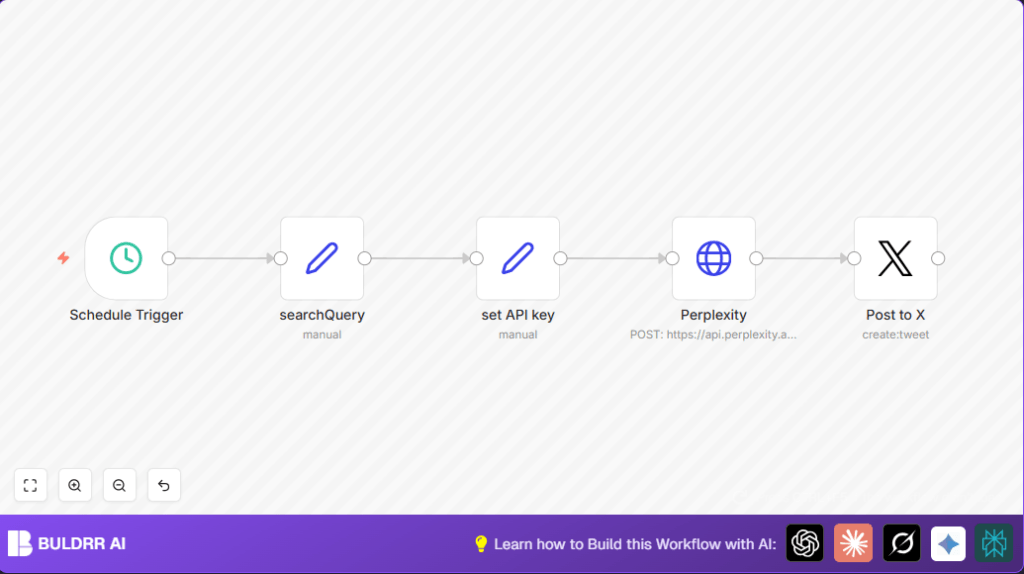

What this workflow does
This workflow finds the newest AI news automatically.
It then posts a short, clear headline with a link on X (Twitter).
This saves time and keeps followers updated fast.
No need to search or write posts manually anymore.
The process runs about once a day at different minutes to look natural.
It asks Perplexity AI with a question about AI news.
The AI answers with a tweet-ready headline and link.
The workflow takes this and posts it on your X account with OAuth2.
Tools and services used
- n8n: To automate the workflow steps.
- Perplexity AI API: To get the latest AI news results.
- X (Twitter) OAuth2 API: To post the tweet automatically.
This setup needs you to connect your API keys inside n8n.
You also need X developer credentials to post tweets securely.
Inputs, processing steps, and output
Inputs
- A timer trigger that runs roughly every 21 hours at a random minute.
- A fixed question input: “What’s the latest news in artificial intelligence?”
- Perplexity AI API key for authorized news search.
- X OAuth2 access to post tweets.
Processing Steps
- The Schedule Trigger fires the workflow after configured interval.
- The Set node assigns the exact search question.
- Another Set node inserts the Perplexity API key correctly.
- A HTTP Request node calls Perplexity AI’s chat completions endpoint.
It sends a system prompt guiding AI to output a short, single headline with a link, fitting under 200 characters. - The API response is parsed to get the headline text.
- The Twitter OAuth2 node posts the extracted text as a tweet to the linked X account.
Output
A new tweet on the connected X account with a fresh AI news headline and article link.
The tweet respects character limits and posts automatically without manual input.
Beginner step-by-step: How to use this workflow in n8n for production
1. Import the workflow
- Download the workflow file by clicking the Download button on this page.
- In the n8n editor, select “Import from File” and upload the downloaded workflow.
2. Add credentials and API Keys
- Open the set API key node.
Replace the placeholder<yourPerplexityAPI>with your real Perplexity AI API Key. - Go to the Post to X node.
Link your X developer OAuth2 credentials properly.
3. Update any identifiers if needed
- If your posts need special IDs or channels, update them in relevant nodes.
Usually, no changes needed unless using custom configurations.
4. Test the workflow
- Use the manual trigger button to run the workflow once.
Check if the API call returns the headline.
Confirm the tweet is published on your X feed.
5. Activate the workflow
- Switch the workflow status to active in n8n.
Now it runs automatically at intervals.
If self hosting n8n, check self-host n8n for helpful resources.
Customization ideas
- You can change the question text in the searchQuery Set node.
Focus on other tech or news areas. - Adjust the schedule trigger time to run more or less often.
Choose exact daily times if preferred. - Add media URLs from the API result to include images in tweets.
Modify the Twitter node to post pictures. - Tweak the system prompt inside the Perplexity HTTP Request node.
Ask for more details or links to add context in tweets.
Troubleshooting common problems
Problem: “401 Unauthorized” from Perplexity API
Cause: API Key was typed wrong or missing.
Solution: Check that the key in the set API key node is correct and still valid.
Problem: Tweets do not appear
Cause: Twitter OAuth credentials lack posting rights or are linked wrong.
Solution: Recreate OAuth2 tokens with tweet permission.
Link the correct credentials inside the Post to X node.
Pre-production checklist
- Confirm all API keys and OAuth2 credentials are current and active.
- Test the HTTP Request node to get a valid news headline and link response.
- Run the workflow manually to check tweet content and posting.
- Verify the schedule trigger is set as intended with random minute.
Conclusion
✓ This workflow keeps AI news tweets fresh without you searching.
✓ Saves hours by posting automatically to X with right content.
✓ Simple to customize for other topics or media additions.
✓ Runs quietly in background, so you focus on other work.
→ Start with download and import.
→ Add keys and test once.
→ Activate and watch your AI news tweets appear.
Perplexity AI prompt used in HTTP Request
This prompt tells Perplexity AI to make a short social media post.
It asks for a one-line headline with a direct link.
The goal is to fit below 200 characters for X.
{
  "model": "llama-3.1-sonar-small-128k-online",
  "messages": [
    {
      "role": "system",
      "content": "You are a social media assistant summarizing tech news for Twitter/X. Return a single precise headline and article link under 200 characters for posting. Avoid extra text."
    },
    {
      "role": "user",
      "content": "{{ $('searchQuery').item.json.searchInput }}"
    }
  ],
  "temperature": 0.3,
  "top_p": 0.9,
  "return_citations": true,
  "search_domain_filter": ["perplexity.ai"],
  "search_recency_filter": "day",
  "max_tokens": 80,
  "presence_penalty": 0,
  "frequency_penalty": 1
}
