
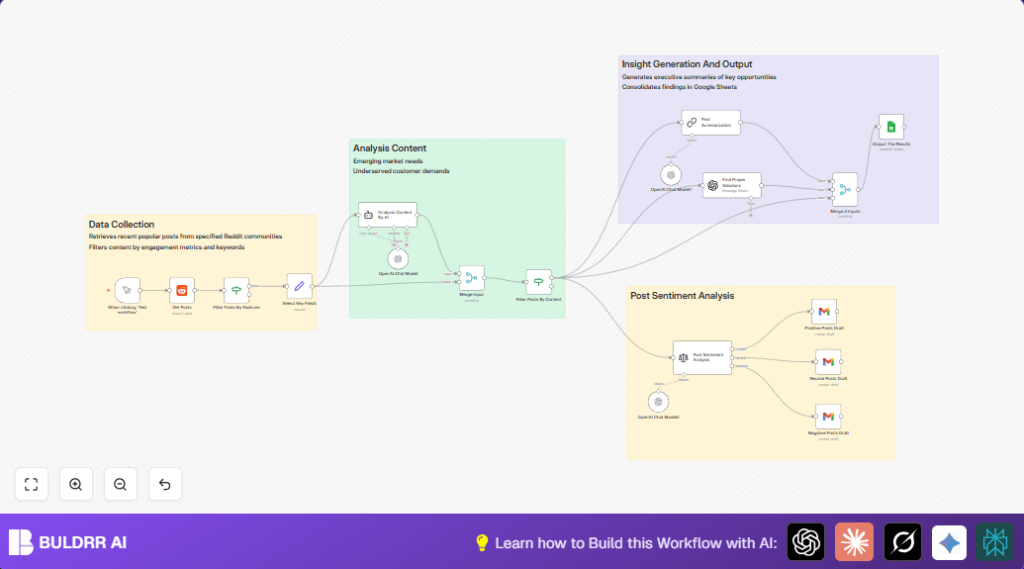

What this workflow does
This workflow reads recent Reddit posts from specific business subreddits. It finds posts with problems or needs about small businesses. It uses AI to check if posts talk about real business issues. Then it makes short summaries and suggests business ideas to solve those problems. It sorts posts by mood and drafts emails for each type. Finally, it saves all info in a Google Sheet for easy review.
Who should use this workflow
This is for people doing business research from Reddit. If you want to find new market problems or ideas fast, this helps. It fits small business analysts or consultants who read many Reddit posts daily but need to save time. It is good if you want to keep posts organized with AI summaries and business suggestions.
Tools and services used
- Reddit API: Gets recent posts from chosen subreddits.
- OpenAI API (GPT-4o-mini): Analyzes if a post shows a business problem, summarizes content, creates business ideas, and analyzes sentiment.
- Gmail API: Drafts emails based on post sentiment (positive, neutral, negative).
- Google Sheets API: Saves data like post summaries and solutions to a spreadsheet.
- n8n automation platform: Connects all nodes to create and run the workflow.
Inputs, Processing, and Outputs
Inputs
- Subreddit posts filtered by keywords like “looking for a solution.”
- Post metadata such as upvotes, content, URL, and date.
Processing Steps
- Filter posts by engagement (more than 2 upvotes) and recent date (within 180 days).
- Use AI to decide if post is about a real business problem (outputs yes/no).
- Keep only posts flagged as business issues.
- Summarize post content into a short paragraph.
- Generate a possible business solution idea based on the post content.
- Analyze the sentiment (positive, neutral, negative) of each post.
- Create email drafts categorized by sentiment with post details.
- Merge all AI outputs with original data.
- Append the final enriched data to a Google Sheet.
Outputs
- Google Sheet rows with summary, solution proposals, sentiment, and post info.
- Email drafts sorted by sentiment for later review.
Beginner step-by-step: How to build this in n8n
Import the workflow
- Click the “Download” button on this page to save the workflow file.
- Open the n8n editor where you want to use the workflow.
- Go to “Import from File” and select the downloaded workflow file.
Set up credentials and configuration
- Add your Reddit OAuth credentials for the Reddit node.
- Insert your OpenAI API Key for the Langchain and OpenAI nodes.
- Configure Gmail OAuth2 credentials for drafting emails.
- Set Google Sheets OAuth2 credentials and update spreadsheet ID and sheet name if needed.
- Check nodes for any IDs or email addresses that need changing.
Test and activate workflow
- Run the workflow using the Manual Trigger node.
- Verify that Reddit posts are fetched and AI nodes produce outputs.
- Check that rows are appended to the Google Sheet and email drafts appear.
- Activate the workflow for regular use or schedule with a Cron node.
- When self hosting n8n, consider using self-host n8n for better control.
Edge cases and failure points
- If no Reddit posts appear, check subreddit name spelling and your Reddit OAuth credentials.
- If AI nodes give empty or wrong answers, check the OpenAI API Key and simplify prompts.
- If Google Sheets does not save data, confirm spreadsheet ID, sheet name, and OAuth settings.
- If Gmail drafts send emails immediately, verify that the Gmail node uses the “draft” resource setting.
Customization ideas
- Change the subreddit or keywords in the Reddit node to explore different business topics.
- Adjust the upvote filter in the conditional node to select more or fewer posts.
- Swap AI models in the Langchain or OpenAI nodes for different summary or solution styles.
- Modify Gmail nodes to send emails directly instead of saving drafts.
- Replace Google Sheets with Airtable, Notion, or other platforms for better project tracking.
Summary and results
✓ The workflow reduces hours of manual Reddit research.
✓ It finds real business problems automatically using AI.
✓ Gives short readable summaries and business ideas.
✓ Sorts posts by sentiment and drafts categorized emails.
✓ Saves everything neatly in Google Sheets for review.
→ Users gain clear insights faster.
→ They can track problems and possible solutions over time.
