

What This Workflow Does
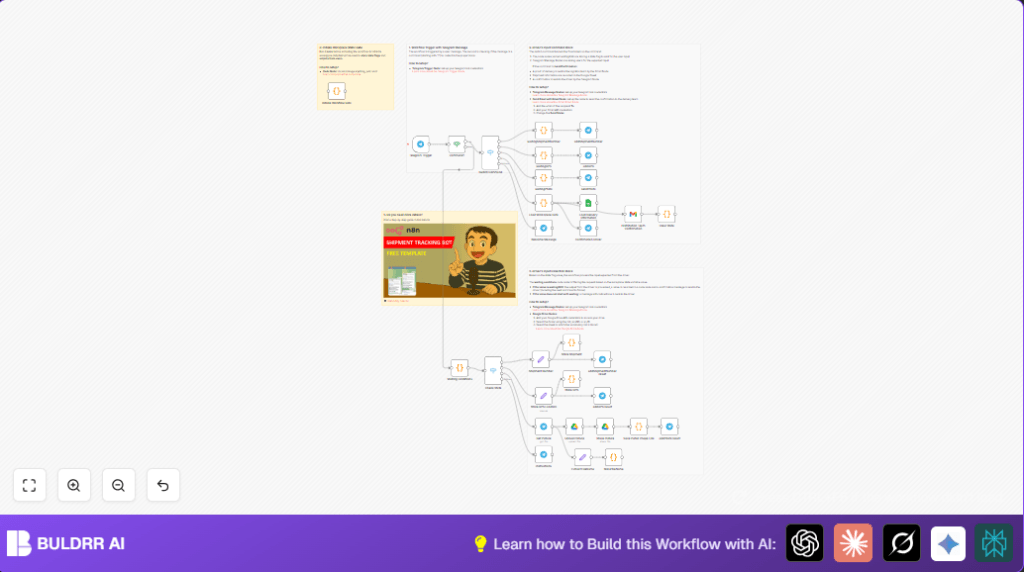
This workflow uses n8n and a Telegram bot called LogiGreenTrack to help delivery drivers report shipment info step-by-step.
It asks drivers for the shipment number, GPS location, and a photo, then saves all data to Google Sheets and Drive.
After gathering info, it sends a confirmation email to the logistics team.
This cuts down errors and saves time spent chasing delivery details.
Who Should Use This Workflow
The workflow fits logistics coordinators and delivery companies needing fast, simple proof-of-delivery recording.
It works for teams with drivers using Telegram who want to remove manual paperwork and phone tag.
Tools and Services Used
- Telegram Bot API: Receives messages and GPS from drivers.
- Google Drive API: Stores shipment photos with public links.
- Google Sheets API: Records shipment data in a spreadsheet.
- Gmail API: Sends delivery confirmation emails.
Inputs, Process, and Outputs
Inputs
- Driver’s Telegram messages and photos.
- Shipment number typed by driver.
- Location shared using Telegram’s GPS feature.
- Shipment photo sent via Telegram.
Processing Steps
- The workflow tracks each driver’s conversation state using workflow static data.
- It sends messages asking for shipment number, location, and photo in order.
- Photo is downloaded from Telegram and uploaded to Google Drive.
- All details are saved to Google Sheets.
- A confirmation email with all info and the photo link is sent to the logistics team.
- Driver’s state is reset to wait for next shipment.
Outputs
- Google Sheet row with shipment number, GPS coordinates, photo URL, and timestamps.
- Google Drive folder with public shipment photos.
- Email to logistics team confirming delivery details and proof.
- Confirmation message back to driver in Telegram.
Beginner Step-by-Step: How to Use This Workflow in n8n Production
1. Import the Workflow
- Download the workflow file using the Download button on this page.
- Open your n8n editor.
- Click “Import” and choose “Import from File.”
- Select the downloaded workflow file to load it.
2. Configure Credentials and Settings
- Add API Keys or Credentials for Telegram, Google Drive, Google Sheets, and Gmail nodes.
- Check Google Drive folder ID is set correctly for photo uploads.
- Update Google Sheets document ID and the specific Sheet name.
- Update notification email addresses in the Gmail node.
3. Initialize Static Data
- Run the Initiate Workflow Data code node once to prepare for tracking driver states.
4. Test the Workflow
- Send a message or command from your Telegram bot to simulate a driver starting a delivery.
- Confirm the bot replies asking for shipment number, location, and photo step-by-step.
- Ensure data is saved properly to Google Sheets and Drive.
- Check the confirmation email arrives at the specified address.
5. Activate the Workflow
- Toggle the workflow switch ON in n8n to run it continuously.
- Monitor executions through the n8n UI for errors.
- Set up alerts if needed to catch failures quickly.
Conversation State Management Explained
The workflow uses static data to keep track of what input each driver must give next.
It saves driver chat IDs with flags like waitingShipmentNumber or waitingPhoto.
This way the bot knows if to ask for shipment number, or location, or photo.
This helps prevent confusion if a driver sends messages out of order.
Photo Upload Process Details
When the driver sends a photo, the workflow downloads it from Telegram.
Then it uploads the photo to Google Drive inside a folder with the right ID.
Permissions are set so the photo URL becomes public and can be shared.
The photo’s public URL is saved with other shipment info for easy access.
Common Errors and How to Fix
- Telegram messages not triggering workflow: Check Telegram bot webhook URL and ensure it matches the Telegram Trigger node.
- Photos not uploading: Verify Google Drive credentials and folder permissions to allow uploads.
- Emails not sending: Make sure Gmail API credentials are valid and email addresses are correct.
- Driver responses not recognized: Confirm drivers use exact commands with the slash ‘/’ prefix.
Customization Ideas
- Change or add new Telegram commands by editing the Switch Command node.
- Replace Gmail node with other email services if needed.
- Add multiple language support by branching Telegram messages.
- After photo upload, add image recognition for automatic tagging.
- Use a database instead of Google Sheets for big data needs.
Production Readiness Checklist
- Run Initiate Workflow Data node once.
- Verify Telegram webhook is set correctly.
- Check Google Drive folder ID and upload permissions.
- Confirm Google Sheets ID and sheet name.
- Test sending mails manually in the Gmail node.
- Simulate a full delivery process on Telegram.
Deployment Notes
After activating workflow in n8n, monitor regularly for errors.
Set alerts for critical failures to fix issues fast.
Keep API credentials updated, especially for Telegram and Gmail.
For long-term use, consider self-host n8n for more control and stability.
Summary
✓ This workflow collects delivery info by guiding drivers over Telegram.
✓ It saves shipment number, GPS location, and photos safely into Google services.
✓ Sends confirmation emails to the logistics team automatically.
→ Saves time by removing manual calls and paperwork.
→ Reduces errors and missed delivery proofs.
→ Scales to many drivers with state tracking.
