
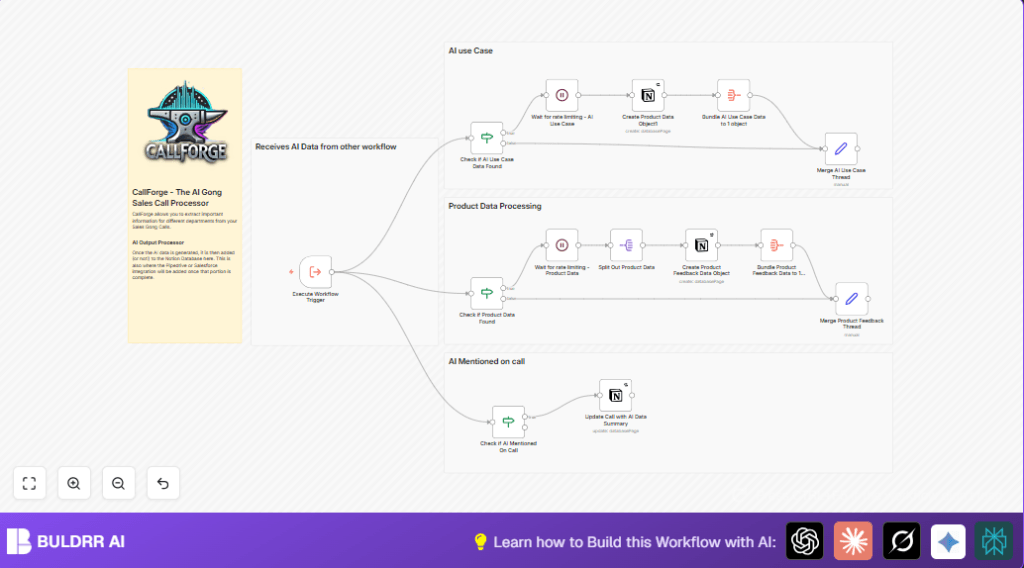

What This Automation Does
This workflow receives AI data from sales calls and updates Notion with important info automatically.
It solves the problem of spending many hours copying notes and avoiding mistakes.
It extracts competitor, integration, objections, and use case details, then adds them to Notion databases.
This saves time and helps the sales team make faster decisions.
The inputs come in JSON format from an AI processor of sales call transcripts.
The workflow checks which types of data exist, then handles each type step-by-step.
It creates or updates pages in Notion, respecting API limits by waiting when needed.
Results are structured and easy to review inside Notion for better sales insights.
Inputs, Processing, and Outputs
Inputs
- AI Output JSON: Contains arrays of Competitors, Integrations, Objections, Use Cases, Call Summary, Sentiment and Next Steps.
- Notion API Credentials: Needed to access and modify Competitors, Integrations, Use Cases, and Calls databases.
Processing Steps
- Verify if each data type exists in JSON using If nodes.
- Split arrays into individual items using SplitInBatches nodes.
- Create or update entries in matching Notion databases using Notion nodes or HTTP Request nodes.
- Format multi-select tags properly for Notion.
- Handle objection tags by updating the main call page.
- Use Wait nodes after blocks to avoid API rate limits.
- Bundle processed data after creation to merge threads and finish workflow.
Outputs
- New competitor pages with pricing, sentiment, and tracking status.
- New integration entries showing status and summary.
- Objection tags added to call page; objection summaries updated.
- Calls updated with summary, next steps, sentiment, and pain points formatted in rich text.
- Use case pages tagged by department and industry.
The workflow prevents data loss and errors by strictly checking inputs and managing Notion API calls carefully.
Who Should Use This Workflow
This workflow fits sales and revenue teams who have many recorded calls like using Gong or similar tools.
Teams that want to save hours manually copying notes into Notion will benefit.
Users should have access to Notion APIs and basic n8n skills.
This helps teams keep competitor, integration, objection, and use case data up to date with less mistakes.
Tools and Services Used
- n8n Automation Platform: Runs the workflow nodes and logic.
- Notion API: Used to create and update pages in Competitors, Integrations, Use Cases, and Call databases.
- AI Output JSON: Supplied by external AI that processes Gong call transcripts.
Beginner Step-by-Step: How to Use This Workflow in n8n
Import the Workflow
- Download this workflow file using the Download button on this page.
- In the n8n editor, click on “Import from File”.
- Select the downloaded workflow JSON file and import.
Configure the Workflow
- Add your Notion API credentials with write access to the involved databases.
- Update database IDs in the Notion nodes if your database IDs differ.
- If the workflow uses email addresses, Slack channels, or folder IDs, update those too.
- Check any code or prompt fields for URLs or JSON paths, confirm they match your setup.
Test and Activate
- Run the workflow once manually with sample AI JSON input to confirm creation of data.
- If all data gets added in Notion properly, activate the workflow by switching on the Execute Workflow Trigger node.
- Monitor workflow logs to spot any API limit warnings or errors.
- Start feeding real AI JSON outputs for automatic processing.
You can refer to self-host n8n for hosting options if not using the cloud version.
Customization Ideas
- Add CRM integrations using HTTP Request or native nodes to push call summaries.
- Enhance objection handling with extra AI sentiment analysis prior to updating Notion.
- Include Slack or email notifications when competitors or objections get updated.
- Adjust wait node timings dynamically if the workflow hits Notion API rate limits often.
Troubleshooting Common Issues
- Problem: “Notion API returned 429 Too Many Requests”
Cause: Too many calls sent to Notion too quickly.
Fix: Increase wait times in Wait nodes after database write operations. - Problem: “Property not found” errors when updating pages.
Cause: Incorrect property keys or types in Notion or n8n mappings.
Fix: Double-check property names and data types exactly match Notion database.
Summary of Benefits
✓ Saves over 4 hours a week by automating sales call note extraction.
✓ Reduces errors caused by manual copying and data mismatches.
✓ Produces structured, tagged data for competitors, integrations, objections, and use cases.
✓ Updates Notion in a controlled way to avoid API limits.
✓ Frees sales teams to act faster with accurate, detailed call insights.
