
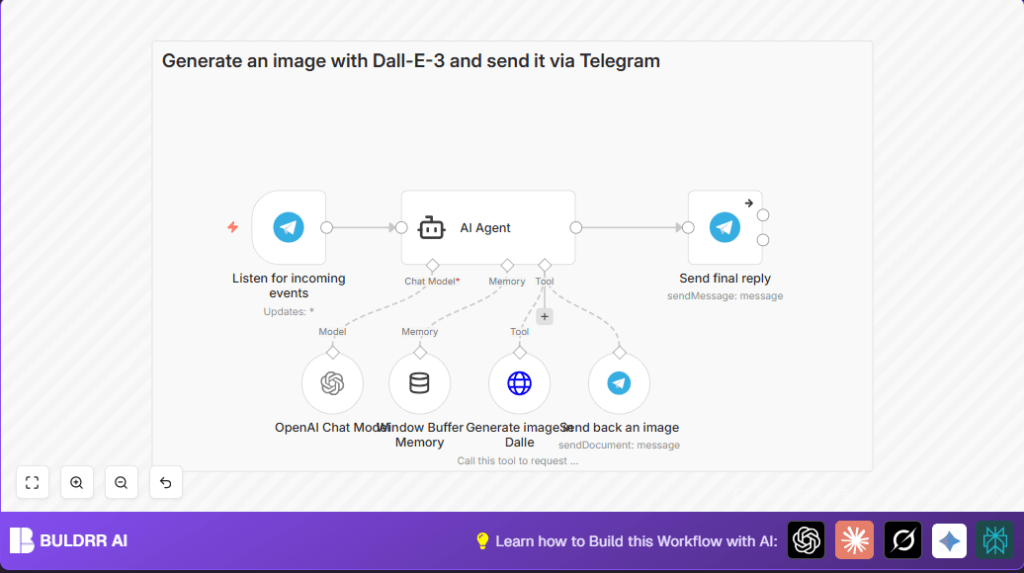

What This Workflow Does
This workflow listens to Telegram messages and replies using AI. It answers chat messages and can make images when asked. It remembers the last 10 messages to keep the chat natural. The AI chooses if it answers by text or by creating an image. The result is faster replies and useful images sent back in Telegram.
Who Should Use This Workflow
This workflow is for anyone who talks to many people on Telegram and wants help answering messages. It works well for freelancers, support teams, or small businesses that want faster replies without typing all the time. Users who want images made by AI inside Telegram will also find it useful.
Tools and Services Used
- Telegram Bot API: Receives user messages and sends replies or images.
- n8n automation platform: Runs the workflow connecting all steps and tools.
- OpenAI GPT-4o model: Generates chat replies with creative but limited repetition.
- OpenAI Dall-E-3 API: Creates images from user prompts.
- LangChain nodes in n8n: Handle AI models and manage conversation memory.
Beginner Step-by-Step: How to Use This Workflow in n8n
Step 1: Import the Workflow
- Download the ready workflow file using the “Download” button on this page.
- Open n8n and go to the editor screen.
- Click on “Import from File” and choose the downloaded workflow file.
Step 2: Configure Credentials
- Enter your Telegram Bot API Token in the Telegram credentials section.
- Add your OpenAI API Key for GPT-4o and Dall-E-3 access.
Step 3: Adjust Settings if Needed
- Check nodes that use chat IDs or file paths and update values if required.
- Review prompt messages in the AI Agent node to add your style or name.
Step 4: Test the Workflow
- Send test messages to your Telegram bot and watch the responses in n8n executions.
- Make sure images generate correctly when prompted.
Step 5: Activate for Production
- Turn on the workflow by clicking the “Active” toggle in n8n.
- Keep your n8n server running so messages process without delay. Consider self-host n8n if needed.
Input → Process → Output
Input
- Telegram user messages sent to the bot.
- Messages may ask questions or request images.
Processing Steps
- Telegram Trigger detects new messages.
- Window Buffer Memory stores last 10 messages per user for context.
- AI Agent decides if reply is text or image based on input.
- OpenAI Chat Model creates text replies using GPT-4o with controlled creativity.
- Generate image in Dalle makes an image using Dall-E-3 when requested.
- Send back an image sends generated image file to user in Telegram.
- Send final reply posts text answer back to user.
Output
- Text message replies personalized with the user’s name.
- Image files sent as Telegram documents when user asks for pictures.
Customization Ideas
- Change Window Buffer Memory to keep more messages for longer chat history.
- Switch AI models for cheaper or faster responses in OpenAI Chat Model node.
- Edit system messages in AI Agent node to add custom greetings or instructions.
- Add command recognition to handle Telegram commands like “/help” and reply with templates.
- Customize image style in prompts to produce pictures in specific artistic looks.
Common Problems and Fixes
Problem: Workflow Does Not Start on Telegram Message
Cause might be wrong Telegram API Key or webhook not accessible.
Fix by rechecking credentials in the Telegram Trigger. Make sure n8n server is public and Telegram can send updates. Use “Test Trigger” button to confirm.
Problem: Images Are Not Sent Back
User may not get image if the Send back an image node does not get a valid URL or Telegram bot lacks permission.
Check the AI Agent output for image URLs. Confirm bot permissions allow sending documents. Test image URL manually to verify it opens correctly.
Summary and Results
✓ The workflow listens and replies fast to user chats.
✓ It remembers recent talks for better replies.
✓ It makes images when users want pictures.
→ The user gets good, friendly answers and images inside Telegram.
→ This saves time and helps users stay engaged.
Pre-Production Checklist
- Check Telegram API credentials and bot permissions.
- Confirm OpenAI API keys work for GPT-4o and Dall-E-3.
- Test webhook triggers with example Telegram messages.
- Make sure conversation memory works by checking stored messages.
- Verify image generation results in pictures arriving in Telegram.
- Save a backup copy of the workflow JSON before deploying.
Deployment Guide
After tests pass and workflow nodes show running, toggle the “Active” switch in n8n.
Keep the n8n service running all the time. Consider self-host n8n for stable access.
Watch the Telegram trigger node to see incoming messages and use logs for error checking.
Track OpenAI API usage to avoid exceeding limits or unexpected billing.
