
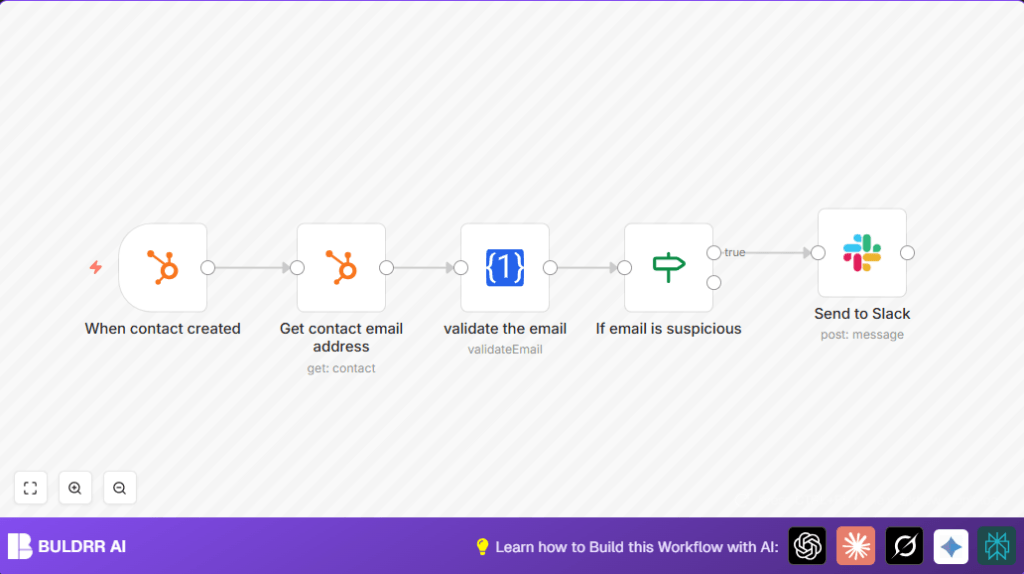

What this workflow does
This workflow checks every new contact email in HubSpot to find if the email is bad, fake, or disposable.
It stops bad emails from messing up marketing and sales work by sending alerts to a Slack channel when a suspicious email is found.
You get warnings right away about contacts with bad emails so your team can fix or remove them fast.
Who should use this workflow
This is good for sales or marketing teams using HubSpot who want to keep their contact lists clean.
It helps anyone who wants to save time and avoid sending emails to fake or disposable addresses that hurt campaign results.
Tools and services used
- HubSpot Developer API: To get event data when a new contact is created.
- HubSpot API: To fetch the new contact’s email address.
- One Simple API: To validate email addresses for deliverability and domain status.
- Slack API: To send alert messages to a team channel for suspicious emails.
- n8n automation platform: To connect all these steps into a workflow.
How this workflow works (Input → Process → Output)
Input
The workflow starts when HubSpot creates a new contact.
HubSpot sends the contact ID and basic info to n8n via a webhook.
Processing steps
- The HubSpot Trigger node detects the new contact event.
- The HubSpot (Contact Get) node uses the contact ID to get the exact email address for the contact.
- The One Simple API node checks the email for validity. It tells if the email can receive mail, if the domain looks real, and if it is a disposable email.
- The If node looks at the validation results. It checks if the email deliverability is not good, or the domain is bad, or the email is disposable. If any of these is true, the email is marked suspicious.
- If the email is suspicious, the Slack node sends an alert message with the contact details to a special Slack channel.
Output
The team gets notified in Slack about suspicious contact emails quickly.
This helps remove or fix bad contacts before wasting time and hurting campaign results.
Beginner step-by-step: How to use this workflow in n8n
1. Import the workflow
- Download the workflow file using the Download button on this page.
- You must be inside the n8n editor. Use Import from File to upload the workflow.
2. Configure credentials and settings
- Add your HubSpot API Key or credentials to the HubSpot Trigger and HubSpot (Contact Get) nodes.
- Insert your One Simple API Key into the One Simple API node.
- Put your Slack API Key in the Slack node and set the correct Slack channel name where alerts should go (like
#hubspot-alerts). - Check any IDs, emails, or channel names and update them if needed.
3. Test the workflow
- Trigger it by creating a test contact in HubSpot.
- Watch if the flow runs without errors and if the Slack alert comes for bad emails.
4. Activate
- Turn on the workflow toggle in n8n to run in production.
- Make sure your n8n instance is accessible for HubSpot to send trigger data. For private servers, check self-host n8n options.
Customizations ideas
- Change the email validation service by replacing the One Simple API node with another API provider.
- Add more contact details in Slack alerts, like phone number or company name.
- Log suspicious contacts to Google Sheets or a database for tracking.
- Send email alerts using Gmail or SMTP instead of or along with Slack.
- Flag more conditions like certain domains or keywords by adjusting the If node rules.
Troubleshooting common problems
- No webhook data from HubSpot Trigger node: Check if HubSpot Developer app has webhook URL set to your n8n webhook correctly and has contact creation event subscribed.
- One Simple API returns errors: Verify API Key is correct and email field expression
{{$json["properties"]["email"]["value"]}}is correct. Test with a known good email. - Slack alerts don’t send: Confirm Slack API token has
chat:writescope and Slack channel name is typed exactly right.
Pre-production checklist
- Test HubSpot webhook trigger by creating test contacts.
- Check HubSpot get contact node correctly fetches email.
- Verify email validation works and responses look right.
- Confirm If node catches bad emails properly.
- Send test Slack alerts to verify messages appear.
- Securely back up workflow and API keys before live launch.
Summary of results
✓ Email addresses from new HubSpot contacts are checked immediately.
✓ Suspicious or invalid emails trigger instant Slack alerts.
✓ Saves time by reducing manual email verification.
✓ Helps keep contact list clean and marketing data accurate.
✓ Avoids sending campaigns to dead or disposable emails, reducing bounce rates.
