
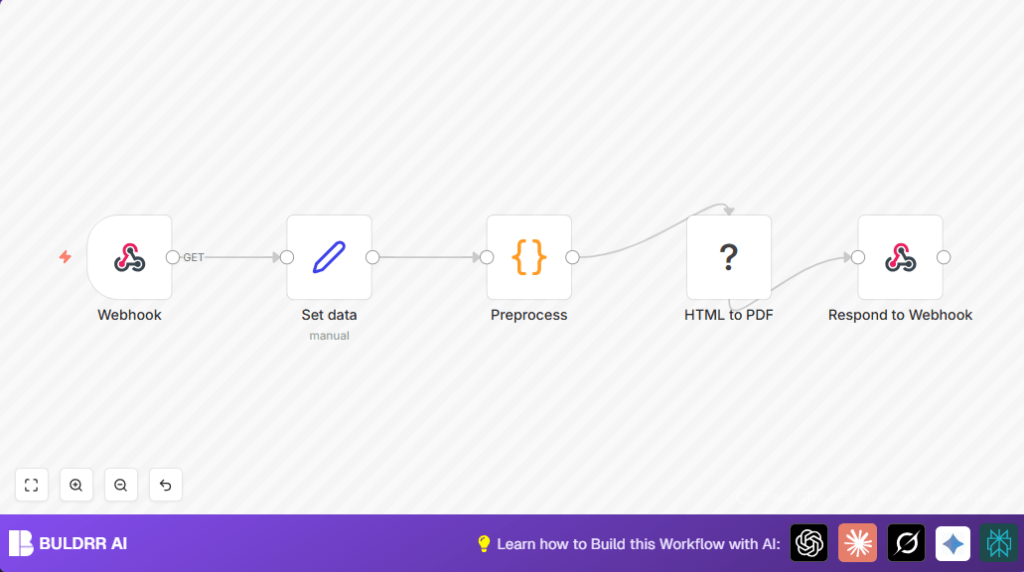

What This Workflow Does
This workflow takes invoice details as input and creates a PDF invoice file automatically.
It solves the problem of spending too much time making invoices and avoiding errors in invoices.
The output is a ready-to-send invoice PDF you can give to clients quickly.
The workflow listens to data sent to a webhook,
formats invoice fields into HTML,
generates a PDF with styled design,
and sends the PDF back as the webhook response.
Inputs, Process, and Outputs
Inputs
- Invoice number, sender info, and client info.
- A list of line items including description, price, and quantity.
- Client contact email for the footer.
Processing Steps
- Webhook receives raw invoice JSON data.
- Set data stores incoming invoice fields.
- Code node formats multiline texts into HTML paragraphs and creates table rows from items.
- The total cost is computed by summing item prices times quantities.
- HTML to PDF node uses a styled HTML template to make the invoice PDF.
- Respond to Webhook sends the PDF file back to the caller.
Outputs
- A binary PDF file of the invoice formatted with client and company details.
- The PDF is ready to send or save.
Who Should Use This Workflow
This is for anyone who needs to make professional invoices often.
It helps people who want to stop copying and pasting invoice data.
You should use this if you want to speed up invoice generation
and avoid mistakes.
Tools and Services Used
- n8n workflow automation: Runs the workflow steps.
- PDF Toolkit node (HTML to PDF): Creates PDFs from HTML with CSS styling using CustomJS API.
- Webhook node: Receives invoice data externally.
- Code node: Formats invoice data into HTML and calculates totals.
Beginner step-by-step: How to Use This Workflow in n8n
Importing the Workflow
- Download the workflow file using the Download button on this page.
- Inside the n8n editor, select “Import from File”.
- Choose the downloaded workflow file and import it.
Configure API Keys and Credentials
- Open the workflow and locate the HTML to PDF node.
- Add your CustomJS API credentials under Credentials settings.
Update IDs and Contact Details
- Check the Webhook node path; change the ID if needed.
- Update client email and company details inside the Set data node.
Test and Activate
- Trigger the webhook by sending a test JSON payload matching the Set data structure.
- Check the workflow runs without errors and returns a PDF.
- If successful, activate the workflow in n8n by clicking the activate button.
The workflow is now ready to generate invoice PDFs automatically.
If self hosting n8n on a server or VPS, see self-host n8n for setup.
Customization Ideas
- Change invoice colors and fonts by editing CSS inside the HTML to PDF node’s HTML template.
- Add a QR code or barcode by generating an image in a new Code node before PDF creation.
- Add payment terms or invoice dates by expanding the Set data node and adjusting Code preprocessing.
- Send invoices via email by adding an Email Send node after PDF generation.
Troubleshooting
- Issue: PDF generation fails with authentication error.
Fix: Verify CustomJS API credentials in n8n under Credentials. - Issue: PDF shows wrong or no invoice details.
Fix: Check field names and code syntax in the Code (Preprocess) node. - Issue: Webhook returns no data or errors.
Fix: Confirm webhook URL is correct and workflow is active.
Pre-Production Checklist
- Send sample JSON data to the webhook to test input.
- Ensure API credentials are set and valid.
- Preview PDF output from the HTML to PDF node.
- Backup the workflow JSON before deploying.
Deployment
Activate the workflow in n8n for production use.
Use the webhook URL with other apps or services to create invoices automatically.
Monitor workflow executions in the n8n executions tab.
Fix any errors as needed.
Summary
✓ Saves time by automating invoice PDF creation.
✓ Reduces errors from manual invoice formatting.
✓ Creates professional, brand-styled invoices.
✓ Sends PDF files back immediately via webhook.
✓ Easy to extend with email or payment integrations.
→ Provides a simple automatic way to handle invoicing inside n8n.
