
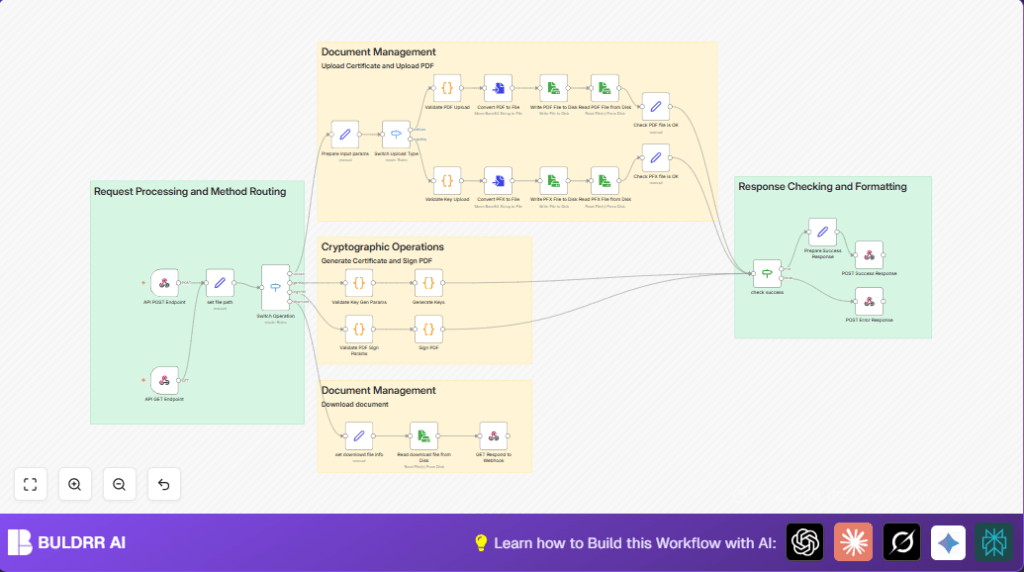

What This Workflow Does
This workflow automates making digital certificates and signing PDF files. It stops errors from manual work like missing info or wrong document versions. Using this process, users get signed PDFs with proper certificates quickly and safely.
The workflow checks all needed input details for generating certificates. It creates keys and certificates using RSA encryption. It uploads PDF and key files, then digitally signs the PDFs. It also lets users download the signed files or keys through the API. Errors show messages clearly so users can fix problems fast.
Who Should Use This Workflow
This workflow fits people who handle many PDFs needing digital signatures. It works well for compliance teams or anyone who must create certificates and sign documents often. It cuts hours of manual work and lowers mistakes during file handling.
Tools and Services Used
- n8n Automation Platform: Runs and manages the workflow nodes.
- Node.js environment: Needed for Code nodes that run JavaScript and use npm packages.
- npm package node-forge: Generates RSA key pairs and X.509 certificates.
- npm package @signpdf/signpdf: Signs PDFs digitally with PFX files.
- File system on n8n drone or server: Stores temporary PDF and key files safely.
- Secure API endpoints: Receive requests for uploading files, generating keys, signing documents, and downloading results.
Beginner Step-by-Step: How to Build This Workflow in n8n
Import the Workflow
- Download the workflow file using the Download button on this page.
- Open the n8n editor and select “Import from File”.
- Upload the downloaded workflow JSON file into n8n.
Configure Credentials and Settings
- Add any required credentials or API Keys to the workflow nodes.
- Update node settings like email addresses, folder paths, or IDs if your use case needs it.
- Check the set file path node and update PDF and key storage paths if necessary.
Test and Activate
- Send a test POST request to the Webhook node at
/docu-digi-signwith sample data. - Verify the workflow runs without errors and produces signed PDFs or keys as expected.
- Turn the workflow active to run automatically for real requests.
If hosting on your own server, consider using self-host n8n for better control.
Inputs, Processing, and Outputs
Inputs
- POST requests with JSON carrying method types like
upload,genKey,signPdf, ordownload. - Required parameters: certificate details (common name, validity dates, password), PDF files, and key files.
Processing Steps
- Check method type and route request accordingly with Switch Operation node.
- Validate upload parameters and files for PDFs and keys.
- Store PDFs and keys physically to disk using conversion and write nodes.
- Generate RSA keys and X.509 certificates with
node-forgeto create self-signed certificate files. - Digitally sign PDFs using
@signpdf/signpdfpackage and provided PFX files. - Handle errors clearly to inform the user if any step fails.
Outputs
- Digitally signed PDF files with timestamps in their file names.
- Certificate and key files (PFX, PEM) saved securely for use or download.
- API responses include success or error info.
- GET endpoint to download signed files or keys by filename.
Edge Cases and Failures
- Missing parameters cause failure with messages like “Missing required parameters: inputPdf, pfxFile.”
- Errors generating keys happen if date formats are wrong or node-forge is missing.
- Invalid signature placeholder length or corrupted PDFs cause signing failure.
Check error responses and review input data format or file integrity when failures happen.
Customization Ideas
- Change the set file path node to update where PDFs and keys save.
- Edit the certificate attributes in the Generate Keys code node for real names, country, or org info.
- Add email sending nodes after signing to notify recipients with attachments.
- Modify signature metadata like reason or location in the Sign PDF code node.
- Add new API methods by extending the Switch Operation node for tasks like revoking certificates.
Summary of Results
✓ Saves 2-3 hours daily by automating certificate creation and PDF signing.
✓ Removes errors common to manual signing workflows.
✓ Provides secure, valid digital signatures on PDF documents.
✓ Offers downloadable signed files and keys through the API.
✓ Clear error messages help fix issues quickly.
