
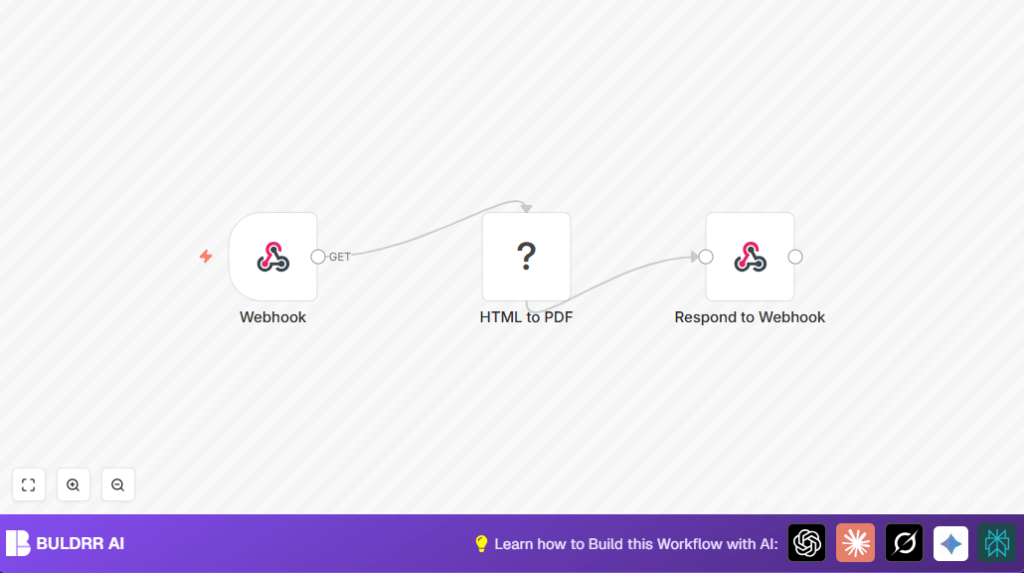

What this workflow does
This workflow converts HTML content into a PDF file automatically using n8n and CustomJS nodes.
It solves the problem of slow, manual PDF creation by making it fast and automatic.
Users send HTML to a webhook, and get a PDF file back instantly.
Who should use this workflow
People or developers who need to create PDFs from HTML often.
Anyone who wants to avoid manually copying and converting reports or writing complex server scripts.
Great for web apps that want instant PDF generation on demand.
Tools and services used
- n8n: Automation platform to build and run workflows.
- CustomJS HTML to PDF node: Converts HTML into a PDF document.
- Webhook node: Listens for incoming HTML data.
- Respond to Webhook node: Sends back the generated PDF file.
Inputs, processing steps, and outputs
Inputs
- HTML content sent by the user to the webhook as POST data.
Processing steps
- Webhook node receives the HTML data.
- HTML to PDF node converts the HTML into PDF binary data.
- Respond to Webhook node sends the PDF file as a binary response back.
Output
The user or system receives a ready-to-use PDF file matching the HTML input.
Beginner step-by-step: How to use this workflow in n8n production
Step 1. Import the workflow
- Download the workflow file from this page.
- Inside the n8n editor, click Import from File and select the downloaded file.
Step 2. Configure credentials
- Find the HTML to PDF node and add your CustomJS API Key under credentials.
Step 3. Adjust settings if needed
- Change the webhook Path to something unique and easy to remember.
- If any IDs, emails, or folder info are in the workflow, update them.
Step 4. Test the workflow
- Activate the workflow using the toggle on top right.
- Send a test POST request to the webhook URL with some HTML content.
- Check if the PDF file is returned correctly.
Step 5. Activate for production
- Keep the workflow active to run automatically on new webhook calls.
Now the webhook can be called by web apps or other tools to get PDF files from HTML without coding.
If hosting or privacy is a concern, consider self-host n8n for full control.
Customization ideas
- Change the webhook to accept varied HTML from different sources.
- Add CSS styles inside the HTML for branding or layout.
- Attach storage nodes to save PDFs automatically to cloud drives.
- Use logic nodes to return either PDF or HTML based on request data.
Common failures and fixes
- No PDF or empty file: Check webhook settings have responseMode as responseNode and connections are complete.
- PDF has bad formatting: Make sure HTML is valid and CSS is inline if needed.
- Workflow not responding: Confirm workflow is active before testing.
- API errors: Verify CustomJS credentials are correct and valid.
Summary of results
✓ Save time by automating PDF creation from HTML.
✓ Get instant PDF files sent back via webhook.
✓ Remove the need for manual downloads or server coding.
✓ Easily integrate with any web app or tool that can post HTML.
