

Automate Todoist Task Snoozing with n8n Workflow

Struggling to manage and snooze your Todoist tasks efficiently? This detailed n8n workflow automates moving tasks between Inbox and Snoozed projects based on due dates, saving you hours of manual task juggling and ensuring timely task returns.
todoist
scheduleTrigger
if
+7
Workflow Identifier: 1834
NODES in Use: Schedule Trigger, Todoist, If, DateTime, Set, Filter, Crypto, Item Lists, HTTP Request, Sticky Note
Automate Todoist tasks with n8n

Press CTRL+F5 if the workflow didn't load.

Learn how to Build this Workflow with AI:

What this workflow does

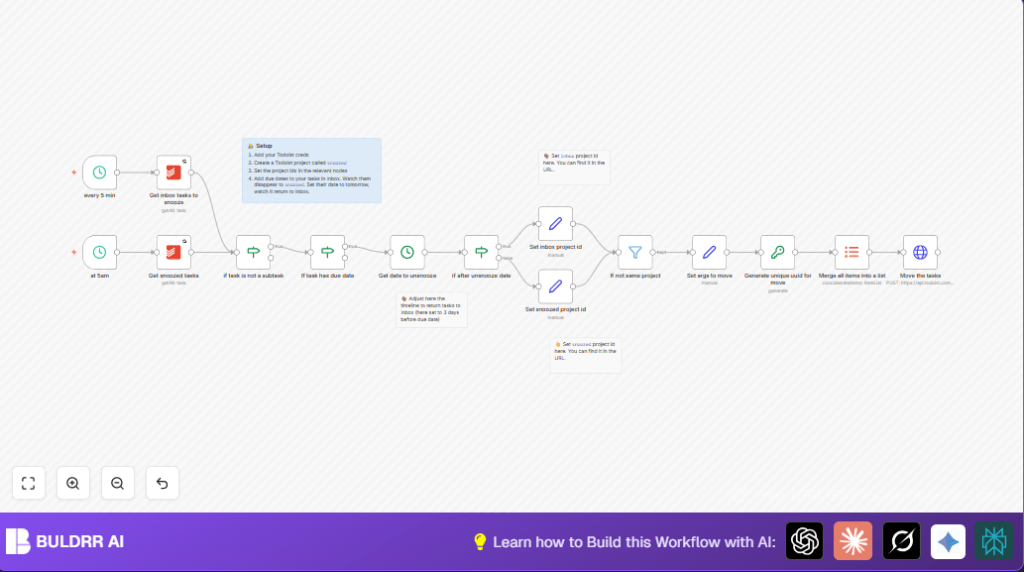
This workflow moves tasks with due dates from Todoist Inbox to a Snoozed project automatically.
It brings tasks back to the Inbox only when they become actionable based on due dates.
It skips subtasks to keep task structures clean.
This helps keep the Inbox tidy and reduces time spent manually moving tasks.


Who should use this workflow

This workflow is good for people who get many tasks in Todoist Inbox with due dates.
It works well if manual snoozing and unsnoozing wastes time or causes missed deadlines.


Tools and services used

  • n8n: for building and running the automation workflow.
  • Todoist API: accessed for reading and updating tasks.
  • Schedule Trigger nodes: to run the workflow every 5 minutes and once daily at 5 AM.
  • HTTP Request node: to send batch commands to Todoist Sync API.
  • Crypto node: to generate unique IDs for API commands.
  • DateTime node: used to calculate unsnooze times before due dates.

Inputs, Processing, Outputs

Inputs

  • All tasks currently in the Inbox project fetched using Todoist API.
  • All tasks currently in the Snoozed project fetched similarly.

Processing Steps

  • Exclude all subtasks by checking if parent_id is empty.
  • Keep only tasks that have a due date.
  • For Inbox tasks, move them to Snoozed if they have a due date (to reduce clutter).
  • For Snoozed tasks, calculate a date to move back based on subtracting 3 days from due date.
  • Check if current time is after that calculated unsnooze date.
  • Move tasks back to Inbox if ready.
  • Ensure tasks aren’t moved unnecessarily by comparing current and target project IDs.
  • Create Todoist Sync API commands with unique UUIDs to batch move tasks.

Output

  • Tasks moved between Inbox and Snoozed projects automatically.
  • The Inbox only shows actionable tasks close to their due date.
  • Snoozed project keeps early tasks out of the way.

Beginner step-by-step: How to use this workflow in n8n

Import the workflow

  1. Download the workflow file from this page.
  2. Open n8n editor where the workflow will be run.
  3. Use the “Import from File” option in n8n to add the workflow.

Configure the workflow

  1. Add Todoist API credentials in the credential manager.
  2. Update the Inbox and Snoozed project IDs in the designated Todoist nodes.
  3. Check and adjust times or other variables if you want to customize behavior.

Test and activate

  1. Run the workflow manually once to verify it works and check logs.
  2. When confirmed, activate the workflow to run automatically as scheduled.

What to watch for

If tasks do not move, check project IDs and API permission scopes.

If dates seem wrong or tasks stay snoozed, verify the date subtraction settings and date field mappings.

Make sure both schedule triggers are enabled and firing.

Always back up important data before activating this workflow.


Customization ideas

  • Change how many days before due date a task unsnoozes by editing the DateTime node duration.
  • Allow subtasks to be moved by changing the condition in the subtask filter node.
  • Adjust the schedule trigger frequency, for example run every 10 minutes instead of 5.
  • Duplicate and expand the workflow to support multiple Inbox or Snoozed projects.

Summary

✓ Saves time by automating task moving in Todoist.
✓ Keeps Inbox clean until tasks are ready.
✓ Reduces missed deadlines and manual errors.
→ Runs every 5 minutes and daily to maintain task order.
→ Uses robust Todoist API commands with unique IDs.

Automate Todoist tasks with n8n

Visit through Desktop to Interact with the Workflow.

Frequently Asked Questions

This workflow mainly uses Schedule Trigger, Todoist, HTTP Request, Crypto, DateTime, If, and Set nodes.
The workflow calculates a date 3 days before each task’s due date and moves the task back to the Inbox if the current date is after that calculated date.
Users must add Todoist API credentials and update Inbox and Snoozed project IDs in the associated Todoist nodes.
Subtasks are excluded to avoid breaking task hierarchies and keep project structures intact.

Promoted by BULDRR AI

Related Workflows

Automate Twist Channel Creation and Messaging with n8n

This workflow automates creating and updating a channel in Twist and sending a personalized message to specific users. It eliminates manual setup errors and saves time managing Twist communications.

Automate Ideogram Image Generation with Google Sheets & Gmail

This workflow automates graphic design image generation via Ideogram AI, storing image data in Google Sheets and Google Drive, with email alerts via Gmail. It saves designers hours by automating image creation, remixing, review, and record-keeping.

Automate IT Support with Slack and OpenAI in n8n

Streamline IT support by automating Slack message handling using n8n and OpenAI. This workflow handles Slack DMs, filters bots, queries a Confluence knowledge base, and delivers AI-generated responses, improving support efficiency and response time.

Automate Crypto Analysis with CoinMarketCap & n8n AI Agent

Discover how this unique n8n workflow leverages CoinMarketCap’s multi-agent AI to deliver precise, real-time cryptocurrency insights directly via Telegram. Manage crypto data analysis efficiently with automated multi-source API integration.

Automate Gumroad to Beehiiv Subscriber Sync with n8n

Learn how to automatically add new Gumroad sales customers as Beehiiv newsletter subscribers using n8n automation. This workflow saves time by syncing sales data to Google Sheets CRM and notifying your Telegram channel instantly.

Generate On-Brand Blog Articles Using n8n and OpenAI

This workflow automates the creation of on-brand blog articles by analyzing existing company content using n8n and OpenAI. It extracts article structures and brand voice to produce consistent draft articles, saving significant content creation time.
1:1 Free Strategy Session
Your competitors are already automating. Are you still paying for it manually?

Do you want to adopt AI Automation?

Every hour your team does repetitive work, you're burning real money.
While you wait, faster businesses are cutting costs and moving quicker.
AI and automations aren't the future anymore — they're the present.

Book a live 1-on-1 session where we show you exactly which of your daily tasks can be automated — and what it’s costing you not to.