
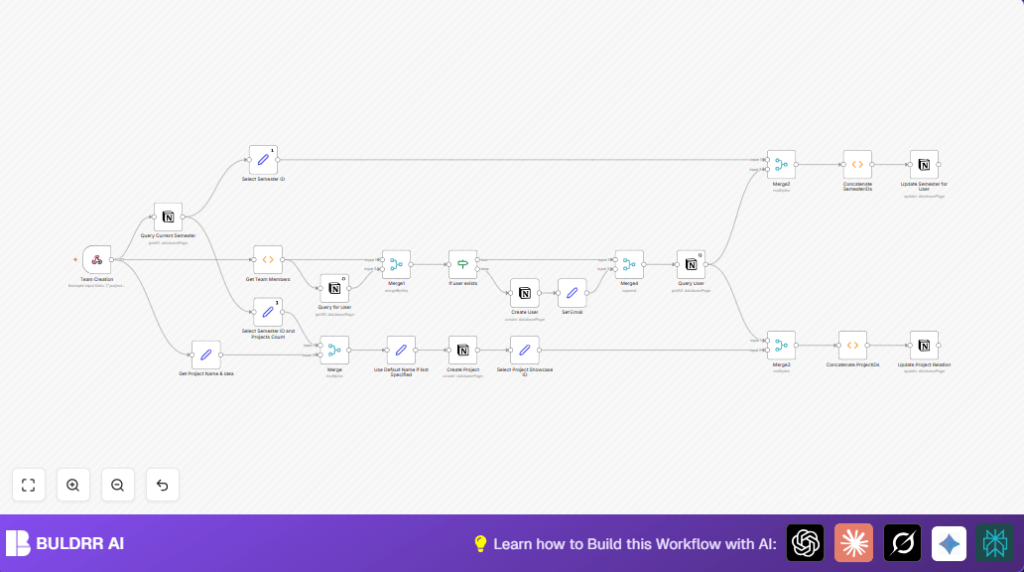

What this workflow does
This workflow takes new project data and teams sent by a webhook.
It checks which team members are already in Notion by email.
It creates new users if needed, finds current semester info, and adds new projects linked to the right semester.
It also updates users to link them with all their semesters and projects automatically.
This saves many hours weekly and helps avoid mistakes in manual work.
Who should use this workflow
This is for people managing school or community projects using Notion.
It suits coordinators who spend time entering data manually and want to reduce errors.
They should have basic understanding of Notion and n8n automation.
Tools and services used
- n8n Automation: Runs workflow and handles webhook, processing, and data update.
- Notion API: Reads and writes data to Users, Projects, and Semesters databases.
- HTTP Basic Authentication: Secures the webhook to accept only authorized requests.
Inputs, processing, and outputs
Inputs
- Project data: name, idea, and team members sent as JSON to webhook.
- Existing Notion databases containing users, projects, and semesters.
Processing steps
- Webhook node receives POST request with Basic Auth.
- Set node extracts project name and idea fields.
- Function node splits team members array into individual items.
- Notion node queries users by email to check existing members.
- Merge node pairs incoming members with query results to find who is new.
- If node determines if user exists and decides to create new users if missing.
- Notion node queries current semester based on checkbox property.
- Set node extracts semester id and counts existing projects.
- Merge node combines project details with user and semester data.
- Set node sets default project name if empty, adding numbering.
- Notion node creates new project page linked to semester and project idea.
- Set node extracts new project id for later updates.
- Notion node queries user again for up-to-date info.
- Function node combines semester ids including new semester.
- Notion node updates user semester relations with combined ids.
- Function node combines all project IDs user belongs to and updates user project relation.
- Merge nodes sync all final data to Notion maintaining links and relations.
Outputs
- New project pages created in Notion with name, idea, and semester linked.
- User pages are updated or created with correct semester and project relations.
- Semester relations updated to maintain proper tracking of projects and users.
- Error reduction and time saved by automating project and team management.
Beginner step-by-step: How to use this workflow in n8n production
Step 1: Download and Import the Workflow
- Download the workflow file using the Download button on this page.
- Open your n8n editor where you want to run the workflow.
- Use the top menu option “Import from File” and select the downloaded workflow file.
Step 2: Configure Credentials
- Add your Notion API credentials in the Credential section of n8n.
- Configure the Webhook node Basic Auth username and password to match your external sender’s credentials.
- Update any IDs, emails, channel names, or database IDs inside nodes if your Notion setup differs.
Step 3: Testing the Workflow
- Trigger the webhook by sending a test POST request with sample JSON team and project data.
- Watch execution in n8n to check nodes pass without errors.
- Verify new users and projects appear correctly in Notion.
Step 4: Activate for Production
- Toggle the workflow to “Active” in the n8n editor to allow automatic runs.
- Ensure your webhook URL is reachable securely from your project submission system.
- Monitor executions regularly in n8n’s Executions tab for smooth operation.
- Consider adding logs or alerts to catch errors early.
For teams using a server or VPS, see helpful resources on self-host n8n for stable workflow hosting.
Customizations
- Change project naming in the default name node to use year or special prefixes.
- Add more fields to create user, like roles or pictures.
- Modify webhook node to accept PATCH if updating projects partially.
- Filter semesters to cover future or past ones.
- Add email notifications to alert stakeholders when new projects or users appear.
Troubleshooting common issues
Problem: No data returned from Notion query node
Check if email filter matches exactly the Notion database property.
Verify Notion API credentials and database permissions.
Problem: Workflow fails to create users
Inspect the If node condition for existing user based on presence of an ID.
Confirm merge nodes use exact key names for email fields.
Problem: Project not linked to current semester
Make sure semester ID is correctly taken from the current semester query.
Confirm Notion relation property keys match what the node expects.
Summary and outcome
✓ Saves close to 10 hours weekly of manual data entry.
✓ Automatically keeps all team member user and project data accurate.
✓ Links projects, users, and semesters in Notion without errors.
✓ Makes project management simpler and faster.
✓ Easy to import and run in n8n with little setup.
✓ Scales well for larger teams with proper configuration.
