
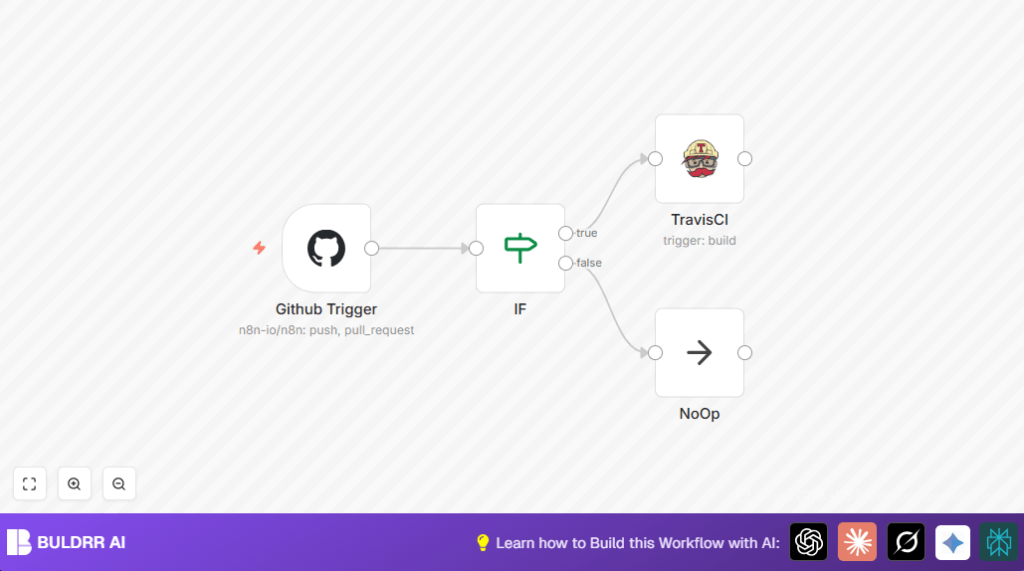

What This Workflow Does
This workflow watches for changes in GitHub repositories.
When someone pushes code or opens a pull request, it starts a TravisCI build automatically.
This stops the user from doing that manually every time.
The result is faster testing and fewer missed builds.
Tools and Services Used
- GitHub Account: To send push and pull request events.
- GitHub OAuth2 API Credentials: Used inside n8n for secure connection.
- TravisCI Account: To receive build triggers.
- TravisCI API Credentials: Configured inside n8n to authorize triggers.
- n8n Workflow Automation: To connect and automate GitHub events with TravisCI builds.
How This Workflow Works (Input → Process → Output)
Input
- GitHub sends webhook events for push or pull request opened to n8n.
Process
- GitHub Trigger listens for push and pull_request events.
- IF Node checks if event is a push or a pull request opened.
- If event matches, TravisCI Node triggers a build on the related repository branch.
- If event does not match, NoOp Node handles it silently to avoid errors.
Output
- A build is automatically started in TravisCI for valid GitHub events.
- Events that don’t trigger builds are ignored without error.
- This results in faster automated testing and less manual work.
Beginner Step-by-Step: How to Use This Workflow in n8n
Step 1: Get the Workflow File
- Use the Download button on this page to get the workflow file.
- Open your n8n editor where you build workflows.
Step 2: Import the Workflow
- Click on the menu and choose Import from File.
- Select the downloaded workflow file and load it into your n8n editor.
Step 3: Configure Required Details
- Add or verify your GitHub OAuth2 API credentials in n8n.
- Add or check your TravisCI API credentials.
- Update repository owner and name in the GitHub Trigger node if different from default.
- Adjust the TravisCI node branch field if you want to target a specific branch.
Step 4: Test the Workflow
- Save your changes.
- Push a test commit or open a pull request in the GitHub repo set in the workflow.
- Verify the workflow runs correctly in n8n by checking executions and TravisCI build start.
Step 5: Activate Workflow for Production
- Toggle the switch to activate the workflow.
- Monitor executions regularly to confirm stable operation.
If running n8n on your own server, consider using reliable VPS setup or self-host n8n for better uptime.
Common Problems and How to Fix
- No builds start after push: Check OAuth2 credentials and webhook setup in GitHub exactly match the repo in workflow.
- TravisCI API errors: Verify the TravisCI API key and repository slug format are correct.
- Incoming GitHub events not recognized: Ensure the IF node uses “any” for conditions to catch push or pull request opened.
- Unexpected workflow errors: Add NoOp node after IF node false branch to handle unmatched events safely.
Customization Ideas
- Set TravisCI node branch field to specific branch names like “main” or “develop” to limit build triggers.
- Change IF node conditions to add events like pull request closed or tag push for more build triggers.
- Add a Slack node after TravisCI to send messages when builds start or fail, with dynamic content from payload.
- Use Google Sheets node to log GitHub event details for audit or tracking.
Summary
→ This workflow automatically starts TravisCI builds for push and pull request open events from GitHub.
→ It removes manual steps and saves time for developers and teams.
✓ Your code is tested faster and more reliably.
✓ The workflow handles unwanted events safely without errors.
✓ You get a clear, easy setup and can customize it as needed.
