

What This Workflow Does
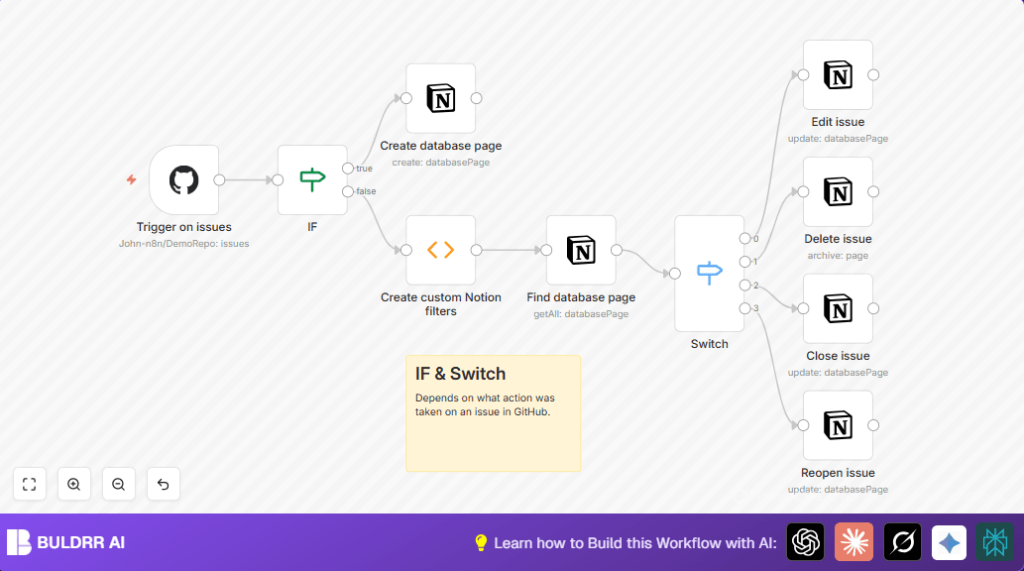
This workflow listens for issue events from a GitHub repository and automatically updates a Notion database to match those changes.
It creates new Notion pages when an issue opens, edits pages when the issue updates, deletes pages if the issue is deleted, and marks issues closed or reopened in Notion.
This workflow saves time and avoids mistakes from manually updating Notion to track GitHub issues.
Tools and Services Used
- GitHub API and Webhooks: Sends issue event notifications to n8n.
- Notion API: Manages pages in the Notion database.
- n8n Automation Platform: Hosts and runs the workflow connecting GitHub and Notion.
How the Workflow Works
Inputs
- GitHub webhook events about issues such as opened, edited, closed, reopened, or deleted.
- Notion database configured with Issue ID (number), Link (URL), Issue title (title), and Closed (checkbox) properties.
Processing Steps
- Trigger: A GitHub Trigger node starts the workflow when an issue event occurs.
- Decision: An IF node checks if the event is a new issue opened.
- Create Page: If opened, a Notion node creates a new page with the issue details.
- Filter: For other events, a Function node builds a Notion filter targeting the page by Issue ID.
- Find Page: A Notion node uses that filter to find the right page in the database.
- Switch: A Switch node routes events by type: edited, deleted, closed, reopened.
- Update Page: Depending on the event, Notion nodes edit the page title, archive the page, or check/uncheck the Closed box.
Output
Notion database pages stay up to date reflecting GitHub issue states without manual work.
Who Should Use This Workflow
This is for anyone tracking GitHub issues in Notion and wanting to save time.
It helps if multiple issue updates happen frequently and manual syncing gets hard or prone to errors.
The user should have GitHub and Notion connected via APIs and the ability to add credentials to n8n.
Beginner Step-by-Step: How to Use This Workflow in n8n
Import and Setup
- Download the workflow file using the Download button on this page.
- In the n8n editor, click “Import from File” and select the workflow file.
- Add required API credentials for GitHub and Notion where prompted.
- Update the Notion Database ID to match your own Notion issues database.
- If needed, update GitHub repository owner and name to your repository.
Test and Activate
- Test the workflow by opening, editing, closing, or reopening an issue in the GitHub repo.
- Check that the Notion database updates as expected for each test event.
- When tests pass, activate the workflow in n8n to run continuously in production.
- If hosting n8n yourself, follow best practices for running n8n on server. See self-host n8n for suggestions.
Inputs, Processing, and Output Summary
Inputs
- Issue events from GitHub: open, edit, close, reopen, delete.
- Notion database configured to track issues by ID.
Processing
- Workflow triggers on GitHub webhook event.
- Determines event type with an IF node.
- Creates, updates, archives, or changes status of Notion pages accordingly.
Output
- Accurate Notion database pages that mirror GitHub issue lifecycle events.
Common Problems and Fixes
No Notion Pages Found After Filter
Check that Notion database has an Issue ID property set as a number.
Verify the filter JSON in the Function node really matches the Issue ID from GitHub events.
GitHub Webhook Does Not Trigger Workflow
Make sure the webhook URL from the GitHub Trigger node is correctly added and activated in the GitHub repository settings.
Check webhook delivery logs in GitHub for errors or failed deliveries.
Customization Ideas
- Map extra GitHub issue properties like Assignees or Labels to Notion fields.
- Filter events in the Switch node to only process desired issue types.
- Add Fetch API calls to get GitHub issue comments and add them to Notion pages.
Summary of Benefits
✓ Saves hours every week by automating GitHub to Notion syncing.
✓ Prevents errors from manual data entry mistakes.
✓ Keeps issue tracking up to date in real time.
✓ Supports open, edit, close, reopen, and delete events.
✓ Easy to set up and customize in n8n.
