

What this workflow does
This workflow automates replies to Instagram messages using n8n, ManyChat, and ChatGPT AI. It helps save hours by answering messages fast and in a personal style. The AI reads subscriber questions, remembers past chats, and sends replies like the influencer’s usual way.
This stops slow replies and keeps answers simple and friendly.
Who should use this workflow
Anyone managing many Instagram messages daily can use this to save time.
It fits influencers, marketers, or small businesses that want quick and consistent replies.
Tools and services used
- n8n automation platform: Runs the workflow and connects nodes.
- ManyChat: Receives Instagram messages and forwards them via webhook.
- OpenAI ChatGPT API: Generates AI responses based on subscriber messages and system prompt.
Inputs, processing, and outputs
Inputs
- Instagram subscriber message captured by ManyChat.
- Webhook sends message data to n8n.
- Custom system prompt text defining answer style.
- Conversation history stored for context.
Processing steps
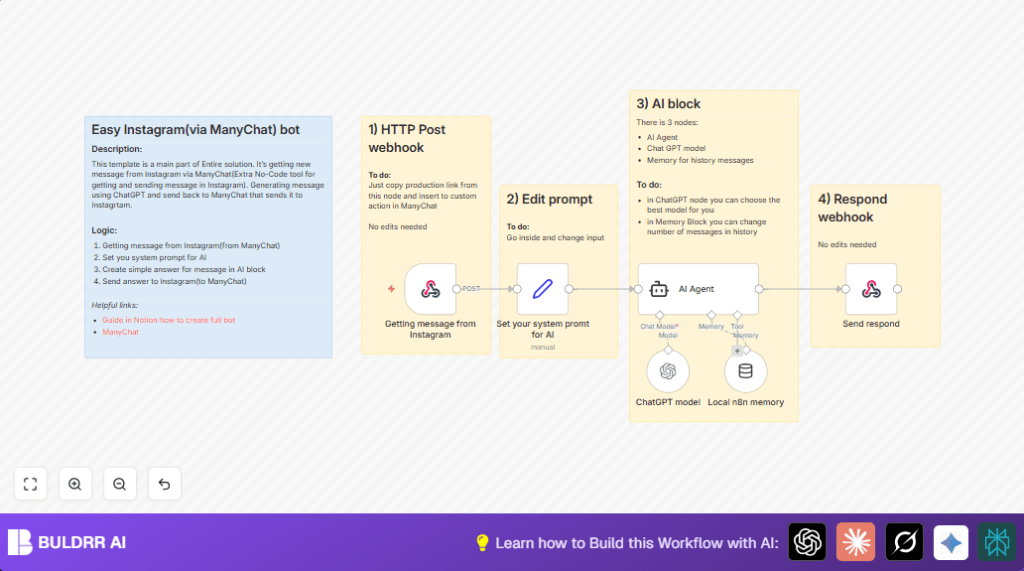
- The Webhook node receives message data.
- The Set node applies a system prompt with influencer style instructions.
- The Local n8n memory node stores last 20 messages to keep chat context.
- The AI Agent node sends prompt, message, and history to ChatGPT model node.
- ChatGPT model node uses OpenAI API key and selected model to produce a reply.
- The Send respond node sends the AI reply back to ManyChat.
Outputs
- Personalized AI reply delivered to Instagram subscriber through ManyChat.
- Reduced manual reply time and consistent message tone.
Beginner step-by-step: How to build this in n8n
Import workflow
- Download the workflow from this page.
- Go to n8n editor and choose “Import from File”.
- Select the downloaded workflow JSON file.
Configure credentials and settings
- Add OpenAI API key in the ChatGPT model node settings.
- Check ManyChat webhook URL and update if needed in the Webhook node.
- Adjust system prompt text in the Set your system promt for AI node if you want a different reply style. Example prompt is provided.
- Verify and update any IDs, tokens, or parameters related to your ManyChat or Instagram accounts.
Test and activate
- Send a test message from an Instagram subscriber to confirm the workflow triggers.
- Check that the AI reply comes back on Instagram via ManyChat.
- Once confirmed, activate the workflow in n8n for live use.
- If using self hosting or VPS, consider self-host n8n to run workflow securely and always online.
Customization ideas
- Change system prompt in the Set your system promt for AI node to match different writing tones.
- Modify the memory window length in the Local n8n memory node to remember more or fewer past messages.
- Switch the ChatGPT model to GPT-4 for better understanding and replies in the ChatGPT model node.
- Update webhook URL or path in the Webhook node for other campaigns or social channels.
- Add logging nodes before or after AI steps to keep message records or debug flows.
Common issues and fixes
No reply from ChatGPT
Probably wrong or missing OpenAI API key, or rate limit hit.
Check API key in the ChatGPT model node and OpenAI usage dashboard.
Webhook gets no data
ManyChat webhook may not be set or uses wrong HTTP method.
Confirm ManyChat sends POST requests to n8n webhook URL.
AI answers seem wrong or generic
Prompt in Set your system promt for AI node may be too weak or generic.
Improve prompt with clear persona and style rules.
Summary and results
✓ Fast, personal replies sent automatically to Instagram subscribers.
✓ Saves hours daily on manual message replies.
✓ Consistent style matching influencer’s voice.
→ Subscribers get quick answers and better experience.
→ Influencer focuses on content instead of replying constantly.
