
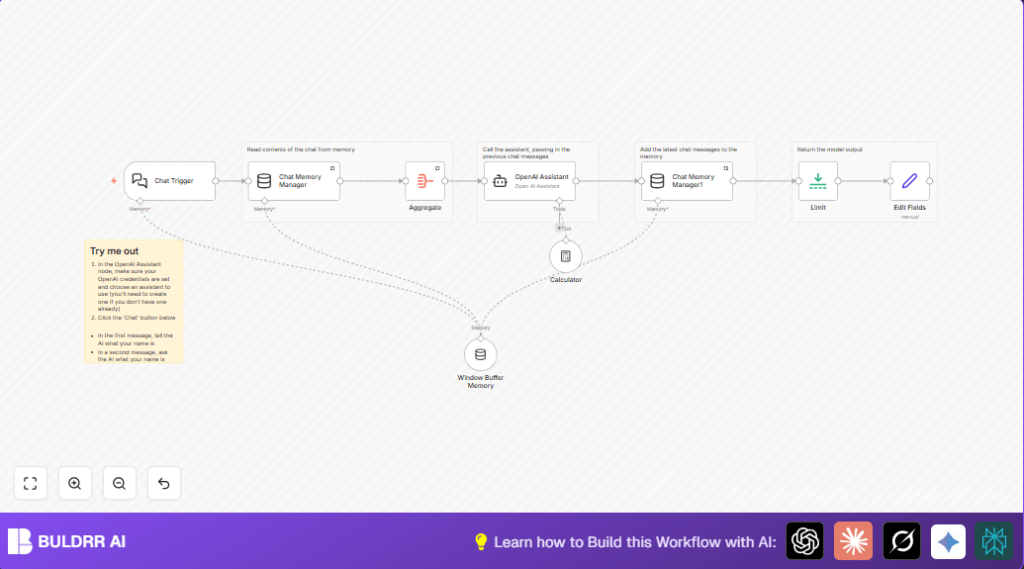

What this workflow does
This n8n workflow creates a chatbot that remembers past messages, understands user questions better, and can do calculations during chats.
It helps customer support teams save time by tracking conversation history automatically and giving smart answers fast.
Who should use this workflow
This workflow is good for people managing chat support where many questions come daily.
It works well for startups or small businesses needing faster response and better customer chat experience.
Tools and services used
- n8n: Automation platform running the workflow.
- LangChain nodes: Special nodes for chatbot triggers, memory management, assistant AI, and calculator.
- OpenAI API: GPT models help generate chat answers.
- Calculator node: Runs math operations during conversations.
Inputs, Processing Steps, and Output
Inputs
User chat messages trigger the workflow through a webhook.
Past chat history is loaded automatically using memory nodes.
Processing Steps
Memory Manager node reads all previous messages.
Aggregate node joins old messages into a list.
OpenAI Assistant node receives full conversation context and current message to create a reply.
Calculator node works inside the assistant node if math is needed.
New question and answer get saved back to memory.
Limit node trims the output length.
Edit Fields node cleans the output for sending back to the user.
Output
The workflow outputs a clear, context-aware chat reply ready for user interface display.
Beginner step-by-step: How to use this workflow in n8n production
Download and Import
- Download the workflow file using the Download button on this page.
- In n8n editor, click on “Import from File” and upload the downloaded workflow.
Configure Credentials and IDs
- Add your valid OpenAI API Key in the OpenAI Assistant node credentials.
- Check the Chat Trigger node settings and make sure “public” is enabled for external webhook use.
- Update any session IDs or memory keys if needed to match your usage.
Test and Activate
- Trigger the webhook URL with a sample chat message to make sure it starts correctly.
- Check the workflow logs to confirm responses come back from OpenAI Assistant.
- When ready, turn on the workflow with the activation switch at the top right corner to run live.
Note: For those hosting n8n themselves, self-host n8n resources might be helpful.
Common issues and fixes
- No response from OpenAI Assistant: Check API Key is correct and not expired.
- Memory not updating: Ensure Chat Memory Manager insert mode maps user and AI messages correctly.
- Calculator node not working: Confirm Calculator node is linked as ai_tool inside OpenAI Assistant node.
- Webhook not reachable: Verify Chat Trigger node has public enabled and webhook URL is correct.
Customization ideas
- Change the chatbot personality by editing the prompt text in the OpenAI Assistant node.
- Adjust how many past messages to keep in the chat memory nodes settings.
- Add other AI tools like translation or summarization nodes for extra features.
- Modify Limit node parameters to control reply size.
- Use session keys uniquely to keep chat memories separate per user.
Summary
✓ saves time by managing chat memory automatically
✓ provides smarter, context-aware replies
✓ can do math within conversations
✓ easy to configure and activate in n8n
✓ supports changing AI style and memory depth
→ better customer support experience with faster answers
→ less manual work on remembering past chats
→ flexible for adding more AI tools later
