

no per-workflow configuration required.
What this workflow does
Most n8n users find out a workflow failed the same way:
something downstream stops working and someone notices
hours later.
A lead wasn’t logged. An order wasn’t processed.
A report wasn’t sent. And the workflow has been sitting
red in n8n since 2am.
This workflow fixes that permanently.
The moment any connected n8n workflow fails, you get
a Telegram message with exactly what broke and where:
→ Which workflow failed
→ Which node caused the error
→ The exact error message
→ When it happened
→ A direct link to the failed execution in n8n
You’re not checking logs. You’re not polling dashboards.
You’re not finding out hours later.
You know instantly — on your phone, wherever you are.
One Setup. Every Workflow Covered.
The biggest advantage of this error alert system is how
it scales: you set it up once and it monitors every
workflow on your n8n instance automatically.
No per-workflow configuration. No adding error nodes
to each workflow individually. No maintaining separate
alert setups as you add new workflows.
Here’s how it works:
→ Import this workflow and activate it (takes 5 minutes)
→ Go to any existing workflow → Settings → Error Workflow
→ Select “Self-Heal Handler” (this workflow)
→ Done — that workflow now sends Telegram alerts on failure
For new workflows you build in the future: just set the
Error Workflow field during setup. One click per workflow.
The alerting infrastructure is already there.
10 workflows or 100 — the monitoring overhead stays the same.
Who should use this workflow
This automation is for anyone running multiple workflows in n8n who wants to get fast error alerts.
It suits engineers or teams needing to keep workflows reliable and avoid missed error notifications.
Anyone wanting to save time by not checking logs manually will find this helpful.
Tools and services used
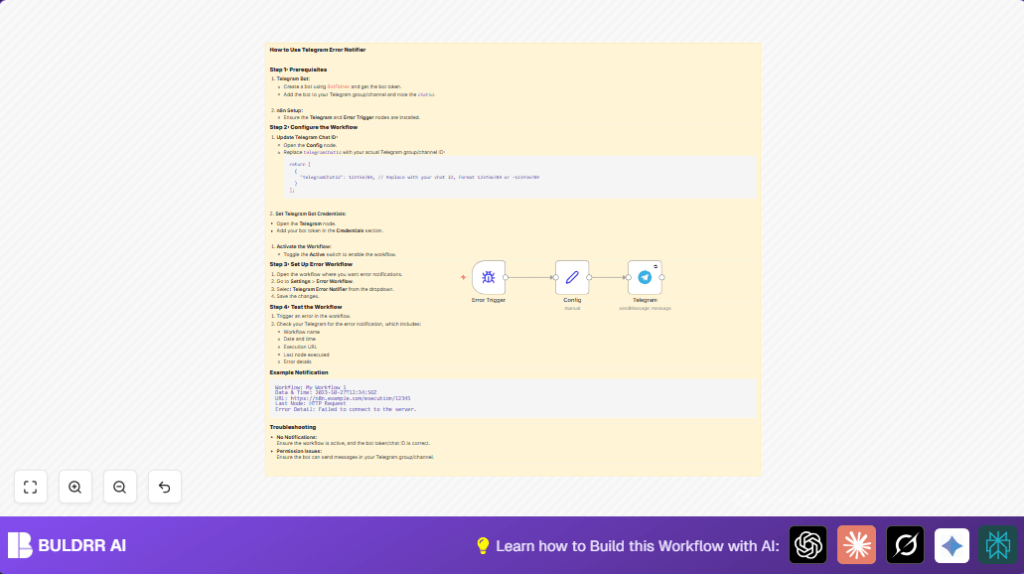
- Error Trigger node: Detects when any connected workflow has an error.
- Set node: Stores configuration like the Telegram chat ID for easy reference.
- Telegram node: Sends formatted messages through the Telegram Bot API.
- Telegram Bot API: Sends alert messages to the user’s Telegram chat.
How this workflow works (Input → Process → Output)
Input
It listens for error events from workflows linked to the Error Trigger node.
No manual input data is needed to start.
Processing steps
- The Error Trigger detects an error in any connected workflow.
- The Set node holds the Telegram chat ID to send the message to.
- The Telegram node prepares a message using data from the error event. It pulls workflow name, time, error message, last node executed, and execution URL.
- The Telegram node sends this message to the specified chat ID. It tries again if sending fails, waiting between attempts.
Output
An instant Telegram message arrives in the defined chat.
It shows error details clearly, allowing fast response.
This reduces downtime by alerting users as soon as a workflow problem happens.
Beginner step-by-step: How to use this workflow in n8n production
Step 1: Import the workflow
- Download the workflow file by clicking the Download button on this page.
- Inside the n8n editor, click on “Import from File.”
- Select the downloaded JSON file.
Step 2: Add your credentials and IDs
- Open the Telegram node and add your Telegram Bot API Key in Credentials → Create New → Telegram API.
- In the Set node named Config, replace the telegramChatId value with your Telegram chat ID.
Step 3: Test the workflow
- Manually cause a test error in any workflow connected to this error handler.
- Check if you receive a Telegram message showing error info.
Step 4: Activate for production
- Switch the workflow toggle ON in the n8n editor.
- Set this workflow as your error workflow in other workflows under Settings → Error Workflow.
- Monitor Telegram for future error alerts.
If self-host n8n, make sure your server and credentials have access to all links.
Customization ideas
- Change the Telegram message format in the Telegram node’s Text field, using HTML to improve readability.
- Add other Telegram groups by copying the Telegram node and setting new chat IDs for wider alerts.
- Adjust retry delay settings in the Telegram node to control how often failed messages resend.
- Secure your chat ID in environment variables or credentials instead of the Set node.
Handling errors and edge cases
- If no Telegram alerts arrive when errors happen, check if the workflow is active.
- Verify the Telegram bot token and chat ID correctness in the Set node and node credentials.
- Make sure the bot is a member of the target Telegram group with permission to send messages.
- If the Telegram API rate limits or blocks messages, increase waitBetweenTries or reduce retry count in the Telegram node settings.
Summary of results
✓ Instant error alerts appear in Telegram as soon as any workflow fails.
✓ Fast responses reduce downtime and damage.
✓ Saves time by automating manual error checks.
✓ Easy configuration and message customization.
✓ Supports retry to avoid missing alerts.
