

What this workflow does
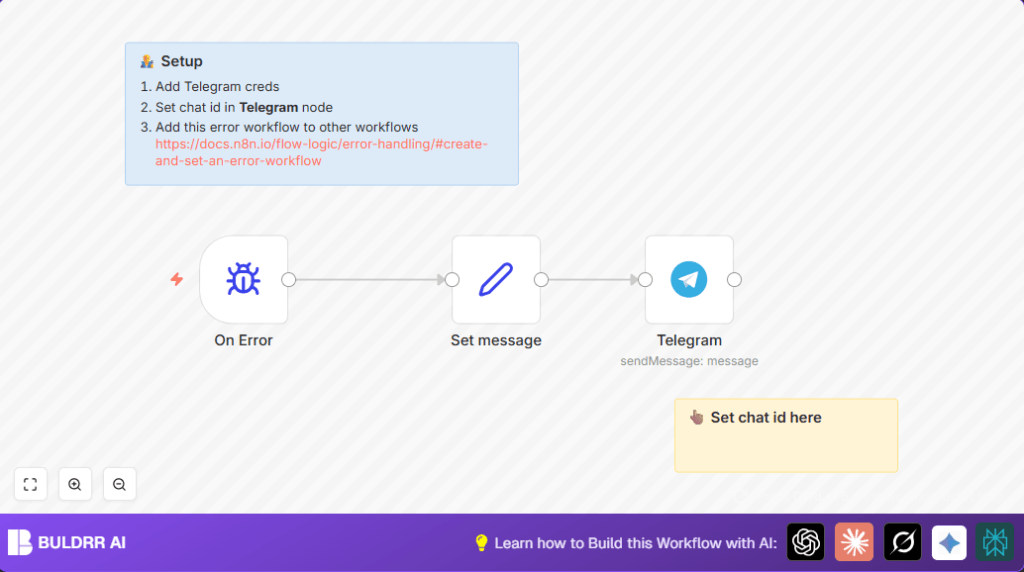
This workflow watches for errors in other n8n workflows and sends an alert message to a Telegram chat right away.
It helps catch workflow failures quickly by sending details about the failed workflow and a link to check the error.
This lets users fix problems faster and spend less time finding errors.
Who should use this workflow
Users who run multiple n8n workflows and want immediate alerts on any failure can use this.
It is good for teams needing faster error response, avoiding downtime, and keeping automations running smoothly.
Tools and services used
- n8n automation platform: Runs workflows and handles error events.
- Error Trigger node: Detects any workflow failure in n8n.
- Set node: Builds a custom error message with workflow name and execution link.
- Telegram Bot API: Sends alert messages to a Telegram chat.
- Telegram chat ID: Identifies where to send notifications.
How this workflow works (Inputs → Process → Output)
Inputs
- Error details automatically caught by the Error Trigger node when any linked workflow fails.
- Telegram chat ID and Bot API key for sending messages.
Processing Steps
- The Error Trigger node detects failure events.
- The Set node creates a message that includes the workflow name and a clickable link to the error execution details.
- The Telegram node sends this message to the configured Telegram chat.
Output
A real-time Telegram alert appears with clear info on which workflow failed and how to check the error.
This reduces waiting time before errors are found and fixed.
Beginner step-by-step: How to build this in n8n for production use
Step 1: Import the workflow
- Click the Download button on this page to save the workflow file.
- Open the n8n editor and go to the menu to choose “Import from File.” Upload the downloaded workflow file.
Step 2: Configure credentials and settings
- Add Telegram API credentials in n8n if not already done.
- Update the Telegram chat ID field in the Telegram node with your chat’s unique ID.
Step 3: Test the workflow
- Run a test by causing a controlled error in another workflow linked to this error handler.
- Check that the alert message arrives in your Telegram chat.
Step 4: Activate for production
- Turn on this error workflow in the n8n dashboard.
- Set this workflow as the default error workflow in other workflows’ settings so all errors are caught.
For users running n8n on their own server, consider using self-host n8n for better control.
Customization ideas
- Change the Telegram chat ID in the Telegram node to send alerts to other groups or users.
- Edit the message content in the Set node to add more error details or metadata.
- Duplicate the notification flow to also send alerts via Slack, Email, or SMS for broader coverage.
Common problems and solutions
Problem: Telegram messages not sending
Check the Telegram Bot API credentials and ensure the Telegram chat ID is correct. Group chat IDs may start with a dash (-).
Problem: Error Trigger does not activate
Ensure the error workflow is set inside each workflow’s settings as the error handler. Errors outside this setup will not trigger the workflow.
Summary of results
✓ Immediate detection of failed workflows.
✓ Real-time Telegram alerts with workflow name and error link.
✓ Faster error response and less downtime.
✓ Centralized error management across multiple workflows.
✓ Easy import and configuration for quick deployment.
