
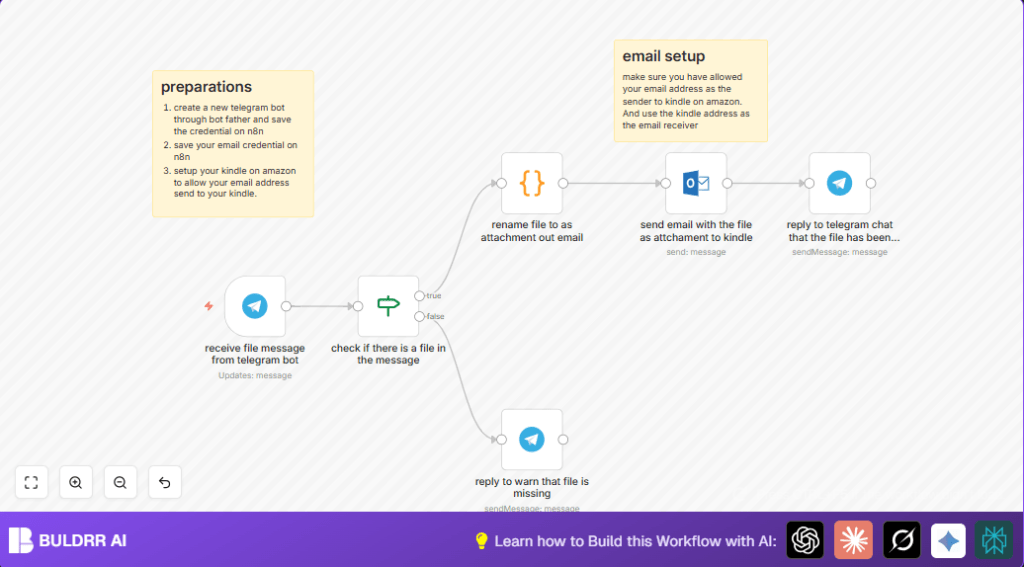

2. What This Automation Does
This workflow gets files sent to a Telegram bot and sends them to a Kindle email address.
It solves the problem of manually forwarding each document from Telegram to Kindle, saving lots of time.
The result is that users don’t have to do the same steps over and over, and files arrive on the Kindle automatically.
The input is a file sent in a Telegram chat to the bot.
The main process checks if the message has a file, renames it properly, and then sends it by email.
The output is a confirmation message in Telegram and the file delivered to the Kindle device.
3. Prerequisites ⚙️
- Telegram Bot API: Receives user messages.
- Microsoft Outlook SMTP: Sends emails with attachments.
- Kindle Email Service: Receives documents for e-readers.
- n8n Automation Platform: Runs the workflow.
4. Beginner Step-by-Step: How to Use This Workflow in n8n
Step 1: Import the Workflow
- Download the workflow file using the Download button on this page.
- Inside the n8n editor, choose “Import from File” to bring the workflow into n8n.
Step 2: Add Credentials
- Open the imported workflow and add your Telegram Bot API Key as a credential to the Telegram Trigger and Telegram nodes.
- Add your Microsoft Outlook SMTP credentials in the Microsoft Outlook node.
Step 3: Update Email and Chat Info
- Enter your Kindle email address in the Microsoft Outlook node’s “To Recipients” field.
- Ensure the chat ID and message reply options are correctly set as per the imported workflow.
Step 4: Review Code and Expressions
- Check the Code node named “rename file to as attachment out email” contains this code:
// Loop over input items and rename the file
for (const item of $input.all()) {
  item.binary.data.fileName = item.json.message.document.file_name;
}
return $input.all();
- Check the expression used in the Microsoft Outlook node body:
=This is a book named {{ $json.message.document.file_name }} from telegram bot.
Step 5: Test and Activate
- Send a test file to your Telegram bot.
- Check that the bot replies in Telegram and that the file arrives at the Kindle email.
- If all works, toggle the workflow from inactive to active.
- Ensure the webhook URL is accessible online. For self-host n8n, confirm the webhook domain is public.
5. Workflow Inputs, Processing, and Outputs
Inputs
- User sends a message with a file (document) to Telegram bot.
Processing Steps
- Telegram Trigger: Detects new message with possible file.
- IF Node: Checks if message contains a file (document object).
- Telegram Node (false branch): Replies warning if no file is found.
- Code Node: Renames file in binary data to original filename.
- Microsoft Outlook Node: Sends email with file attached to Kindle email.
- Telegram Node: Sends confirmation message in chat.
Outputs
- File is emailed to Kindle, ready for reading.
- User receives confirmation message in Telegram chat.
6. Customizations ✏️
- Change the email address in the Microsoft Outlook node to forward files to other devices.
- Modify Telegram reply messages to personalize bot responses.
- Extend the IF node logic to also detect photos or videos for more file types.
- Swap Microsoft Outlook node with Gmail or SMTP nodes if different email service is preferred.
7. Troubleshooting ????
- Problem: No file detected after sending.
Fix: Confirm IF node uses expression{{$json.message.document}}with “exists” operator. - Problem: Email fails to send.
Fix: Check Microsoft Outlook credentials in n8n.
Make sure Kindle email is authorized under approved list. - Problem: Webhook does not trigger.
Fix: Verify Telegram bot token and webhook URL setup.
8. Production Tips
After testing your workflow, activate it inside n8n by switching it on.
Make sure your Telegram webhook URL is publicly available.
For hosting on your own server, consider self-host n8n for control and reliability.
Watching the executions log helps find and fix errors early.
10. Conclusion
This workflow helps send files from Telegram to Kindle automatically.
It removes manual emailing and saves about 15 minutes per file.
Users get file delivery confirmed in Telegram and easy reading on Kindle.
The workflow is simple, repeatable, and customizable.
Next steps could add file conversion or backups if needed.
Summary
✓ Automatically send Telegram files to Kindle by email.
✓ Saves time by removing manual forwarding steps.
✓ Confirms success message in Telegram chat.
✓ Checks messages have files before processing.
✓ Can be customized for different file types or email services.
