
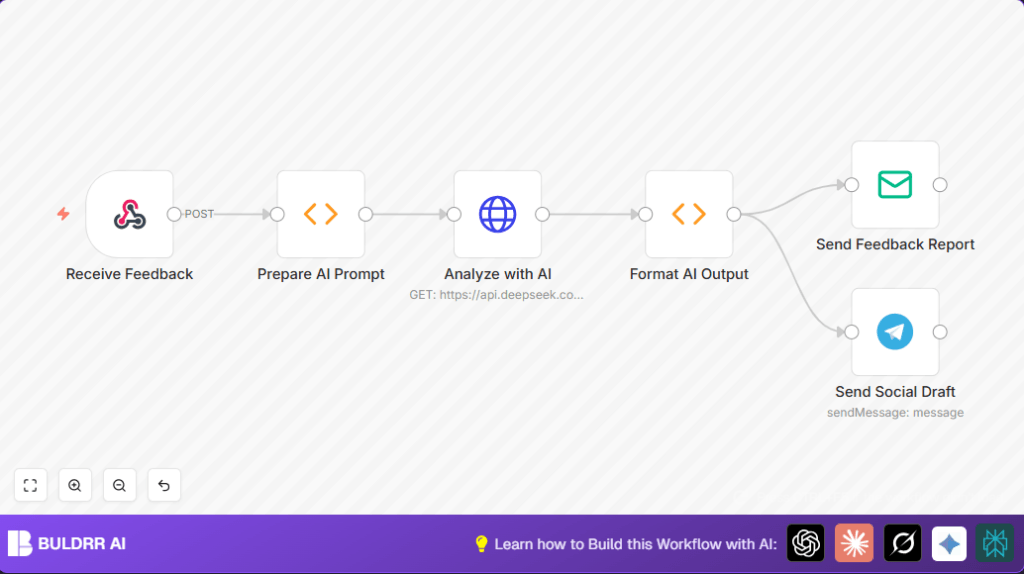

What This Workflow Does
This workflow gets client feedback from a web request and uses AI to analyze it quickly.
A summary of good points and improvements is made.
Also, it creates a short social media post draft.
The workflow then emails the summary to the team and sends the post draft to Telegram.
This saves hours of manual work reading feedback.
Input is client feedback sent as a POST request.
Processing includes building an AI prompt, calling an AI service, and splitting the AI output.
Output is an email report and a Telegram message.
Who Should Use This Workflow
This workflow fits people who handle many client feedback messages weekly.
It helps customer experience managers, marketing teams, or anyone who wants to quickly get insights from feedback.
Users who want to avoid manual reading and save time will benefit.
Tools and Services Used
- n8n Workflow Automation: Runs the nodes and connections.
- HTTP Webhook node: Receives client feedback via POST.
- Function node: Prepares AI prompt and formats AI output.
- HTTP Request node: Calls AI API (DeepSeek or similar).
- Email Send node: Sends the feedback summary to the team.
- Telegram node: Sends social media draft to Telegram chat.
Also needs configured accounts for AI API, email SMTP, and Telegram bot.
Beginner Step-by-Step: How To Use This Workflow in Production
Step 1: Import the Workflow
- Download the workflow file from the provided Download button.
- In the n8n Editor, click the top-right menu.
- Select “Import from File” and upload the downloaded workflow.
Step 2: Configure Credentials and Settings
- Add your AI API credentials in the Analyze with AI
- Set your email account in the Send Feedback Report node.
- Update the Telegram Bot token and Chat ID in the Send Social Draft node.
- If needed, change email addresses, chat IDs, or URLs inside nodes.
Step 3: Run a Test
- Manually send a POST request to the webhook URL with JSON containing a “feedback” field.
- Check the results in the Email and Telegram outputs.
Step 4: Activate the Workflow
- Turn on the active toggle in the n8n editor to run this in production.
- Monitor workflow executions periodically for errors.
If using self-host n8n instead of cloud, verify server setup and credentials for reliability.
See self-host n8n resources.
Inputs, Processing, and Outputs Explained
Inputs
The only input is client feedback sent as a JSON POST request to the webhook URL.
The key JSON field to provide is “feedback” with the feedback text.
Processing
- The Webhook node gets the feedback.
- The Prepare AI Prompt Function node extracts the feedback text and builds a prompt asking AI for a summary, suggestions, and social post.
- The Analyze with AI HTTP Request node sends the prompt to DeepSeek or another AI API.
- The Format AI Output Function node splits the AI text into a summary report and a social media post.
Outputs
- The Send Feedback Report Email node sends the summary to the internal team.
- The Send Social Draft Telegram node sends the social media draft to a Telegram chat.
Customization Ideas
- Add more feedback categories by changing the AI prompt in the Prepare AI Prompt node.
- Switch AI services by adjusting the HTTP Request node with new API URL and keys.
- Replace the Email Send node with Slack or other messaging tool.
- Improve Telegram messages by adding inline keyboards for approvals.
Troubleshooting Common Issues
- If the workflow does not start, check the Webhook node for correct POST method and exact path.
- If the AI API returns errors or empty output, verify API Key and JSON body format.
- If emails fail to send, double-check SMTP credentials and email settings.
- If Telegram messages do not appear, confirm Bot Token and Chat ID are correct.
Pre-Production Validation
- Send sample POST JSON with a “feedback” field to test webhook triggering.
- Check AI response format matches the parsing logic.
- Verify emails deliver correctly with proper formatting.
- Send Telegram test messages to confirm chat permissions.
- Export backup of the workflow before live use.
Conclusion
This workflow quickly turns client feedback into clear insights.
It summarizes positives, lists improvements, and drafts social posts automatically.
It saves near 5 hours weekly by cutting manual reading.
You get faster team updates and quicker social media content ready.
Try extending it with CRM tagging or scheduling posts.
Code and Prompt Examples
Here is the code used in the Prepare AI Prompt node to build the AI request:
const feedback = $json.feedback || "No feedback provided.";
return [{
  json: {
    prompt: `Analyze this client feedback: "${feedback}"

1. Summarize the positive points.
2. Suggest improvements.
3. Generate a short social media post based on the positive elements.`
  }
}];
It pulls “feedback” field and structures a simple three-part prompt for AI.
Next, the Format AI Output node splits AI reply text:
const output = $json.response || $json.choices?.[0]?.text || "No AI output.";
const splitIndex = output.indexOf("3.");
let summary = output;
let post = "No post generated.";

if (splitIndex !== -1) {
  summary = output.substring(0, splitIndex).trim();
  post = output.substring(splitIndex).replace(/^3\./, "").trim();
}

return [{
  json: {
    report: summary,
    post: post
  }
}];
This divides numbered AI responses into report and post segments.
Sample Webhook Test JSON
Use this JSON in your HTTP POST request to test the webhook:
{
  "feedback": "The client loved the quick response and creative ideas but wants better reporting features."
}
This triggers the full workflow and AI analysis.
Summary of Benefits and Results
→ Get fast, clear feedback summaries and suggestions.
→ Save about 5 hours weekly from manual reading.
→ Create social media drafts directly from feedback.
→ Deliver updates to team by email instantly.
→ Share social post drafts on Telegram quickly.
