

What This Automation Does
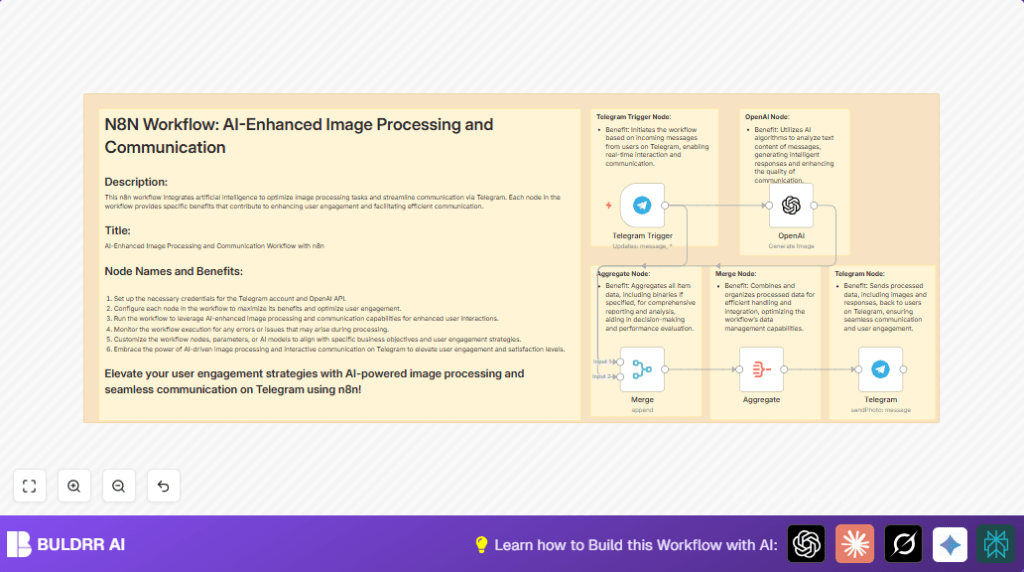
This workflow listens to Telegram messages with image prompts. It sends those prompts to OpenAI’s image generation API. Then it collects the image files and sends them back to the right Telegram user as photos. This stops manual work and speeds up image replies in chats.
The user just sends a text, and the AI replies with the picture fast. Everything happens automatically inside n8n without needing extra steps.
Who Should Use This Workflow
This is for Telegram community managers or group admins who get many requests for AI images. It helps if many people ask for pictures from text prompts.
It works well for anyone wanting to give instant AI art replies to Telegram users without manual delays.
Tools and Services Used
- Telegram Bot API: Receives user messages.
- OpenAI API: Generates images from text prompts.
- n8n Workflow Automation: Connects Telegram and OpenAI, processes data.
- Optional hosting: Self-host n8n if preferred, see self-host n8n.
Inputs, Processing Steps, Output
Inputs
- Text messages from Telegram users with image description prompts.
Processing Steps
- The Telegram Trigger node catches incoming messages.
- The OpenAI node sends prompt text to image generation API.
- The Merge node joins AI image data and original Telegram message info.
- The Aggregate node collects all relevant data, including images.
- The Telegram node sends image back as a photo to the user.
Output
- AI-created images delivered directly to Telegram user chats.
Beginner Step-by-Step: How to Use This Workflow in Production
1. Import the Workflow
- Download the workflow file using the Download button on this page.
- Open n8n editor and choose “Import from File”.
- Select the downloaded workflow file to import.
2. Add Credentials and API Keys
- Configure Telegram Bot API credentials with the bot token.
- Enter OpenAI API key with permission for image generation.
- Check and update any IDs, like chat IDs, if needed.
3. Test the Workflow
- Send a text message prompt to the Telegram bot.
- Watch the workflow activate and reply with an image.
4. Activate for Production
- Turn the workflow switch to “Active” in n8n.
- Monitor live executions for errors and correct setup.
This simple setup lets you start quickly without building from scratch. Configuring keys and testing are the main work.
Customization Ideas
- Change the OpenAI prompt text to guide styles (e.g., “Draw a cartoon version of ” + user text).
- Listen only for certain words or commands to avoid generating images all the time.
- Save returned images to Google Drive or AWS S3 for records.
- Ask users for feedback after image delivery using extra Telegram messages.
Troubleshooting
- OpenAI node has no response: Check API key and internet connection.
- chatId is missing: Verify the expression path for user ID matches input data.
- Images not sending: Confirm Aggregate node has “includeBinaries” enabled.
Pre-Production Checklist
- Test Telegram API credentials for bot and group access.
- Verify OpenAI API key specifically allows image generation.
- Send test messages to confirm workflow triggers and replies.
- Check image delivery to correct Telegram user chats.
- Review all expressions and mappings for proper data flow.
Deployment Notes
After activating the workflow, monitor execution logs inside n8n. Fix any errors fast to keep the bot stable.
Optionally set alerts for errors through email or other channels to catch failures early.
Summary of Benefits
✓ Saves hours of manual image creating work
✓ Automates replies in Telegram chats fast
✓ Supports many simultaneous users naturally
✓ Easy to customize for different prompt styles
✓ Makes Telegram groups more active and fun with AI art
