

What this workflow does
This workflow automates chat replies using AI models that remember past messages and think carefully before answering.
It solves the problem of slow, inconsistent manual chat replies by using AI to keep conversation history and reason over it, producing fast and accurate answers.
The result is an always-ready chat assistant that handles conversations with context, reducing time and effort in customer support.
Tools and services used
- n8n LangChain Nodes: For AI integration and workflow steps.
- DeepSeek API: Provides reasoning AI models named deepseek-reasoner and others.
- Ollama Local Model (optional): Runs AI reasoning models locally as fallback or enhancement.
- HTTP Request Nodes: For direct API calls using raw and structured JSON bodies.
Who should use this workflow
This workflow fits teams or managers wanting to automate chat replies with AI that remembers recent talk.
It works for those who want to reduce manual typing, keep conversation details alive, and improve reply quality without coding.
How this workflow works (Inputs → Processing → Outputs)
Inputs
- Chat messages received via a webhook trigger from chat applications.
Processing Steps
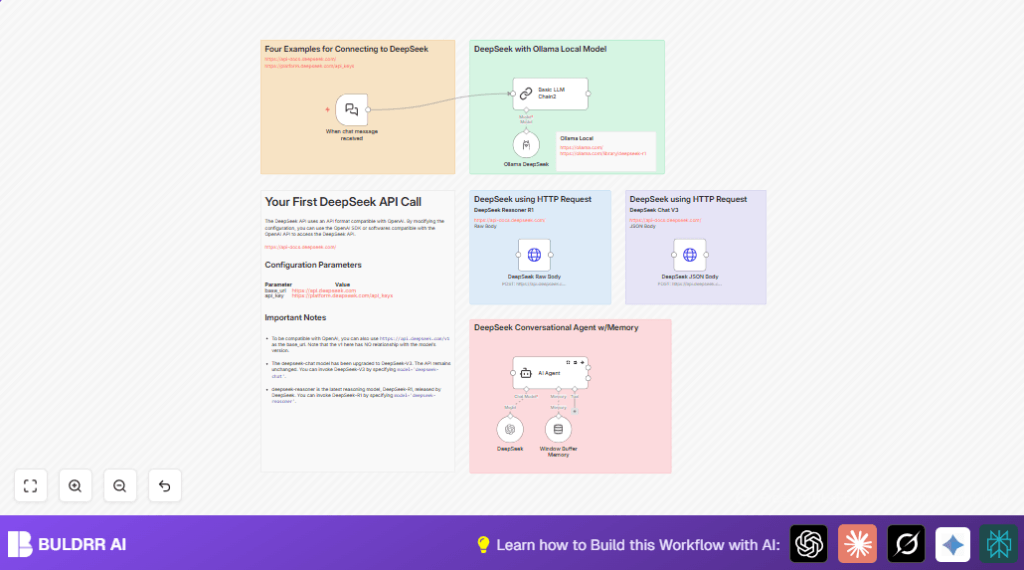
- The Chat Trigger (LangChain) node starts the workflow when a message comes in.
- The Basic LLM Chain node sets a simple AI assistant context with a system message.
- The DeepSeek node runs the deepseek-reasoner model to generate thoughtful answers.
- The Window Buffer Memory node holds recent chat history to keep AI context accurate.
- The AI Agent node combines AI reasoning and memory, managing the conversation flow with retries on failure.
- Optionally, the Ollama DeepSeek node runs a local AI model deepseek-r1:14b to support or extend reasoning ability.
- Two HTTP Request nodes send raw and structured JSON requests directly to the DeepSeek API for flexibility and fallback.
Outputs
- AI-generated chat replies based on recent history and reasoning models.
- Automated, context-aware conversation responses that save manual effort.
Beginner step-by-step: How to use this workflow in n8n
Importing the workflow
- Download the workflow file from this page using the Download button.
- Open the n8n editor and go to “Import from File” to upload the workflow JSON.
Configuration
- Add your DeepSeek API Key to the DeepSeek node’s credentials section.
- If using Ollama, add your local API credentials to the Ollama DeepSeek node.
- Check and update any IDs, emails, channels, or folders if your production environment needs it.
Testing and activation
- Send a test chat message to the webhook URL generated by the Chat Trigger node.
- Watch the workflow run to confirm the AI agent produces a reasonable reply.
- Activate the workflow by toggling it active in n8n to deploy for real chat interactions.
- If self-hosting n8n, ensure the webhook URL is publicly reachable; see self-host n8n for help.
Customization ideas
- Change the DeepSeek node’s
modelparameter to try other AI models like deepseek-chat or deepseek-davinci. - Adjust the sliding window size in the Window Buffer Memory node to keep shorter or longer chat history.
- Add more AI nodes for multi-model reasoning or fallback layers from other services such as OpenAI or Ollama.
- Edit system messages inside Basic LLM Chain and AI Agent nodes to control the assistant’s tone or instructions.
- Enhance error handling by connecting AI Agent node failure events to notification nodes like Slack or email for monitoring.
Handling errors and common issues
Authentication failed on HTTP Request nodes
Check the DeepSeek API Key is entered correctly in HTTP header authentication.
Test API access with tools like Postman to confirm credentials work.
Empty or wrong AI output from DeepSeek node
Make sure the chat input message is properly passed and formatted without extra spaces.
Use n8n debug logs to inspect what input the node receives.
Workflow not triggering on chat message
The webhook URL must be publicly accessible.
Test webhook reachability with external tools like webhook.site before sending chat input.
Summary of benefits
✓ Saves time by automating chat responses with AI reasoning and memory.
✓ Maintains conversation context for accurate and consistent replies.
✓ Uses multiple ways to call DeepSeek API for flexible operation.
✓ Makes chat support smoother with retry logic and error handling.
✓ Easy to customize AI models, memory size, and system messages.
