

What This Automation Does
This workflow listens for new Telegram messages and uses them to create AI-generated pictures automatically.
It solves the problem of spending too much time replying with images manually.
When a user sends a text, the workflow makes a matching image and sends it back right away.
The result is instant, personalized picture replies that keep the chat active.
Who Should Use This Workflow
This is perfect for Telegram group managers or community admins who want to save time.
People who want fast, automatic image replies without searching or delays will find it useful.
Tools and Services Used
- Telegram Bot API: Receives user messages.
- OpenAI Image Generation API: Creates images from text prompts.
- n8n Workflow Automation Platform: Connects Telegram with OpenAI to automate image replies.
How the Workflow Works
Input
- New text messages sent to Telegram bot by users.
Processing Steps
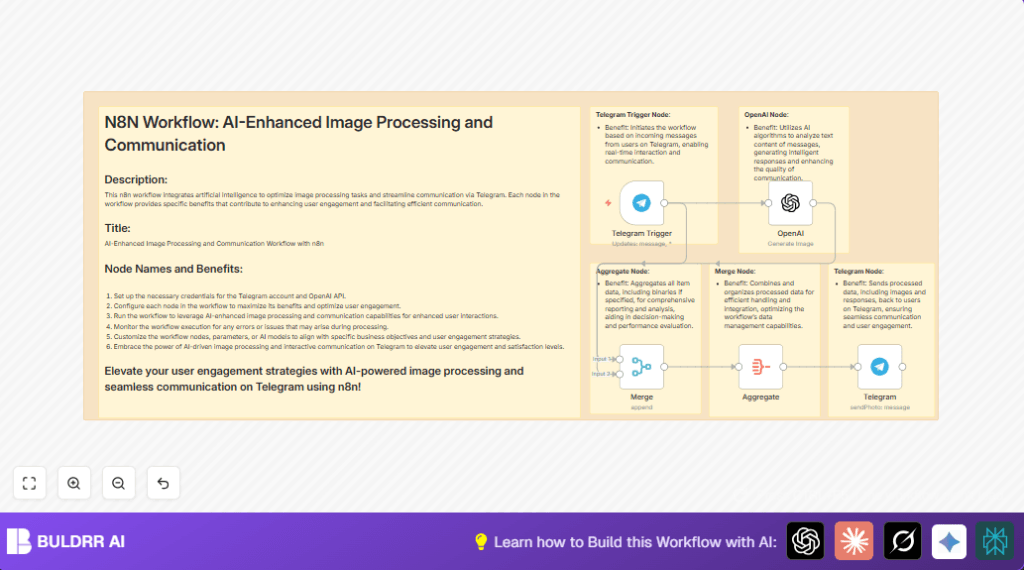
- Telegram Trigger starts when a new message arrives.
- OpenAI node receives the text prompt to generate an image.
- Merge node combines Telegram user data with the image response.
- Aggregate node ensures the image binary data is kept intact.
- Telegram node sends the generated image back to the original sender.
Output
- Telegram user receives an AI-created image reply fast.
Beginner Step-by-Step: How to Use This Workflow in n8n
Import the Workflow
- Download the workflow file using the Download button on this page.
- Open n8n editor and click “Import from File.”
- Select and upload the downloaded workflow file.
Configure Credentials
- Add Telegram bot credentials with API keys and permissions.
- Add OpenAI API Key with image generation access.
Adjust Parameters If Needed
- Update chat IDs, email, channel names, or database details if used.
- Check the OpenAI prompt expression for correctness:
= {{$json.message.text}}
Test and Activate
- Run the workflow in test mode by sending a message to the Telegram bot.
- Verify an AI-generated image returns quickly.
- Activate the workflow to make it work 24/7.
- Monitor logs for errors or failed calls.
For self hosting options, consider checking self-host n8n resources.
Inputs, Processing, and Outputs
Inputs
- Telegram Bot receives text messages from users in real time.
Processing
- OpenAI takes message text and generates related images.
- Merge node aligns user info and AI results.
- Aggregate node safely keeps image data in workflow.
Outputs
- Telegram Bot sends AI image back to the user’s chat.
Common Failures and Troubleshooting
No Image Generated or Empty OpenAI Response
Cause: Wrong prompt mapping or wrong OpenAI resource setting.
Fix: Check the OpenAI node uses this expression:
= {{$json.message.text}}And ensure resource is set to “image”.
Telegram Message Not Sent or Wrong Chat ID
Cause: Chat ID is hardcoded or mapped incorrectly.
Fix: Use expression:
= {{$json.data[1].message.from.id}}To dynamically pick user’s chat ID.
Customization Ideas
- Change OpenAI prompt to add descriptive words, for example: “Draw a beautiful …” before passing user text.
- Add a filter node to let only specific keyword messages generate images.
- Change Telegram node operation to send videos or documents with proper binary data.
- Add captions to images using Telegram additional fields.
- Log messages and image links into a database or Google Sheets for tracking.
Pre-Production Checklist
- Make sure Telegram bot API credentials have rights to read and send messages.
- Verify the OpenAI API key works and has access to create images.
- Send test messages to confirm webhook triggers the flow.
- Confirm Merge node combines Telegram and OpenAI data correctly.
- Check that binary image data is included and sent by the Telegram node.
Deployment Guide
Activate the workflow after confirming tests.
Watch the execution logs to catch errors.
To support scale, set alerts for failures.
Monitor OpenAI API usage to stay within limits.
For hosting on a private server, see self-host n8n.
Summary
✓ Automatically create AI images from Telegram messages.
✓ Save time by removing manual image searches.
✓ Give quick, tailored replies to users.
✓ Keep Telegram groups more lively and engaged.
✓ Easy to run with Telegram Trigger and OpenAI nodes in n8n.
