
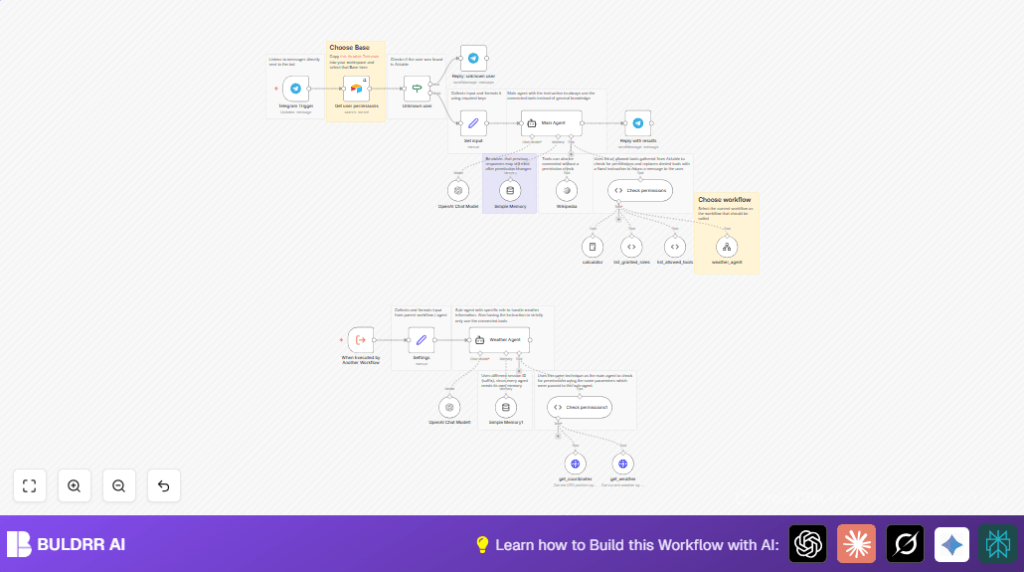

What This Automation Does
This workflow controls who can use AI tools through Telegram. It stops people without permission from using certain tools. It checks user rights from Airtable and only allows allowed AI functions. People who are not allowed get clear messages telling them to ask their boss.
The workflow listens to Telegram messages from confirmed users. It looks up their roles and allowed tools in Airtable. Then it changes AI tools used by the session. Tools not allowed are turned off with a “not authorized” reply. User input goes to a smart assistant using only allowed tools. The workflow handles special tasks like weather info with a smaller, restricted agent. This system saves time by managing tool access automatically and stops mistakes.
Tools and Services Used
- Telegram Bot API: Receives and sends user messages.
- Airtable: Stores user roles and tool permissions.
- OpenAI API: Runs AI agents responding to user queries.
- n8n Platform: Automates the workflow; includes Langchain, Airtable, Telegram nodes.
- HTTP Request Nodes: Used by sub-agents for external data like weather.
Workflow Inputs, Processing, and Outputs
Inputs
- User messages sent to Telegram Bot.
- Usernames extracted from Telegram messages.
- Permissions data (roles, allowed tools) queried from Airtable.
Processing Steps
- Telegram Trigger captures incoming messages.
- Airtable node fetches user permissions by username.
- If node checks if user data exists.
- Unauthorized users receive a Telegram message denying access.
- Set node formats permissions data for use.
- Code node overrides unauthorized tools with a fixed message.
- Agent nodes process user input using only allowed AI tools.
- Memory nodes keep session context based on Telegram user ID.
- Outputs sent back through Telegram node to user chat.
Outputs
- AI assistant replies in Telegram chat tailored by user permissions.
- Messages denying access if tools or users are unauthorized.
Beginner Step-by-Step: How to Use This Workflow in n8n Production
Step 1: Import the Workflow
- Download the workflow file using the Download button on this page.
- Inside the n8n editor, choose “Import from File” to load the downloaded workflow.
Step 2: Configure Credentials and Settings
- Add your Telegram Bot API Key in the credentials section of the Telegram Trigger and Telegram reply nodes.
- Enter OpenAI API Key in relevant Agent nodes.
- Update Airtable Base ID, Table name, and API Key in the Airtable node to match your Airtable setup.
- Make sure Airtable fields for username, roles, and allowed tools exist and are named correctly.
Step 3: Review Code and Prompt Nodes
- Check the Code node named “Check permissions” for correct tool names matching your Airtable list.
- Look at text prompts in Agent nodes to customize messages if needed.
Step 4: Test the Workflow
- Send test messages in Telegram with authorized and unauthorized usernames.
- Confirm that users get allowed tools only and correct access-denied messages.
Step 5: Activate the Workflow for Production
- Turn the workflow “Active” in n8n to run on all Telegram messages.
- Monitor logs for errors and confirm expected behavior in Telegram responses.
- Consider exploring self-host n8n if hosting on your own server.
Common Problems and How This Workflow Handles Them
- If a Telegram user does not exist in Airtable, the workflow sends a clear “unknown user” reply, stopping further actions.
- If tool permissions are missing or tool names do not match, the Code node disables those tools and replies with “not authorized”.
- If Telegram messages do not trigger the workflow, it often means missing API keys or webhook misconfiguration. The setup must be double-checked in all Telegram nodes.
How to Customize the Workflow
- Change OpenAI models in Agent nodes for better speed or quality.
- Add new AI tools in Langchain nodes, then update Airtable with users allowed to access them.
- Modify Airtable permission fields for more detailed control and update the Code node accordingly.
- Change Telegram reply node messages for richer formats like buttons or images.
- Increase session memory by adjusting Simple Memory node settings or connect to external storage for long sessions.
Summary – What You Get from This Workflow
✓ Controls AI tool access via Telegram commands automatically.
✓ Stops unauthorized users and tools safely.
✓ Saves hours of manual permission checking.
✓ Keeps conversation memory per user.
✓ Supports customizing tools and adding sub-agents.
✓ Works smoothly inside n8n with Airtable permissions.
