
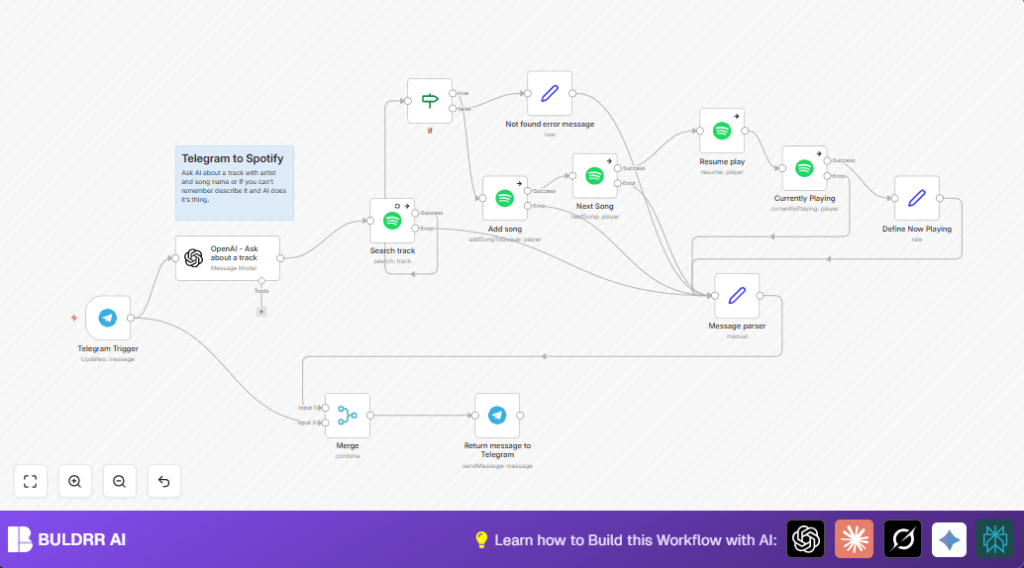

What This Automation Does
This workflow lets you control Spotify using Telegram messages. It solves the problem of switching apps and typing song names wrong. When you send a message in Telegram, it finds the song on Spotify, adds it to your queue, skips to it, and plays it. Then it tells you which song is playing back in Telegram.
The workflow uses AI to understand what song you want, even if you type it badly or describe it roughly. This saves time and stops you from breaking your chat flow to search manually.
Tools and Services Used
- Telegram Bot API: Receives user messages.
- OpenAI (GPT-4o-mini): Extracts artist and track names from messages.
- Spotify API: Searches tracks, controls playback (requires Premium).
- n8n Automation Platform: Runs and connects all nodes.
Beginner Step-by-Step: How to Use This Workflow in n8n
Step 1: Import Workflow
- Download the workflow file using the Download button on this page.
- Inside the n8n editor, click “Import from File” and upload the downloaded workflow.
Step 2: Configure Credentials
- Add your Telegram Bot API credentials in the Telegram Trigger node.
- Add your OpenAI API Key in the OpenAI node.
- Add your Spotify OAuth credentials in all Spotify nodes.
- Check and update any IDs, emails, or channel names if present.
Step 3: Test and Activate
- Run the workflow once by sending a message to your Telegram bot.
- Check if the song correctly adds to Spotify and reply sends back.
- Activate the workflow by turning it on in n8n for production use.
Consider using self-host n8n to run the workflow securely and reliably.
Workflow Inputs, Processing, and Outputs
Inputs
- User sends a text message to Telegram Bot.
Processing Steps
- OpenAI reads the message and extracts artist and track details.
- Spotify nodes search for the track using extracted data.
- If track found, it is added to the queue, then playback is skipped to it.
- If paused, playback resumes.
- Spotify fetches currently playing song details.
- Formatted now playing message is prepared.
Outputs
- Telegram bot replies with current song info.
- If no track found, bot replies with “Song not found” message.
Common Problems and Troubleshooting
- Song not found error:
OpenAI might not extract correct names or Spotify search query can fail.
Check prompt setup and query input. - Spotify resume errors:
Resuming when already playing can cause errors.
This is safe to ignore as the workflow continues. - Telegram Trigger not firing:
Usually caused by missing or invalid Bot API credentials.
Verify Bot setup and credentials inside n8n.
Customization Ideas
- Switch OpenAI model in the node to improve accuracy.
- Add nodes to control pause, previous track, or shuffle functions.
- Update Telegram Trigger to handle multiple users or groups.
- Adjust AI prompt for better understanding or different languages.
Code Example: OpenAI Prompt Template
Use this prompt to extract artist and track names clearly:
=get artist and song name from '{{ $json.message.text }}'. Reply only eg. 'track:song name artist:artist name'This prompt helps OpenAI respond with structured info for Spotify search.
Summary
✓ Sends Telegram messages as song requests to Spotify.
✓ Uses AI to interpret vague or partial song details.
✓ Automatically adds songs to playback and resumes music.
→ Keeps chat and music flow together without app switching.
→ Saves users time searching and typing song information.
