
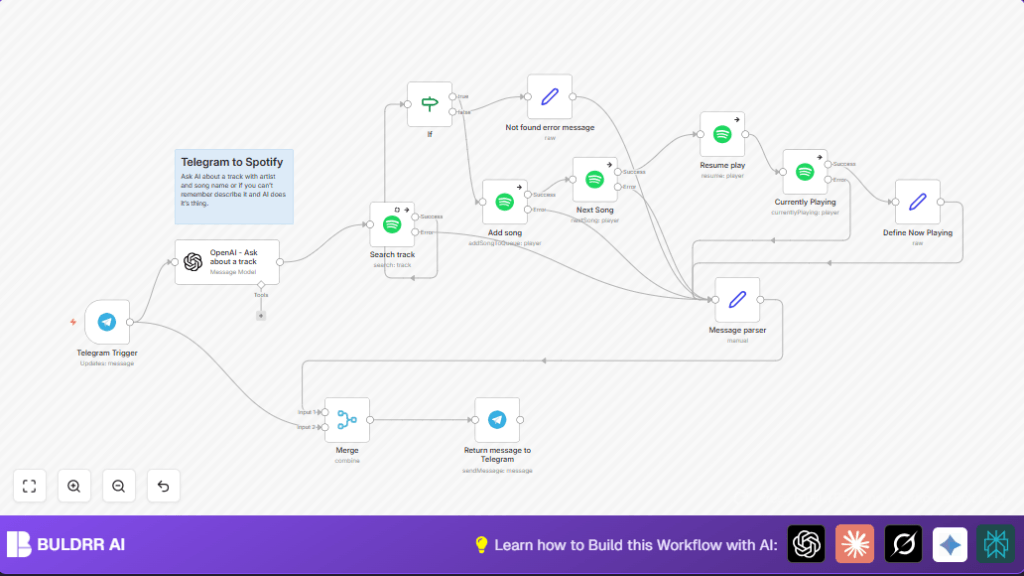

What this workflow does
This workflow listens for messages sent to a Telegram bot with a song description or name.
It uses AI from OpenAI to find the artist and song name from the message.
Then it searches Spotify for that track and adds it to the playback queue.
It also skips to play the added track and sends back a confirmation to Telegram.
This solves the problem of having to manually search and play music on Spotify by typing or speaking in Telegram.
Who should use this workflow
This is good for anyone who uses Spotify and Telegram and wants to control music without leaving a chat app.
It helps users who forget song details or want fast hands-free music control via text.
Tools / services used
- Telegram Bot API: receives messages from users.
- OpenAI GPT-4o-mini: extracts artist and song name from text.
- Spotify API: searches tracks, adds songs to queue, controls playback.
- n8n workflow automation: connects all the steps.
How this workflow works (Inputs → Processing → Output)
Inputs
User sends a message to Telegram bot with a song description or name.
Processing Steps
- Telegram Trigger node catches the new message.
- OpenAI (LangChain) node runs AI to get artist and song name.
- Spotify Search Track node looks up the track with the AI result.
- If a track is found, the workflow adds the song to Spotify queue.
- Spotify Next Song and Resume Play nodes start playback.
- Spotify Currently Playing node fetches current song info.
- Set and Merge nodes build a confirmation message.
- Telegram node sends success or error message back to the user.
Output
A Spotify song is added and played.
Telegram user gets a message showing song playing or an error if not found.
Beginner step-by-step: How to use this workflow in n8n
Importing and Setup
- Download the workflow file using the Download button on this page.
- In the n8n editor, click on “Import from File” and select the downloaded file.
- Open the imported workflow and add your Telegram Bot API credentials in the Telegram Trigger node.
- Add your OpenAI API key to the OpenAI (LangChain) node.
- Add your Spotify OAuth credentials to all Spotify nodes.
- Check any IDs or parameters and update if needed (usually IDs auto-fill from AI or Spotify nodes).
Testing and Activation
- Test the workflow by sending a message to your Telegram bot describing a song.
- See if the workflow adds and plays the song on Spotify and returns a confirmation message.
- If it works, activate the workflow so it runs automatically for all messages.
The workflow is ready to help control Spotify music from Telegram chat.
If using self hosting n8n, refer to self-host n8n for setup support.
Common issues and how to fix
- Spotify add song fails: Check Spotify OAuth tokens are set and valid. Confirm track ID format starts with “spotify:track:”.
- Telegram trigger not firing: Make sure Telegram bot webhook URL is set to the Telegram Bot via BotFather. Confirm bot permissions to read messages.
- OpenAI parsing wrong: Review the AI prompt in OpenAI node. Adjust model to
gpt-4if available for better results.
Ideas to customize
- Switch OpenAI model to stronger one like
gpt-4for better song recognition. - Add voice message support in Telegram and convert speech to text for AI processing.
- Return multiple search results and add several songs for playlist queuing.
- Add language detection or specify language in OpenAI prompt for multilingual users.
- Add controls for pause, shuffle, or repeat using more Spotify nodes triggered by Telegram commands.
Summary
✓ Adds songs to Spotify queue from Telegram chat.
✓ Uses AI to understand song requests from text.
✓ Controls playback without switching apps.
✓ Sends confirmation back on Telegram.
