
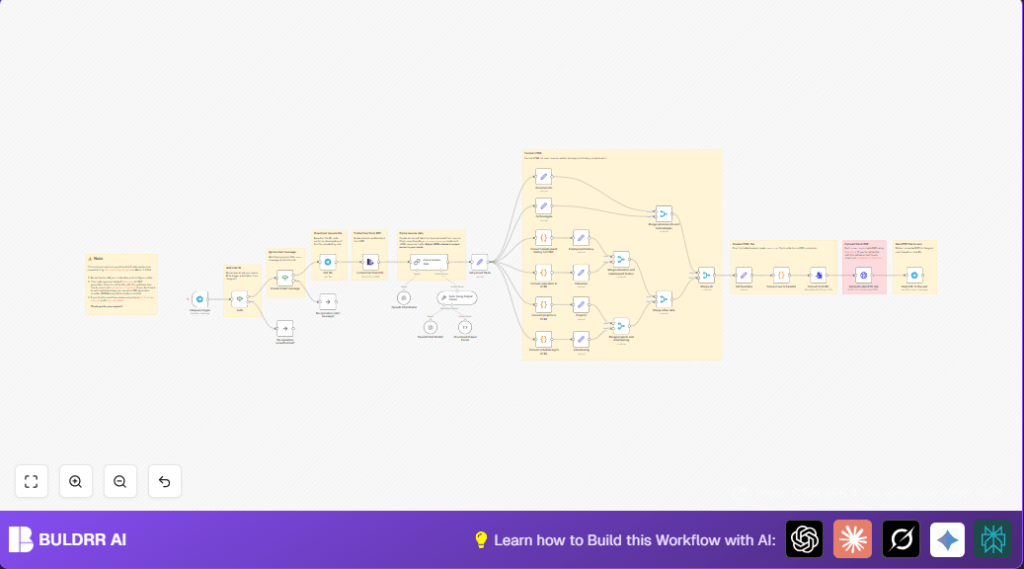

What This Automation Does
This workflow watches for PDF resumes sent to a Telegram bot.
It downloads the PDF, reads the text inside, and uses OpenAI GPT-4 turbo-preview to make that text into structured JSON data.
Then, it turns each part of the JSON data into clear HTML sections.
Finally, it joins all HTML pieces into one document, changes that HTML into a PDF with Gotenberg, and sends the PDF back through Telegram.
Who Should Use This Workflow
This is for recruiters or HR persons who get many resumes by Telegram and want to save time reading and organizing information.
It helps avoid copying info by hand, which is slow and causes errors.
Anyone wanting fast, automatic resume summaries will find it useful.
Tools and Services Used
- Telegram Bot API: Receives user messages.
- n8n Automation Platform: Manages the workflow.
- OpenAI GPT-4 turbo-preview: Parses raw resume text into structured data.
- Gotenberg API: Converts HTML content into a PDF.
Inputs, Processing, and Outputs
Inputs
- PDF resume files sent as documents through Telegram chat.
- Chat ID and file ID data for user identification and file retrieval.
Processing Steps
- Download the PDF file from Telegram servers.
- Extract text from the downloaded PDF file.
- Send raw text to OpenAI GPT-4 turbo-preview to build structured JSON with fields like personal info, jobs, education, projects, volunteering, and skills.
- Transform JSON sections into HTML code for formatted reading.
- Combine all HTML snippets into a single full resume HTML document.
- Encode HTML, convert it to a file, and send it to Gotenberg for PDF transformation.
- Return the finished PDF file back to the user via Telegram.
Outputs
- A neatly formatted PDF resume summary sent to the Telegram user automatically.
Beginner Step-by-Step: How to Use This Workflow in n8n
Importing the Workflow
- Download the workflow file by clicking the Download button on this page.
- Open the n8n editor where you want to use the workflow.
- Choose “Import from File” and select the downloaded workflow JSON file.
Configuration After Import
- Add your Telegram Bot API credentials in the Telegram trigger and Telegram nodes.
- Insert your OpenAI API Key in the Langchain Chat Model node.
- Update the chat ID in the If node named Auth to allow only trusted users.
- Set the URL and port of your Gotenberg server in the HTTP Request node.
- Check any code nodes or prompt inputs for correct values and copy-paste code provided below if needed.
Testing and Activation
- Send a test PDF resume to your Telegram bot to watch the workflow run and confirm the output PDF returns correctly.
- If the PDF comes back formatted, toggle the workflow active in n8n to run it live for all users.
This simple import and setup works well for users already inside the n8n platform.
Using self-host n8n can allow continuous running of this automation on a server or VPS.
Workflow Details: Section-by-Section Explanation
Telegram Trigger and Authorization
Telegram trigger watches messages for PDF file uploads.
An If node checks if the chat ID is on an allowed list.
Messages with /start commands get ignored by another If node.
Download and Extract PDF Text
Telegram node fetches the actual PDF file using file ID.
The Extract text from PDF node changes the PDF into raw plain text.
Parse Text to Structured JSON with OpenAI
Langchain Chat Model node sends the PDF text to GPT-4 turbo-preview.
Using a Structured Output Parser, GPT returns consistent JSON with personal info, jobs, education, skills, and more.
Format Resume Sections into HTML
Code nodes convert employment history, education, projects, and volunteering arrays into styled HTML with bold labels and breaks.
Set nodes create HTML snippets for personal info and technology skills.
Merge and Compile Full HTML Document
Multiple Merge nodes combine HTML from all sections step-by-step into one object.
The final Set node consolidates all HTML into a single output string.
Convert HTML to PDF and Send Back
The final HTML string is base64 encoded in a code node and made into an index.html file in a ConvertToFile node.
An HTTP Request node posts the file to Gotenberg for PDF conversion.
Once the PDF is returned, the Telegram node sends the new PDF resume back to the user’s Telegram chat with a filename based on the candidate’s name.
Customization Ideas
- Expand JSON Fields: Add extra info like certifications or LinkedIn URLs in the Structured Output Parser node.
- Change PDF Service: Swap the Gotenberg HTTP Request node with another PDF API such as PDFMonkey or ApiTemplate.
- Style HTML: Edit JavaScript code nodes to add CSS or special tags for custom resume looks.
- Support Other Languages: Adjust OpenAI prompts to parse resumes in languages besides English.
- Enhance Authorization: Allow multiple chat IDs or load trusted users from files or databases.
Handling Problems and Failures
Extract text from PDF node fails or returns empty text
Cause: PDF may contain scanned images, not text.
Fix: Use OCR software outside this flow to turn images into text first.
OpenAI request exceeds token limit or times out
Cause: Resume text is too long.
Fix: Split or shorten text in a prior step before sending to OpenAI.
Gotenberg HTTP request fails or no response
Cause: Gotenberg server offline or wrong URL.
Fix: Check Gotenberg server status and correct URL/port in HTTP Request node.
Pre-Production Checklist
- Check Telegram bot token and allowed chat IDs are correct in nodes.
- Test sending PDF resumes through Telegram to confirm trigger and download work.
- Verify OpenAI API Key and temperature settings work well.
- Make sure Gotenberg server replies to a simple HTML-to-PDF request successfully.
- Run a full end-to-end test sending PDF resume and receiving final formatted PDF back.
- Save your n8n workflow JSON file backup before big changes.
Deployment Guide
Turn on the workflow in n8n by switching it active.
Keep the n8n instance running 24/7 to listen for Telegram messages continuously.
Watch for errors and execution logs in n8n dashboard and fix issues as needed.
Monitor the Gotenberg server uptime too if self hosting it.
Use self-host n8n for best continuous operation on a server or VPS.
Summary of Benefits and Results
✓ Saves hours of manual resume reading and copying.
✓ Produces clear and structured PDF summaries quickly.
✓ Reduces errors caused by manual data entry.
✓ Automatically sends finished PDFs back to users in Telegram.
→ Simplifies resume handling for recruiters.
→ Speeds up candidate screening process.
→ Allows easy automation inside n8n with OpenAI and Gotenberg.
