

What This Workflow Does
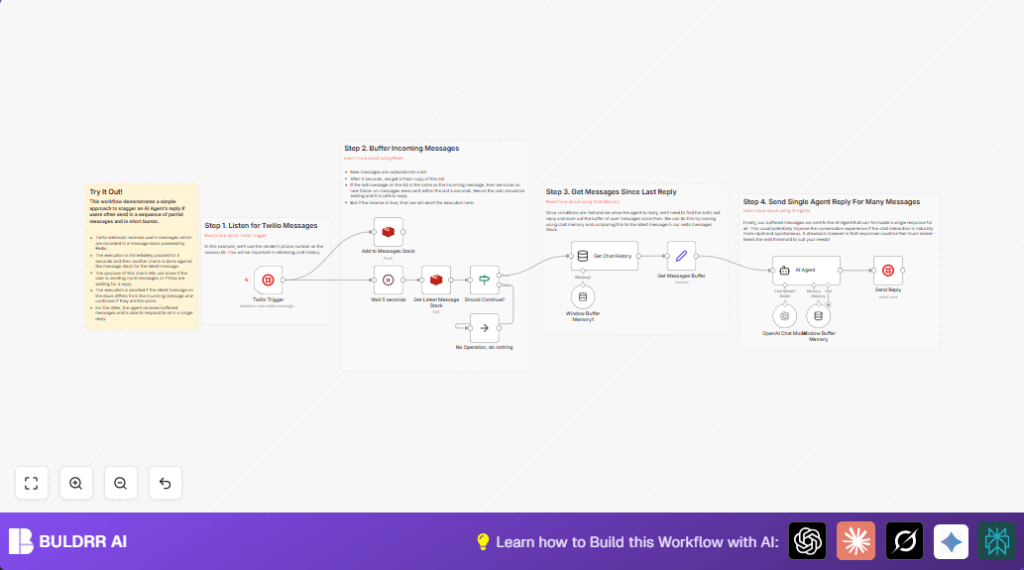
This workflow collects fast SMS messages from users, waits a short time, then sends one clear answer after users stop texting. It solves the problem of bots replying too fast to many quick messages, which can confuse customers. The final AI reply is smarter and easier to understand.
The workflow works with Twilio messages, stores texts in Redis by user, waits 5 seconds to catch quick message sequences, checks if new messages arrived, then sends all recent messages to the AI for one combined response. The answer is sent back by SMS through Twilio.
This helps improve chat flow, reduces confusion from fragmented replies, and saves time by cutting down extra follow-ups.
Tools and Services Used
- Twilio: Receives incoming SMS and sends SMS replies.
- Redis: Stores message stacks keyed by sender phone number.
- OpenAI API: Generates AI-powered replies from buffered user messages.
- n8n Automation Platform: Orchestrates the workflow nodes and controls execution flow.
Inputs, Processing, and Outputs
Inputs
- Incoming SMS messages via Twilio webhook.
- Sender’s phone number (used as key).
Processing Steps
- Push each incoming message to a Redis list keyed by the sender’s number.
- Wait 5 seconds to detect additional quick messages.
- Fetch current message list from Redis to check for new entries.
- Use a condition to decide if the workflow should continue—only if sender stopped messaging.
- Retrieve past chat history for context through LangChain.
- Extract and join new messages since last AI reply into one text block.
- Send the combined text to OpenAI AI agent to generate a single response.
- Send the AI reply back to the user by Twilio SMS.
Output
The user receives one neat AI response after pausing their quick SMS messages.
Beginner Step-by-Step: How to Use This Workflow in n8n
Step 1: Import Workflow
- Download the workflow file using the Download button on this page.
- Open n8n editor where you want to run this workflow.
- Click Import from File and select the downloaded workflow file.
Step 2: Configure Credentials and Settings
- Add your Twilio account credentials (API Key, SID, etc.) in the Twilio Trigger and Twilio nodes.
- Add your Redis server credentials in the Redis nodes.
- Add your OpenAI API Key in the LangChain AI Agent and Memory Manager nodes.
- If needed, update phone numbers, Redis key namespace, or AI model settings.
Step 3: Test the Workflow
- Send a test SMS to your Twilio phone number.
- Watch the workflow run in n8n to confirm messages are added and delayed replies generate.
- Check that AI reply is sent back as a single message.
Step 4: Activate for Production
- Once testing is successful, activate the workflow by toggling the switch in n8n.
- Make sure the Twilio webhook URL is live and linked to your Twilio number.
Note: For better control and privacy, consider self-host n8n on a server before production.
Customization Ideas
- Change the wait time from 5 seconds to a shorter or longer interval to match user texting speed.
- Use a different Redis key prefix to better organize multiple chat buffers.
- Switch the AI model in LangChain nodes to a newer or more suitable version like GPT-4 for better answers.
- Add a logging node after sending replies to keep records for audits.
Edge Cases and Troubleshooting
- Workflow stops after waiting: Check if Redis server is reachable and credentials are correct. Increase webhook timeout in n8n if necessary.
- AI replies immediately, ignoring buffering: Verify the If node logic and Redis key usage are correct and consistent.
- Messages get mixed up between different users: Confirm Redis keys use sender phone numbers dynamically like
chat-buffer:{{ $json.From }}.
Summary
✓ Inputs: Incoming SMS messages once per text via Twilio webhook.
✓ Processing: Buffer messages per user in Redis, wait 5 seconds, check for new messages, then combine texts to send to AI.
✓ Output: One unified AI reply sent back to user SMS.
→ Result: Avoids fragmented bot replies and improves chat clarity.
→ Saves time by cutting down repeated AI calls and manual fixes.
→ Gives better customer experience with clear conversations.
