
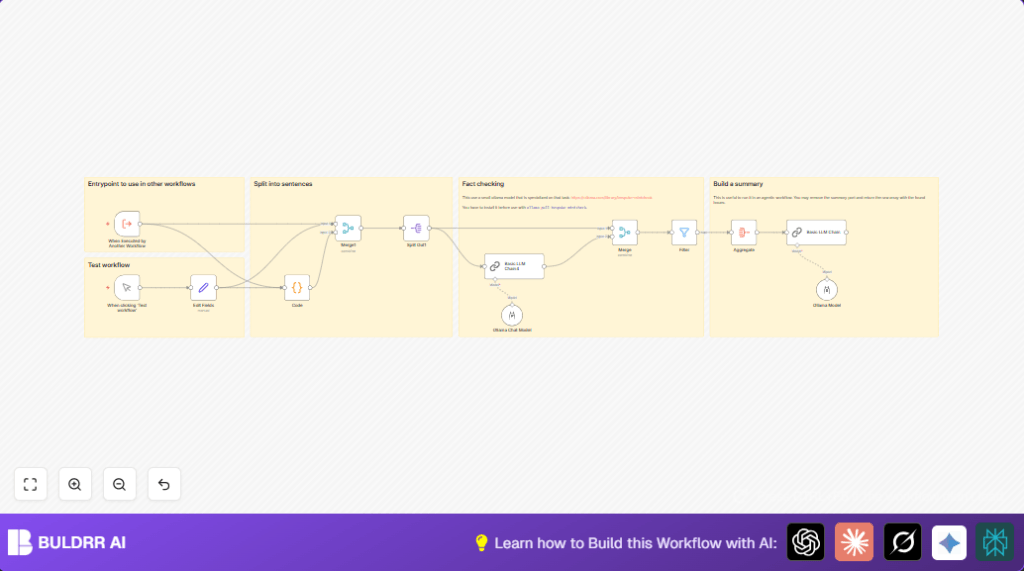

What this workflow does
This workflow breaks down long articles into sentences, checks each sentence against known facts using an AI model, and finds which sentences are wrong.
It helps editors save time and avoid mistakes by showing incorrect parts clearly.
The workflow outputs a list of sentences that are false and a summary of errors, so users can fix articles faster.
Who should use this workflow
Editors who must verify many facts quickly in long texts can use this workflow.
People who want less human error and faster review in magazines or online media will find it helpful.
Tools and services used
- n8n automation platform: Runs the workflow flows visually.
- Ollama AI service: Special AI model runs fact checks on sentences.
- JavaScript code node: Splits text into sentences while protecting dates and lists.
Inputs, processing steps, and outputs
Inputs
- Full article text to check.
- Verified fact document to compare claims.
Processing steps
- Split text into clean sentences using code node.
- Separate sentences to process each individually.
- Combine each sentence with the same facts context.
- Use AI in the Ollama node to mark sentences as true or false.
- Filter out sentences marked true, keep only incorrect ones.
- Aggregate wrong sentences together.
- Run a summary via a language model to explain errors.
Outputs
- List of incorrect sentences.
- Summary report of errors found.
Beginner step-by-step: How to use this workflow in n8n production
Download and import
- Click the Download button to get the workflow file.
- Inside the n8n editor, choose “Import from File.”
- Select the downloaded workflow file to load it.
Configure credentials and settings
- Add Ollama API Key credentials in n8n’s Credential Manager.
- Check if the Edit Fields node has your article text and facts filled.
- Update any IDs, emails, or folder names if your use case needs them.
- Make sure the Ollama AI model “bespoke-minicheck” is installed locally if running self-hosted (see linked self-host n8n).
Test and activate
- Run the workflow once manually to check everything works.
- Verify the output shows incorrect sentences clearly.
- Activate the workflow to run automatically or by trigger as fits your editor’s process.
- Adjust input text and facts as needed for new articles.
Details on sentence splitting code
The Code node uses JavaScript that splits on sentence ends (like “.” or “?”) but protects dates such as “12. März 2023” not to split inside these.
This splitting creates smaller chunks that AI checks better and faster.
// Get the input text
const text = $input.item.json.text;

if (!text) {
 throw new Error('Input text is empty');
}

function splitIntoSentences(text) {
 const monthNames = '(?:Januar|Februar|März|April|Mai|Juni|Juli|August|September|Oktober|November|Dezember)';
 const datePattern = `(?:\d{1,2}\.\s*(?:${monthNames}|\d{1,2}\.)\s*\d{2,4})`;
 const regex = new RegExp(`(?<=[.!?])\s+(?=[A-ZÄÖÜ]|$)(?!${datePattern}|\s*[-•]\s)`, 'g');
 return text.split(regex).map(sentence => sentence.trim()).filter(sentence => sentence !== '');
}

const sentences = splitIntoSentences(text);
return { json: { sentences: sentences } };
Customizations and typical fixes
- Change the facts in Edit Fields node to suit other topics like health or finance.
- Adjust the month names regex to handle other languages requests in the Code node.
- Try different AI models by updating the credentials and model name in the Ollama Chat Model node.
- If seeing “Input text is empty” error, check the facts and text inputs are not blank in Edit Fields node.
- For API errors, verify the Ollama API Key is correctly added in n8n credentials.
Best practices before production
- Use trusted, accurate facts data to compare against.
- Run a single sentence test with Ollama node to confirm API access.
- Validate the sentence splitting works without errors on sample texts.
- Check that only sentences marked “No” (wrong) pass the filter node.
- Test entire workflow using manual trigger before scheduling or deploying.
Deployment
Activate the workflow in n8n after confirming tests pass.
Run it on new articles before publishing for faster, automated fact-checking.
Monitor logs for errors especially from AI responses.
Summary of results
✓ Saves hours of manual review
✓ Highlights only wrong sentences
✓ Produces clear error summaries
→ Faster, safer publishing decisions
