
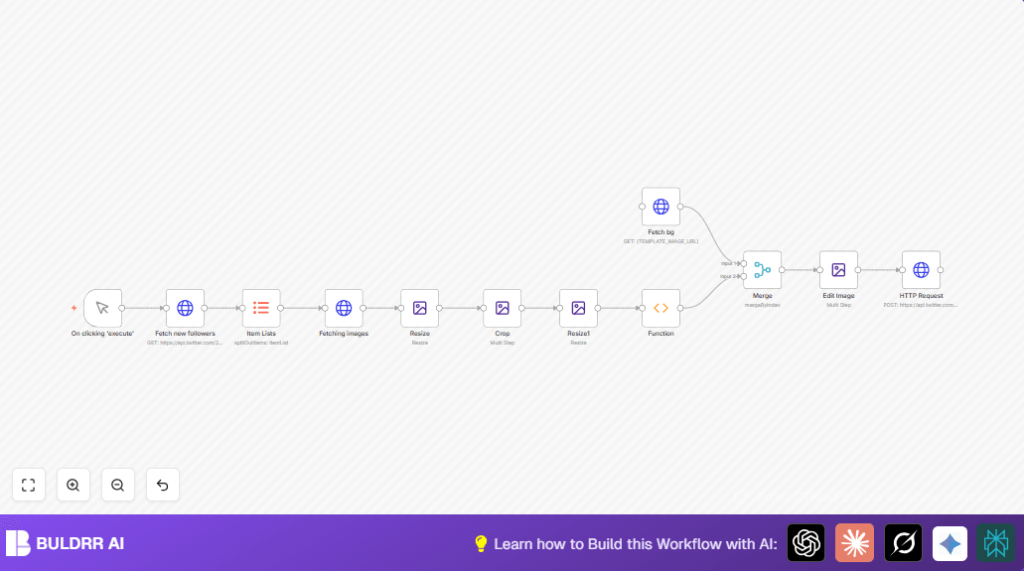

What this workflow does
This workflow finds the newest 3 followers on Twitter.
It downloads their profile pictures, changes them to circles, and puts them on a banner.
Then it updates the Twitter profile banner automatically.
This saves time and prevents mistakes in manual work.
Tools and services used
- Twitter API v2: To get the list of newest followers and their images.
- Twitter API v1.1 with OAuth 1.0: To update the profile banner with the new image.
- n8n automation platform: For automating the workflow steps.
- Edit Image node in n8n: To resize, crop, and composite images.
- HTTP Request node in n8n: To fetch data and images via URLs.
Inputs, processing, and output
Inputs
- Twitter Bearer Token for authorization to read followers.
- Twitter OAuth1 credentials for writing banner updates.
- User Twitter ID number for API calls.
- Background banner image URL.
Processing steps
- Fetch 3 newest Twitter followers using API v2 with Bearer Token.
- Split the array of followers into separate items.
- Download each follower’s high-res profile image (400×400).
- Resize images to 200×200 pixels.
- Crop images into circles with transparent backgrounds.
- Scale circle avatars down to 75×75 pixels.
- Collect avatars into one item with multiple binaries.
- Download the banner background image.
- Merge avatars and background image by index.
- Composite the avatars side-by-side on the banner at set coordinates.
- Upload the new banner image as profile banner using OAuth1 HTTP POST.
Output
A new Twitter profile banner image showing latest 3 followers’ avatars on background.
Who should use this workflow
Social media managers who want to show appreciation to new Twitter followers.
Teams saving hours by avoiding manual image editing and uploading.
Anyone who wants an updated, engaging profile banner without errors or delay.
Beginner step-by-step: How to use this workflow in n8n production
1. Download and import the workflow
- Click the Download button on this page to save the workflow file.
- Inside your n8n editor, use the “Import from File” option to load the workflow.
2. Configure credentials
- Add Twitter Bearer Token credentials in the HTTP Request node named Fetch new followers.
- Set Twitter OAuth1 credentials (key, secret, token, token secret) in the HTTP Request node that updates the banner.
3. Update IDs and URLs
- Replace
{YOUR_USER_ID}with your numeric Twitter user ID in the followers fetch node. - Replace
{TEMPLATE_IMAGE_URL}with the URL of your banner background image.
4. Test the workflow
- Click the manual trigger node On clicking ‘execute’ then hit Execute to run the workflow.
- Check the logs and preview node outputs to make sure images download and process correctly.
5. Activate for production
- After successful tests, activate the workflow by turning on the toggle switch.
- Optionally replace the manual trigger with a Cron trigger to run automatically.
- Monitor workflow runs and errors in the n8n dashboard.
You do not need deep coding or building knowledge. Just import, set keys, update IDs, test, and activate.
If self-hosting n8n, check out self-host n8n for help.
Customization ideas
- Change
max_resultsin the fetch followers node to show more or fewer followers. - Use a different background banner image by updating the URL.
- Adjust avatar positions in the composite node to fit different banner sizes.
- Change the size of circular avatars by modifying the crop and resize steps.
- Add more image effects by placing extra Edit Image nodes before uploading.
Edge cases and troubleshooting
401 Unauthorized when fetching followers
Cause: Bearer Token might be incorrect or expired.
Solution: Renew token on Twitter and update credentials in n8n.
Banner update fails with OAuth errors
Cause: Wrong OAuth version or expired keys.
Solution: Verify OAuth1 credentials and permissions carefully.
Images do not download or get corrupted
Cause: HTTP Request nodes missing ‘Response Format: File’ or bad network.
Solution: Set correct response format and retry on stable internet.
Summary
✓ Saves hours by automating fetching, editing, and updating Twitter banners.
✓ Eliminates human errors like wrong image sizes or missing updates.
✓ Keeps Twitter profile banner fresh and engaging with latest 3 followers shown.
→ Users get a cleaner workflow with fewer manual steps required.
→ New banner image uploads automatically each run.
