
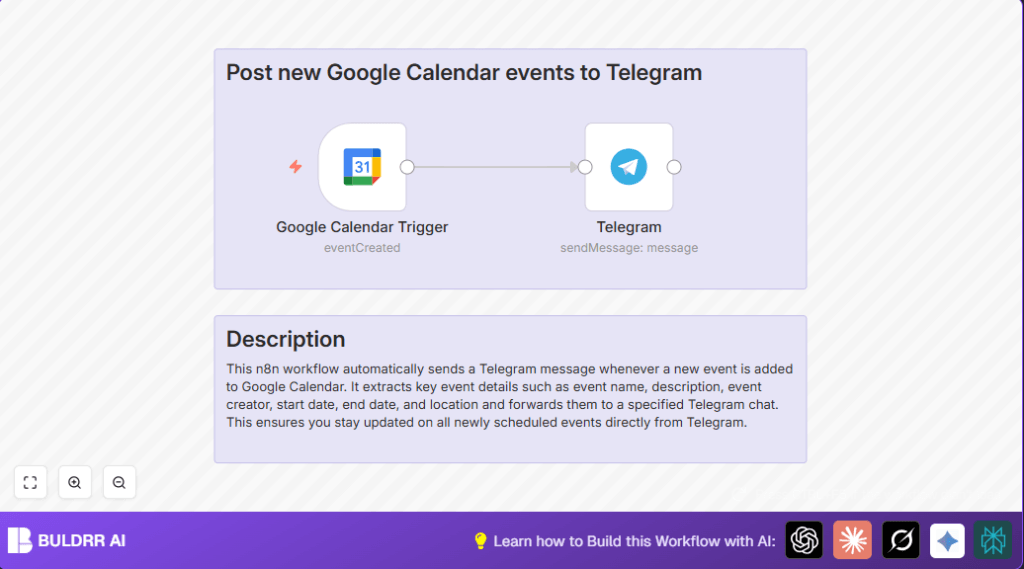

What This Automation Does
This workflow catches new Google Calendar events made by the user and sends their details to a Telegram chat.
It solves the problem of missing new event updates by posting details instantly without checking the calendar app manually.
The user gets quick, clear updates on new meetings directly in Telegram, so no event is missed.
The workflow works by checking Google Calendar every minute for new events.
When one appears, it takes the important info like name, description, time, location, and who created it.
Then it formats the details into a neat message and sends it to a chosen Telegram chat or group.
Who Should Use This Workflow
This is good for anyone managing busy schedules with Google Calendar.
It helps project managers, team leads, or anyone needing fast event alerts in Telegram chat.
Also useful for small groups who want to stay synced on all new meetings.
Tools Used in This Workflow
- Google Calendar API: To watch for new events created.
- Telegram Bot API: To send messages with event details.
- n8n Automation Platform: To connect the calendar and Telegram and run the workflow.
Beginner Step-by-Step: How to Build This Workflow in n8n
Step 1: Import Workflow
- Click the Download button on this page to get the workflow JSON file.
- Open your n8n editor, and select “Import from File” from the menu.
- Choose the downloaded JSON file to upload the workflow.
Step 2: Configure Credentials
- Inside n8n, open the Google Calendar Trigger node.
- Add or select your Google Calendar OAuth2 API Key under credentials.
- Set the correct calendar ID if needed.
- Open the Telegram node.
- Enter your Telegram bot API Key as credentials.
- Put the chat ID of the group or user where messages must go.
Step 3: Test the Workflow
- Save the changes and activate the workflow in test mode.
- Create a new event in Google Calendar being watched.
- Look for the message in Telegram chat confirming the event details.
Step 4: Activate for Production Use
- Toggle the workflow “ON” in n8n to run continuously.
- Make sure n8n is running reliably, eg on self-host n8n or cloud.
Inputs, Processing Steps, and Output Explanation
Inputs
- New event notifications from Google Calendar API triggered every minute.
Processing Steps
- Trigger detects new event created.
- Extract summary (event name), description, start and end times, location, creator email.
- Format extracted details into a Telegram-friendly text message.
Output
- Send message with event details to specified Telegram chat or group.
Customization Ideas
- Change message format in the Telegram node to add emojis or highlight important info.
- Switch calendar ID to track only one calendar if watching multiple is confusing.
- Add event reminder messages before start time using extra delay and Telegram nodes.
- Use Function node to translate event details for teams who speak other languages.
Troubleshooting Common Issues
Problem: No new events show in Telegram.
Cause: Google Calendar credentials missing or wrong calendar ID.
Fix: Recheck the Google Calendar Trigger node credentials and calendar ID.
Problem: Telegram messages fail or never arrive.
Cause: Wrong Telegram bot API key or invalid chat ID.
Fix: Confirm bot API key is correct and test chat ID by messaging bot first.
Pre-Production Checklist
- OAuth credentials for Google Calendar are active and authorized.
- Telegram bot API key and chat ID are set correctly.
- Test at least one event creation to confirm message delivery.
- Workflow is toggled ON and n8n instance runs without errors.
- Keep a backup of the workflow JSON file for restoring if needed.
Deployment Guide
Keep the workflow active so new Google Calendar events get detected and posted to Telegram.
Ensure the n8n instance has steady uptime if running self-host n8n.
Regularly check logs for any failures or errors to fix quickly.
You can extend this automation with alert nodes to get immediate warnings if sending fails.
Summary
✓ Auto-post new Google Calendar events to Telegram
✓ Saves time checking calendars manually
✓ Prevents missing or overlapping meetings
✓ Easy setup and testing inside n8n editor
✓ Clear, quick event details in group or private chat
✓ Can add reminders or translations with extra steps
