
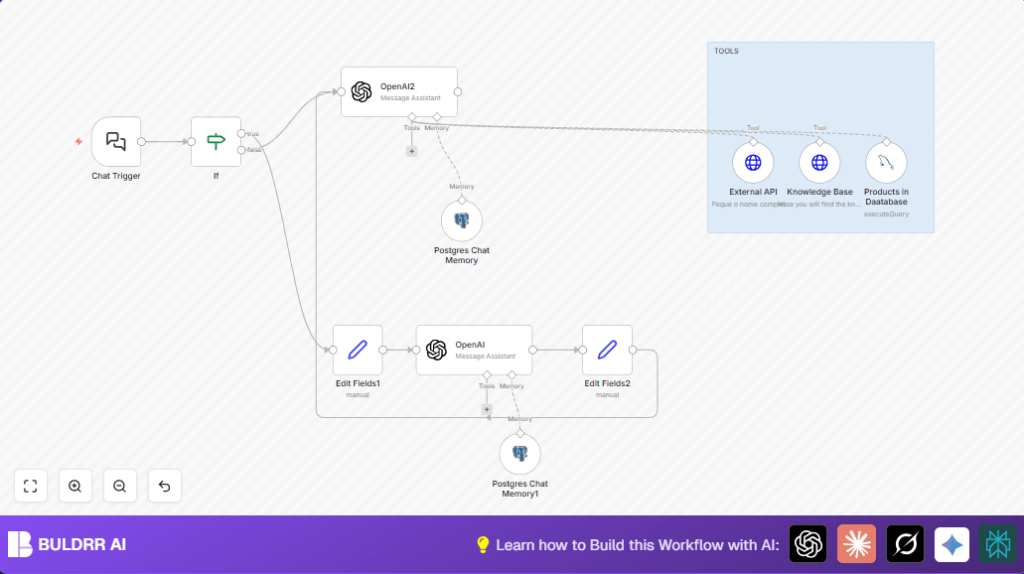

What this workflow does
This workflow creates a chatbot to give personalized health insurance quotes. It solves the problem of slow, manual client handling by automating data collection, insurance product lookup, and chat replies. The result is faster answers, less errors, and more time for insurance agents.
The chatbot understands user inputs, saves conversation history, and finds best insurance options using AI and databases. It answers client questions right away without agent waiting.
Who should use this workflow
Insurance agents or companies who want to speed up client service. Anyone managing many health insurance queries and wanting to reduce manual work. Also useful for developers building chatbots with AI and database integration.
Tools and services used
- OpenAI API: For natural language understanding and chat replies.
- n8n Automation Platform: To create the chatbot workflow with nodes.
- PostgreSQL Database: Stores chat history and session data.
- MySQL Database: Contains health insurance product data.
- External APIs: Validates user personal information.
- Langchain Chat Trigger Node: Starts workflow on user chat input.
This workflow runs in n8n, which can be cloud or self-host n8n. User data must be safely stored.
Workflow Inputs, Processing, and Outputs
Inputs
- User chat messages, including name, age, location, profession, device type, and insurance preferences.
Processing Steps
- Chat Trigger: Listens for new chat messages.
- Input Validation: Checks if user data (leadData) exists.
- Data Enrichment: Builds a personalized introductory message for AI using user details.
- First OpenAI Call: Understands and extracts user context from enriched input.
- Save Conversation: Stores chat messages in PostgreSQL to keep chat history.
- MySQL Query: Looks up insurance products that match user’s age, city, state, and preferred plan type.
- External API Call: Checks and confirms user’s name and birthdate.
- Knowledge Base API Call: Gets additional insurance info like pricing or FAQs.
- Second OpenAI Call: Creates the final natural language reply using stored chat memory and retrieved info.
Outputs
- Quick, personalized answers to users about health insurance options.
- Stored chat sessions that improve reply context over time.
- Filtered list of best insurance plans for each user.
Beginner step-by-step: How to build this in n8n
Importing the Workflow
- Download the workflow file using the Download button on this page.
- Open the n8n editor and click on “Import from File”.
- Select the downloaded workflow file to add it into n8n.
Configuring After Import
- Go to Credentials and add valid OpenAI API key for AI nodes.
- Check and update database credentials for PostgreSQL and MySQL nodes.
- Update any session IDs, table names, or API URLs if needed for your setup.
- Ensure the webhook URL in the Chat Trigger node is public and linked with your chatbot frontend.
Testing and Activation
- Run a test chat with example user data to confirm the workflow executes complete steps.
- Check that AI responses and product queries return correct data.
- Once tests pass, toggle the workflow’s “Active” button to make it live for production.
Following these steps allows quick deployment without building from scratch. For users running self-host n8n, ensure your server allows public webhook calls.
Customization ideas
- Change insurance product filters in MySQL queries to add different plan types like Individual or Family.
- Add multi-language support by including user language in chat inputs and adjusting OpenAI prompts.
- Include notification triggers to alert agents via email or Slack about new user requests.
- Increase chat memory length in PostgreSQL nodes to keep longer conversation history.
- Use sentiment analysis in OpenAI calls to detect user mood and adjust chatbot tone.
Common issues and fixes
- OpenAI 401 Unauthorized: Check and update OpenAI API key in n8n credentials.
- Chat memory not saving: Verify sessionKey correctness and database connection permissions.
- MySQL syntax errors: Test SQL queries with fixed values, check dynamic variable expressions for mistakes.
- Webhook not triggering: Ensure webhook node is public and URL copied correctly.
Summary of results
✓ The workflow automates health insurance quotes with fast, context-aware AI chat replies.
✓ Agents save about 80% of the time spent manually handling client queries.
✓ Personalized insurance products are offered based on user data and validated external info.
✓ Conversations are stored to keep memory and improve chat relevance.
→ Overall, this enables better customer service and more sales focus.
