
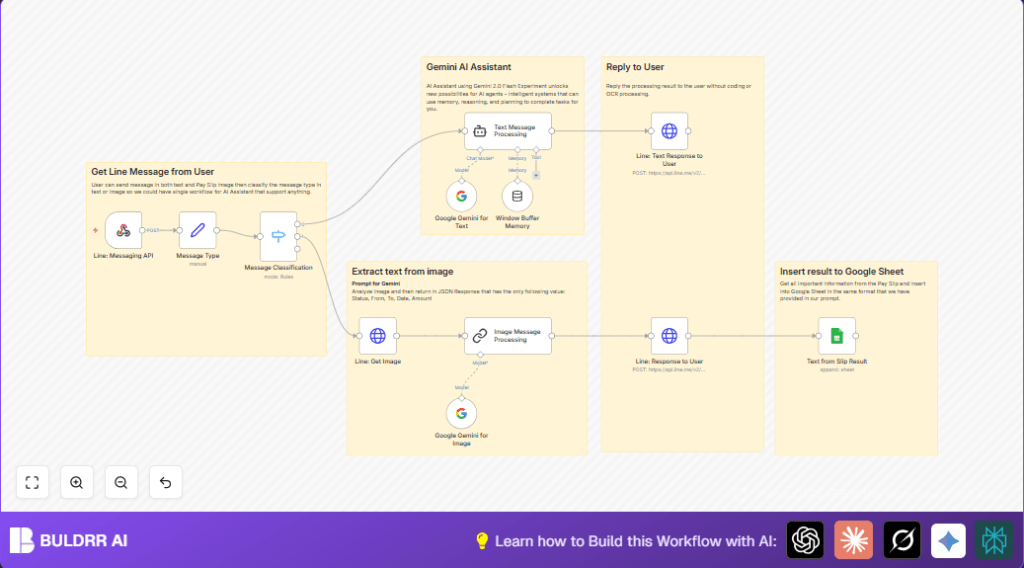

What this workflow does
This workflow listens to messages on Line chat and handles text and image inputs differently.
It pulls key data from pay slip images and chats, then saves info to Google Sheets.
It helps HR reduce manual work and errors in payroll extraction.
- Gets message type from Line API webhook.
- Uses Google Gemini AI to understand text or read pay slip images.
- Replies to users with info or answers.
- Saves extracted data to Google Sheets for records.
Who should use this workflow
This is for HR teams or payroll managers who get pay slips as images in Line group chats.
Anyone who needs to save time by automating text extraction from pay slips.
It fits companies using Line messaging, Google Sheets, and Google Gemini AI.
Users with basic n8n knowledge can deploy it easily.
Tools and services used
- Line Messaging API: Receives and replies to user messages.
- Google Gemini API: Analyzes chat texts and pay slip images.
- Google Sheets API: Stores extracted pay slip data.
- n8n Automation Platform: Runs the workflow.
- HTTP Header Authentication: Secures Line API calls within n8n.
Beginner step-by-step: How to use this workflow in n8n production
Download and import workflow
- Download the workflow file using the Download button on this page.
- Inside the n8n editor, click “Import from File” and choose the downloaded workflow.
Configure credentials and settings
- Add or update your Line Messaging API credentials in n8n.
- Set the Google Gemini API Key in the LangChain nodes.
- Connect your Google Sheets account and update the spreadsheet URL and sheet name if needed.
- If needed, update any referenced IDs, tokens, or fields such as webhook path, or sheet columns.
Test and activate workflow
- Send a test message and/or pay slip image via Line chat to check if the workflow processes data.
- Review outputs and Google Sheets entries for correctness.
- Once confirmed, toggle the workflow to Active in n8n for production use.
For stable production use, consider hosting n8n on your own server. You can visit self-host n8n resources for help.
Inputs, Processing Steps, and Outputs
Inputs:
- Messages (text or images) sent by employees in Line chat.
- Authentication tokens and credentials for APIs.
Processing:
- Webhook node receives Line chat events.
- Set node extracts message type, text, user ID, and message ID.
- Switch node classifies message as text or image.
- If text, LangChain Conversational Agent with Google Gemini AI processes message context.
- If image, HTTP Request downloads pay slip from Line server using message ID.
- Google Gemini AI analyzes pay slip image to extract JSON fields: Status, From, To, Date, Amount.
- Responses sent back to user through Line Messaging API reply.
- Extracted pay slip data appended to Google Sheets for record keeping.
Outputs:
- User receives replies with extracted info or chat answers.
- Google Sheets document updated with pay slip data rows.
Customization ideas
- Add new pay slip fields like “Employee ID” or “Department” in the LangChain prompt and Google Sheets mapping.
- Change LangChain prompts to support multiple languages per employee base.
- Add email notifications to alert payroll team after a new pay slip is saved.
- Add file conversion if PDFs need to be processed by converting them to images first.
- Adjust chat memory window size or timeout in Window Buffer Memory node for better session context.
Edge cases and errors
- Cannot get image from Line API: Check URL and ensure stored Line API access token in n8n is valid.
- Malformed JSON from AI: Fix LangChain prompt to clearly ask for JSON and add error handling.
- User not getting replies: Verify replyToken from incoming Line events is used correctly and promptly.
Pre-deployment checklist
- Confirm Line webhook receives and classifies both text and images properly.
- Verify Google Gemini API key allows chat and image processing.
- Ensure Google Sheets fields match exactly what AI outputs.
- Check HTTP Header Auth credential for Line API is active.
- Run full test: upload a pay slip image, confirm user reply, and check Google Sheets entry.
Deployment guide
Toggle the workflow Active switch in n8n to start handling live messages.
Monitor executions to catch any errors early.
This runs without keeping open servers, triggering on incoming events.
For heavier usage or uptime, consider self-host n8n.
Summary
✓ Saves 4-5 hours of manual pay slip data reading each pay cycle.
✓ Automatically extracts key payment info from chat images.
✓ Replies to employees with clear extracted details.
✓ Archives data reliably in Google Sheets.
✓ Easy to test, configure, and run within n8n.
