

What This Workflow Does
This workflow automatically finds trending GitHub projects linked on Hacker News every 6 hours.
It checks for new posts, writes social media content for Twitter and LinkedIn, and shares posts after a review.
This saves time from manually searching and posting, avoiding duplicate sharing.
Users get fresh, well-written posts ready for social media.
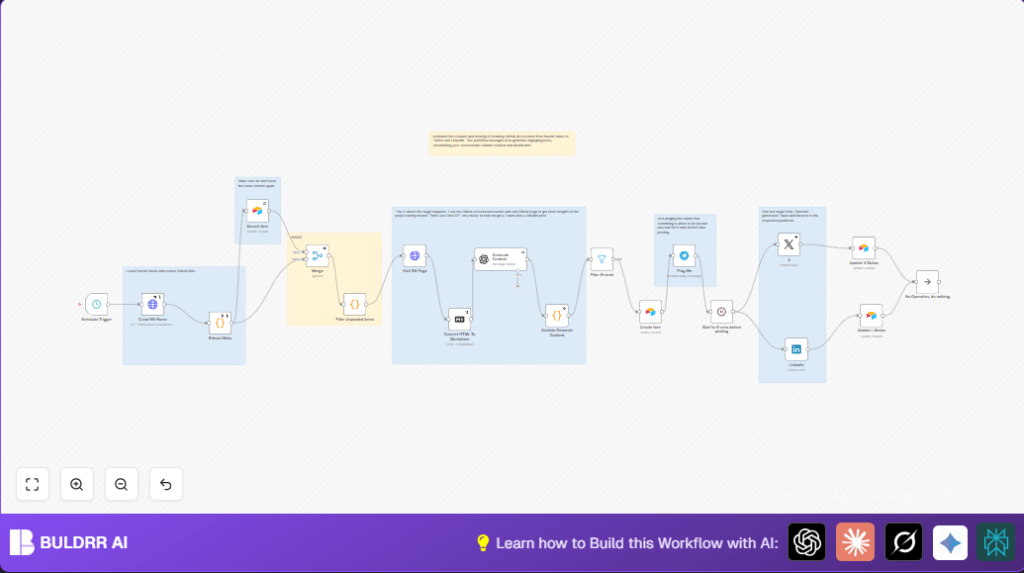
The process includes crawling Hacker News homepage, extracting GitHub links and data, checking duplicates in Airtable, fetching project details from GitHub, creating posts with OpenAI, and posting with confirmation and notifications.
It helps social media managers focus on strategy, not manual tasks.
Who Should Use This Workflow
This workflow suits social media managers, content curators, and tech teams who share open source projects.
It’s good for people who want to save hours weekly and avoid mistake-prone manual curation.
Anyone needing regular updates about trending GitHub repositories on Hacker News can use it.
It works well for teams using Twitter (X), LinkedIn, Telegram, and Airtable for content tracking.
Tools and Services Used
- Hacker News Homepage: Source of tech discussions and GitHub project links.
- BeautifulSoup (Python): Parses HTML to extract GitHub URLs and metadata.
- Airtable: Stores posted items and prevents duplicates.
- GitHub Repository Pages: Source for detailed project information.
- OpenAI GPT-4o-mini: Generates social media posts for Twitter and LinkedIn.
- Telegram Bot API: Sends notifications to content owner for approvals.
- Twitter (X) API: Posts finalized Twitter content.
- LinkedIn API: Publishes LinkedIn posts.
- n8n: Automates entire workflow and connects all parts.
Beginner Step-by-Step: How To Use This Workflow in n8n Production
Importing and Setup
- Download the workflow file using the Download button on this page.
- Open n8n editor and use “Import from File” to add the workflow.
- After import, open the workflow and add all required credentials (API Keys) in the HTTP Request, OpenAI, Twitter (X), LinkedIn, Airtable, and Telegram nodes.
- Update IDs, emails, channel IDs, Airtable base and table names if needed.
- If there is any Python code or prompt text, you can copy-paste it directly from the nodes (for example, the Extract Meta Python code snippet and the AI prompt in the Generate Content node).
Testing and Activation
- Run the whole workflow manually once by triggering the Schedule Trigger node.
- Watch outputs and logs at each stage to make sure GitHub posts are found, AI content is generated, and entries update in Airtable.
- Fix any errors by checking API keys, URLs, and field mappings.
- When tests succeed, turn the workflow ON to enable scheduled runs.
- If self-hosting n8n, learn more about reliable self-host n8n options for production use.
Workflow Inputs, Processing Steps, and Outputs
Inputs
- Hacker News homepage HTML every 6 hours from the Schedule Trigger and HTTP Request node.
- Stored records in Airtable as a reference for filtering repeated posts.
Processing Steps
- The Extract Meta Python node scrapes Hacker News HTML, pulling GitHub URLs and relevant metadata.
- Airtable Search Item node checks if the post ID already exists to avoid reposting.
- JavaScript Filter Unposted Items node filters out duplicates before continuing.
- For new posts, an HTTP Request fetches the GitHub repository page HTML.
- A Markdown conversion node transforms GitHub HTML into simpler Markdown text.
- Generate Content node uses OpenAI GPT-4o-mini to write styled social media posts for Twitter and LinkedIn based on Markdown and metadata.
- JavaScript and Filter nodes check AI output correctness and exclude errors.
- New posts save to Airtable via a Create Item node.
- A Telegram node sends notifications to owners with post previews.
- A Wait node pauses 5 minutes for manual review.
- Posts get published to Twitter (X) and LinkedIn using their respective nodes.
- Two Airtable update nodes mark posts as completed on those platforms.
Outputs
- Fresh Twitter and LinkedIn posts about trending GitHub projects, delivered on schedule.
- Logs and records in Airtable tracking posting status.
- Telegram messages alerting content owners for reviews.
Customization Ideas
- Change how often the workflow runs by adjusting the Schedule Trigger interval to suit your content needs.
- Modify the Extract Meta Python code to search GitHub links by specific topics or authors.
- Edit the AI prompt in the Generate Content node for a different writing tone, like more casual or more technical.
- Add other social platforms by adding corresponding nodes and adjusting post content.
- Switch notification channels to Slack or email by replacing the Telegram node.
Common Problems and How to Fix Them
- No GitHub posts found: Hacker News HTML changed or no new relevant posts.
Check if the Extract Meta Python node’s HTML selectors need updating. - Missing AI outputs for Twitter or LinkedIn: OpenAI may have rate limits or prompt formatting issues.
Verify API usage and correct prompt syntax in the Generate Content node. - Duplicate posts in Airtable: Incorrect filtering setup or Airtable search formula may cause this.
Review Search Item and Filter Unposted Items nodes.
Pre-Deployment Checklist
- Ensure all API Keys and OAuth2 credentials for Airtable, OpenAI, Twitter (X), LinkedIn, and Telegram are correctly set.
- Run the Crawl HN Home node manually to verify GitHub posts are found.
- Test the AI generation with sample Markdown input.
- Complete a full run to check posts creation, notifications, and publishing.
- Backup Airtable base to protect existing data before live use.
Deployment Guide
Turn the workflow ON in n8n to start scheduled runs every 6 hours.
Monitor workflow runs and error logs via the n8n interface.
Telegram notifications keep you updated with content previews before posting.
Scale by adjusting schedule or upgrading OpenAI API plans.
For stable running, consider self-host n8n for better control over environment and credentials.
Summary of Benefits and Results
✓ Saves several hours of manual searching weekly.
✓ Ensures no duplicate or missed social media posts.
✓ Provides clear, consistent, well-styled Twitter and LinkedIn content.
✓ Alerts content owners for review and approval.
✓ Automates entire tech news curation and posting work.
→ Frees social media teams to focus on strategy, not busywork.
→ Delivers timely updates on trending open source projects.
