
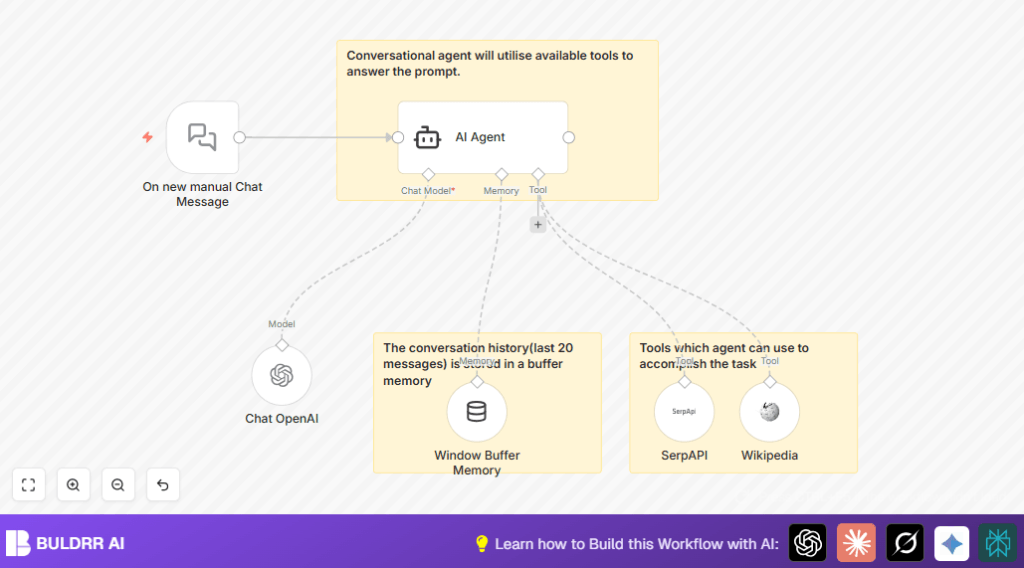

What this workflow does
Most AI chat agents only know what they were trained on.
Ask about something recent — they guess, hallucinate, or say
“I don’t have information about that.”
This agent doesn’t have that problem.
It uses GPT-4o with two live tools:
→ **SerpAPI** — searches the web in real time for current information
→ **Wikipedia** — pulls verified factual articles on demand
The agent decides which tool to use based on your question —
automatically. You don’t instruct it. It figures it out.
Add 20-message conversation memory and you get a chat agent
that remembers context, fetches live data, and gives accurate,
up-to-date answers — every time.
Who should use this workflow
This is useful for customer support teams or anyone who must answer many questions fast and with good info.
It helps reduce time spent searching and improves answer accuracy.
Tools and services used
- n8n Platform: Used to design and run the automation workflow.
- OpenAI GPT-4o-mini: The AI language model that creates smart replies.
- SerpAPI: Gives current search engine results for up-to-date info.
- Wikipedia API: Provides factual information from Wikipedia articles.
- LangChain Nodes: Manage chat memory, AI agent functions, and tool connections.
What Each Tool Actually Does in This Workflow
GPT-4o-mini (via OpenAI)
The brain. Reads the user message, decides which tool to call,
generates the final reply. Swap to GPT-4o full model for
longer context and vision capability.
SerpAPI (Web Search Tool)
Called automatically when the question needs current
information — news, prices, recent events. Returns live
search results the agent uses to form its answer.
Wikipedia Tool
Called automatically for factual lookups — definitions,
historical facts, biographical info. More reliable than
search for stable knowledge queries.
Window Buffer Memory
Stores the last 20 messages per session. Gives the agent
conversation context so it doesn’t treat every message
as a fresh start.
Inputs, Processing, and Outputs
Inputs
- User types questions or messages using the Manual Chat Trigger node.
Processing Steps
- The Window Buffer Memory node keeps the last 20 messages to keep conversation flow.
- The AI Agent node reads the user input and decides how to answer.
- The AI Agent calls the Tool Wikipedia and Tool SerpAPI nodes to find facts live from the web.
- The Chat OpenAI node with GPT-4o-mini model generates the reply using collected info and memory.
Outputs
- The AI Agent sends a clear, up-to-date, and well-informed chat reply to the user.
Beginner step-by-step: How to run this workflow in n8n
1. Importing the workflow
- Download the workflow file using the Download button on this page.
- Open n8n editor and click “Import from File”.
- Select and upload the downloaded workflow file.
2. Configuring the workflow
- Enter your OpenAI API Key in the Chat OpenAI node’s credentials.
- Add your SerpAPI key in the Tool SerpAPI node.
- No changes needed for Wikipedia API since it is public.
- Check if any IDs, emails, channels, or folders need updating for your setup (if applicable).
3. Testing and activating
- Run the workflow manually and send a test message through the Manual Chat Trigger node.
- See if the AI Agent returns a thoughtful answer.
- If all tests pass, activate the workflow for live use.
- For better privacy and control, consider also self-host n8n.
How This Differs from a Basic Chat Agent
A basic n8n chat agent connects GPT to a chat trigger and replies
from training data alone. That’s it.
This workflow adds three layers on top:
Layer 1 — Live Web Search
SerpAPI gives the agent access to current search results.
Ask about today’s news, latest prices, or recent events —
it fetches real answers, not outdated training data.
Layer 2 — Wikipedia Knowledge Tool
For factual questions — definitions, history, people, places —
the agent pulls directly from Wikipedia instead of guessing.
Layer 3 — 20-Message Memory
The Window Buffer Memory node keeps the last 20 messages in
context. Multi-turn conversations work naturally — the agent
remembers what was said earlier in the same session.
If you want to add vision/image analysis on top of this,
swap GPT-4o-mini for the GPT-4o model in the Chat OpenAI
node and add an image input handler — the agent architecture
supports it without rebuilding.
Customization ideas
- You can change how many past messages the AI remembers by adjusting “contextWindowLength” in the Memory Buffer Window node.
- Add more search or knowledge tools by including more LangChain-compatible tool nodes connected to the AI Agent.
- Switch the GPT model in the Chat OpenAI node to a newer one if available for better answers.
- Modify the AI Agent’s prompt settings to change how the agent thinks or replies.
- Replace the manual trigger node with a webhook to accept chat messages automatically from other apps or websites.
Possible problems and fixes
- AI Agent not responding: Check OpenAI API key and usage limits; verify credentials are correct.
- Search tools not working: Confirm Wikipedia and SerpAPI nodes are connected and configured properly.
- Memory not keeping context: Make sure Memory Buffer Window node is linked to AI Agent’s memory input and increase history length if needed.
Summary of results
✓ Faster answers to complex questions without manual searching.
✓ Reduced errors from outdated or missing info.
✓ Smarter chat replies that remember recent conversation.
→ Saves support teams many hours weekly.
→ Improves user satisfaction with instant, accurate help.
