

What this workflow does
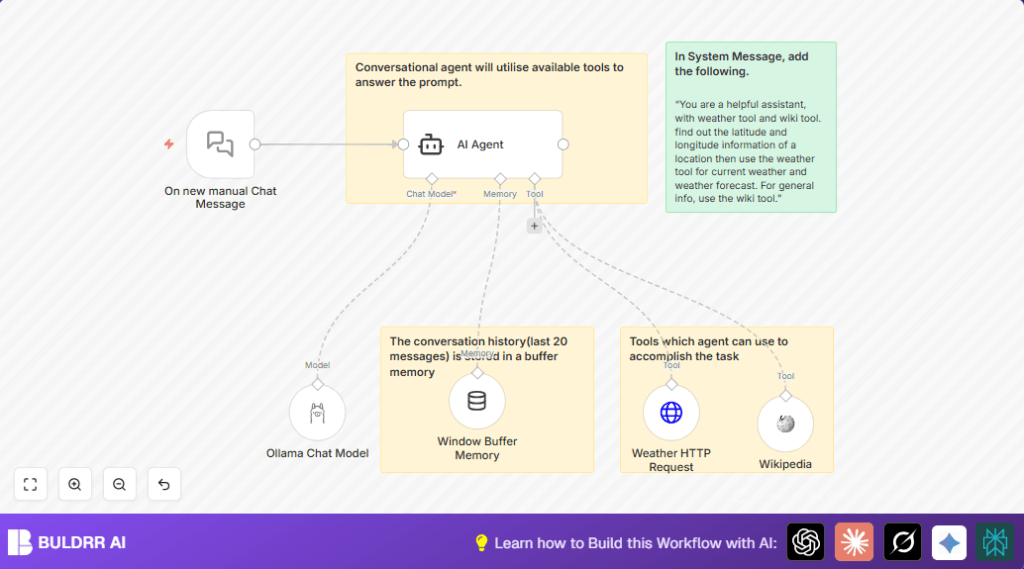
This workflow uses n8n to create a chat assistant that answers questions about weather and general information.
It solves the problem of slow replies and mistakes by giving quick, accurate answers automatically.
The result is faster responses with correct info from Wikipedia and live weather data.
Who should use this workflow
Any user who wants to automate replies about weather or places in a chat.
Good for customer support teams needing fast, accurate help without searching many websites.
Tools and services used
- On new manual Chat Message node: To start the chat when user types a message.
- Window Buffer Memory node: Stores the last 20 messages for keeping conversation context.
- AI Agent node: Uses system instructions and decides when to call tools like Wikipedia or weather API.
- Wikipedia node: Gives detailed general knowledge answers.
- Weather HTTP Request node: Calls Open-Meteo API to get real-time weather using latitude and longitude.
- Ollama Chat Model node: Processes AI language and creates smooth chat replies.
Inputs → Processing → Outputs Explained
Inputs
User sends a chat message manually in n8n via the On new manual Chat Message node.
This message can ask about weather or places.
Processing Steps
The AI Agent reads the chat, guided by a system message.
It checks if the question needs Wikipedia info or weather data.
If Wikipedia info is needed, the agent calls the Wikipedia node to get facts.
If weather info is needed, the agent extracts location coordinates, then calls the Weather HTTP Request node to get the forecast.
The Window Buffer Memory node keeps the last 20 messages so conversations feel connected.
Finally, the Ollama Chat Model creates a natural reply to send back.
Outputs
The user receives a clear chat reply.
It contains either weather forecast data or detailed place information, depending on the question.
Beginner step-by-step: How to use this workflow in n8n
1. Import workflow
- Download the workflow file using the Download button on this page.
- In your n8n editor, click “Import from file” and select the downloaded file.
2. Set credentials and API keys
- Add your Ollama API credentials in the Ollama Chat Model node.
- Ensure internet connection for the Weather HTTP Request node to access Open-Meteo API.
3. Update any relevant data
- If needed, update parameters like location, temperature units, or memory length inside nodes.
4. Test the workflow
- Send a manual chat message via On new manual Chat Message node to see AI answer.
5. Activate for production
- Turn on the workflow in n8n to run live.
If self hosting n8n, see self-host n8n for help setting up.
Common errors and how to fix them
- AI Agent not starting or empty answers: Check the On new manual Chat Message node is connected properly and the system message is set in AI Agent.
- Weather API gives errors or no data: Verify parameter names in Weather HTTP Request are exactly latitude, longitude, forecast_days, and hourly.
- Ollama model authentication fails: Confirm Ollama API keys are correct and the service is running.
Ideas for customization
- Add more tools like YouTube search or dictionary nodes connected to the AI Agent.
- Change the Window Buffer Memory context length to remember more or fewer past messages.
- Switch the Ollama model to another supported language model by updating the model node.
- Improve system message instructions for clearer AI task handling or add fallback replies.
- Tweak the weather API request to include more forecast days or weather alerts by changing query parameters.
Summary and results
✓ Saves time by answering weather and knowledge questions automatically.
✓ Uses real-time weather data and Wikipedia info for accuracy.
✓ Keeps chat memory so answers stay relevant to the conversation.
✓ Easy to test and activate in n8n with simple setup steps.
✓ Helps customer support give fast and correct responses.
