

The same model that powers ChatGPT — running inside your own
Telegram bot, with no monthly ChatGPT subscription needed.
You pay only for what you use via the OpenAI API.
What This Automation Does
This workflow is a fully automated AI image generator built inside
n8n. Type a text prompt — and it generates a high-quality FLUX image
and saves it directly to your Google Drive. No manual downloading,
no copy-pasting URLs, no babysitting the process.
Here’s exactly what happens:
→ You provide a text prompt describing the image you need
→ n8n sends it to the FLUX AI model via fal.ai API
→ The workflow polls every 3 seconds until the image is ready
→ It downloads the image and uploads it straight to your Google Drive folder
One prompt. One click. Image saved — ready to use for social media,
ads, blog posts, or any project.
Tools and Services Used
- Telegram Bot API: Receives user messages.
- Google Sheets: Stores session info and chat history.
- OpenAI GPT-4 mini model: Creates chatbot answers.
- n8n: Runs and automates the workflow.
How the Workflow Works
Inputs
- User messages sent to Telegram bot.
- User commands like /new, /resume, /summary, or /question.
Processing Steps
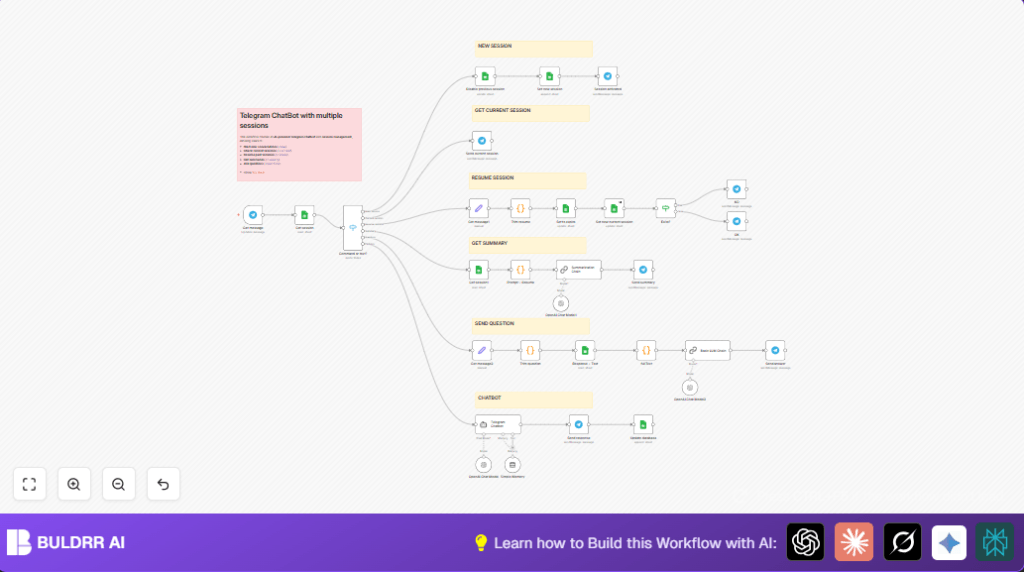
- Telegram Trigger listens for new messages.
- Google Sheets nodes get or update session data.
- Switch node decides what command user sent.
- For /new, old sessions mark expired and new ones set current.
- For /resume, session ID is read with code and updated.
- Langchain OpenAI Chat Model generates answers, keeping chat history using Simple Memory.
- Summary or question commands run separate OpenAI chains.
- Responses go back to user via Telegram nodes.
Outputs
- Clean chatbot answers sent to user chats.
- Session summaries when requested.
- Answers to past-chat questions.
Who Should Use This Workflow
Support teams handling many users through Telegram bots.
Anyone who wants to save time and keep chatbot talks clear.
People needing multiple sessions with easy resume and summary.
Beginner Step-by-Step: How to Use This Workflow in n8n
Download and Import
- Download the workflow file using the Download button on this page.
- Open n8n editor where you want to run the bot.
- Use Import from File option to upload the downloaded workflow.
Configure Credentials and IDs
- Add your Telegram Bot API credentials in the Telegram Trigger nodes.
- Put your OpenAI API Key into the Langchain OpenAI Chat Model nodes.
- Update Google Sheets document ID and sheet names if different from default.
- Check and copy/paste code snippets provided in the workflow for session extraction or question parsing.
Test the Workflow
- Send sample commands like /new or a chat message to test the flow.
- Look in n8n execution output if the nodes work without errors.
Activate Workflow
- Toggle the workflow switch to active when ready.
- Check Telegram bot replies to confirm it handles multiple sessions.
- Make sure the Google Sheets updates show session changes after commands.
For advanced control or more security, consider self-host n8n.
Key Code Snippets to Use
Extract Session from “/resume” Command
This code finds the session ID user writes after /resume.
for (const item of $input.all()) {
  const text = item.json.text || '';
  const match = text.match(/\/resume\s+(.*)/);

  if (match) {
    item.json.resume = match[1].trim();
  } else {
    item.json.resume = null;
  }
}
return $input.all();
Extract Question from “/question” Command
This code reads the question text after /question command.
for (const item of $input.all()) {
  const text = item.json.text || '';
  const match = text.match(/\/question\s+(.*)/);

  if (match) {
    item.json.question = match[1].trim();
  } else {
    item.json.question = null;
  }
}
return $input.all();
Customization Ideas
- Add more commands like /help by updating the Switch node.
- Use a different GPT-4 or GPT-3.5 model in the AI nodes to save cost or add features.
- Extending session expiry times in Google Sheets helps keep sessions longer.
- Store chat data in other databases like Airtable or MySQL for larger scale.
- Change Telegram messages to have clearer or richer text and formatting.
Troubleshooting
- Issue: No current session found after starting new.
Fix: Check Google Sheets update nodes to ensure current session state is set and old sessions expire. - Issue: Telegram Trigger does not get messages.
Fix: Verify webhook URL in Telegram BotFather and confirm message update type enabled. - Issue: AI answers forget past chats or sound off.
Fix: Confirm session key passes correctly to Simple Memory node. - Issue: Question answering returns irrelevant replies.
Fix: Check code nodes combining chat history and prompt format before AI call.
Pre-Production Checklist
- Check Telegram Bot API credentials and webhook are correct.
- Make sure Google Sheets document IDs and sheet names match your setup.
- Try sending all commands (/new, /resume, /summary, /question) and check responses.
- Confirm OpenAI API key works and has enough quota.
- Activate workflow after successful test.
Summary and Results
✓ Saves at least 5 hours weekly by automating session management.
✓ Avoids user confusion by keeping chat context clear.
✓ Lets users start new chats, resume past sessions, and get summaries easily.
→ Improves customer experience and team efficiency.
