

What this workflow does
This workflow connects Telegram messages with NeurochainAI services using n8n automation.
It watches for specific commands in Telegram chats, sends prompt text to AI models, and replies back automatically.
This stops the user from typing answers manually, saving lots of time.
The workflow returns either AI-written text or AI-generated images directly to the chat.
Users get quick replies without waiting or copying data between apps.
Who should use this workflow
Users managing busy Telegram channels or groups with many messages.
Anyone wanting quick AI chat or image responses without manual typing.
This fits community managers, content creators, or business chats needing fast automation.
Beginners can run this with minimal setup once imported into n8n.
Tools and services used
- Telegram Bot API: Receives user messages.
- NeurochainAI REST API: Generates AI chat text responses.
- NeurochainAI Flux API: Creates AI images from prompts.
- n8n Automation Platform: Runs the workflow nodes and logic.
- JavaScript Code nodes: Clean and parse prompt texts and URLs.
Beginner step-by-step: How to use this workflow in n8n
Step 1: Download and import workflow
- Use the Download button on this page to get the workflow JSON file.
- Go inside the n8n editor where you want to deploy.
- Click “Import from File” and select the downloaded JSON.
Step 2: Configure credentials
- Open every Telegram API node like Telegram Trigger, Telegram1, Telegram2, etc.
Add your Telegram Bot API Key under “telegramApi” credentials. - Open HTTP request nodes named NeurochainAI – REST API and NeurochainAI – Flux.
Replace placeholder “Authorization” Bearer token value with your valid NeurochainAI API Key. - If needed, update any IDs, chat details, or other parameters.
Step 3: Test the workflow
- Send a message in Telegram starting with
/fluxor mentioning the bot. - Check the response is AI-generated text or image in your chat.
Step 4: Activate workflow for production use
- Toggle the workflow to “Active” status in n8n editor.
- Monitor execution logs for any errors.
Follow self-host n8n if running on your own server.
This makes running this automation stable and private.
How the workflow works: Inputs, processes, and outputs
Inputs
- Telegram user messages that start with command
/fluxor mention the bot handle. - Text content typed by users requesting text or image AI generation.
Processing steps
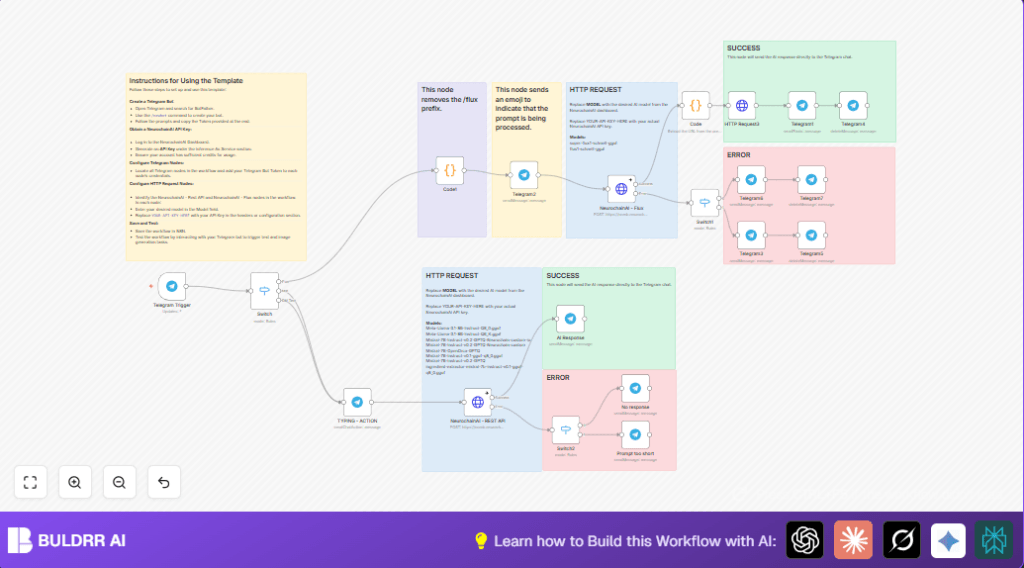
- Telegram Trigger catches incoming messages.
- Switch node routes messages by command prefix or mentions.
- Code1 node cleans the prompt, removing command keywords.
- TYPING – ACTION node shows typing indicator straight to user.
- Text prompts go to NeurochainAI – REST API node to get AI chat response.
- Image prompts go to NeurochainAI – Flux node, then URL parsed by Code, downloaded by HTTP Request3.
- Final Telegram nodes send replies as text messages or images.
- Error handling Switch nodes detect API issues and notify users directly.
Outputs
- AI-generated text answers posted back in Telegram chat.
- AI-created images sent as photo replies.
- Error messages guiding users to retry or correct prompts.
Customization ideas
- Change AI model names inside NeurochainAI – REST API and NeurochainAI – Flux to try different engines.
- Update Switch rules to change command prefix e.g. from
/fluxto/image. - Edit Telegram error message nodes to add personalized text or buttons.
- Modify routing inside Switch node to better handle group chats.
- Add logging with Google Sheets or Database nodes for prompt-response tracking.
Common issues and fixes
- Prompt invalid error: Due to too short or empty input after command.
Fix by ensuring users type descriptive text. - Telegram nodes fail sending messages: Cause is wrong or missing Telegram Bot API key.
Re-add credentials in each node. - Image URL parsing fails: Check JSON parsing code in Code node extracting URLs.
- No AI response: Could be backend service issues or rate limit.
Users should retry or wait.
Pre-production checklist
- All Telegram nodes use correct Bot API keys.
- NeurochainAI API key is active and credits allow calls.
- Test
/fluxcommand to confirm routing. - Image replies display correctly in Telegram.
- Error paths tested, users get friendly notify messages.
- Backup workflow JSON before live use.
Deployment guide
Switch the workflow on in n8n by activating it.
Watch Telegram conversations for smooth replies.
Use n8n logs to check for failed API calls.
Update NeurochainAI keys or models over time as needed.
Schedule backups for long term safety.
Summary of outcomes
✓ Telegram messages sent by users are handled automatically.
✓ AI chat answers and images appear quickly in chats.
✓ Manual typing and copy/paste is no longer required.
✓ Time is saved daily managing the community.
✓ Clear user feedback is given on prompt or system errors.
✓ Workflow runs inside n8n with minimal setup.
