
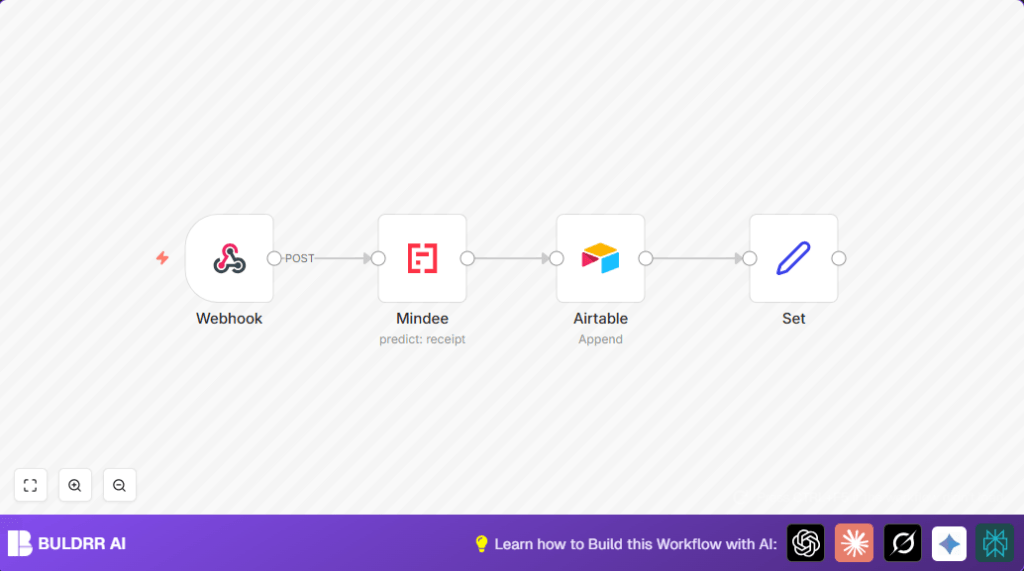

What this workflow does
This workflow solves the problem of manual data entry from paper receipts. It takes receipt images sent to a secured webhook, extracts important details automatically, and saves them in Airtable. The end result is less time spent typing, fewer errors, and neat organized expense records.
The workflow starts with receiving a receipt image file. Then Mindee’s OCR service reads the receipt and pulls out fields like merchant, total, date, and currency. After that, these details get saved as a new row in Airtable’s “Receipt” table. Finally, a short summary message is created showing the key information in plain text.
Who should use this workflow
This workflow is for anyone who wants to stop typing receipt data manually into spreadsheets or databases. It is great for small business owners, freelancers, or anyone tracking expenses from paper receipts.
The workflow saves time and reduces mistakes from manual entry. It works best if you already use Airtable to track finances and if you want automatic data extraction from receipt images.
Tools and services used
- n8n: Runs the automation workflow.
- Mindee Receipt OCR: Extracts structured data from receipt images.
- Airtable: Stores extracted receipt data for easy management.
- Webhook node: Receives receipt images through POST requests.
How this workflow works (Input → Process → Output)
Input
The workflow starts when a receipt image file is sent using an HTTP POST to the webhook URL. The webhook expects the image as binary data under the property “receipt” with header authentication to secure the request.
Process
The Webhook node catches the incoming file and passes it to the Mindee node. Mindee reads the receipt and extracts data fields like merchant name, total amount, date, category, time, currency, and locale.
Next, these extracted fields go to the Airtable node. Airtable appends a new row to the “Receipt” table with the mapped fields.
At last, a Set node gathers Airtable’s output and builds a short text message summarizing the receipt details for easy review or notification.
Output
The output is a new receipt record stored in Airtable, plus a plain text summary message with the key expense details.
Beginner step-by-step: How to run this workflow in n8n
Import the Workflow
- Click the Download button on this page to save the workflow file.
- Open your n8n editor and choose “Import from File”.
- Select the downloaded workflow file to load it into n8n.
Configure Credentials and Settings
- Go to the Mindee node and add your Mindee API Key as credentials.
- Open the Airtable node and enter your Airtable Application ID and API Key.
- Check the Airtable node field mappings to match your base’s “Receipt” table columns.
- Make sure the Webhook node has header authentication set with your chosen credentials.
Test the Workflow
- Send a test HTTP POST request with a sample receipt image to the webhook URL.
- Check if the Mindee node returns data and if Airtable gets a new record.
- Verify that the summary message appears with correct receipt details.
Activate for Production
- Once testing passes, activate the workflow by toggling it on in n8n.
- Share the secure webhook URL with your receipt image source (mobile app, email forwarder, etc.) to start processing live receipts.
If you want to run self-host n8n, check out self-host n8n guides for deployment options.
Common errors and fixes
- “No binary data found” error in Mindee node.
Cause: The Webhook node did not receive the file as binary or property name does not match.
Fix: Enable binary data in the webhook and set Mindee’s binaryPropertyName to “receipt” exactly. - Airtable records not saved.
Cause: Wrong API keys, Application ID, or field mappings.
Fix: Verify Airtable credentials and correct field names matching your Airtable base.
Ideas to customize this workflow
- Add an email node (Gmail or SMTP) after the Set node to send expense summaries automatically.
- Add more fields to Airtable, like payment method or tax, by updating the mapping in Mindee and Airtable nodes.
- Insert a Function node to convert currency based on locale before saving the data.
Summary of benefits and results
✓ Saves 4-5 hours weekly on manual receipt data entry.
✓ Reduces errors in expense tracking.
✓ Organizes receipt data automatically in Airtable.
✓ Produces readable summary messages for quick review.
