
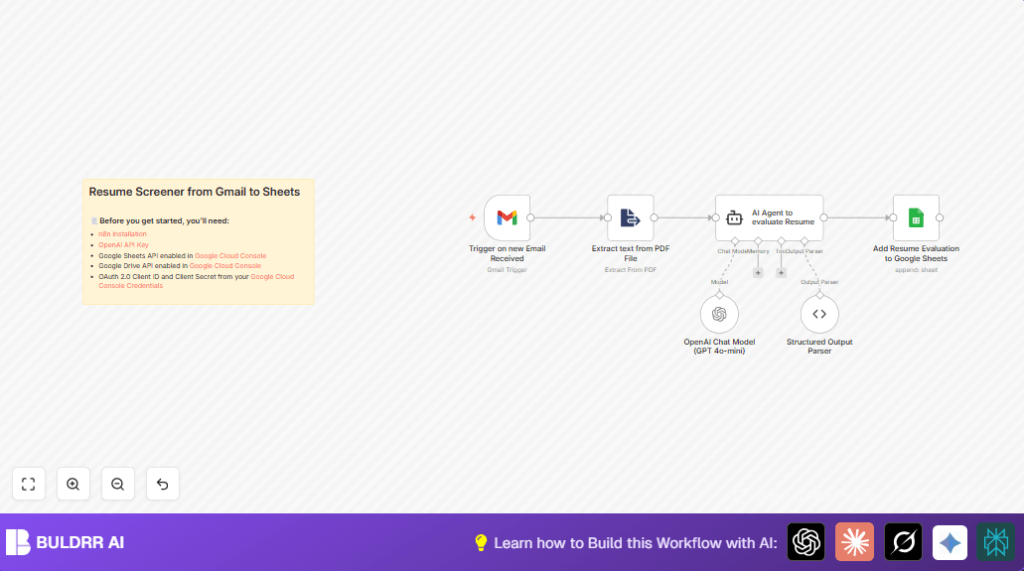

What this workflow does
This workflow watches a Gmail inbox for new emails with PDF resume attachments.
It reads the resume text automatically.
Then it uses an AI model to find name, email, LinkedIn info, and gives a score for the candidate.
Finally, it saves all that data to a Google Sheet.
This removes manual typing and saves hours every day.
Who should use this workflow
This automation is for anyone who gets many resumes by email and wants to process them faster.
Recruiters, HR teams, or small companies can use it to avoid typing candidate details again.
It works best if resumes arrive as PDFs in Gmail inbox.
Tools and services used
- Gmail: To receive emails with PDF resumes.
- Extract Text from PDF File node: To pull text out from PDF attachments.
- OpenAI GPT-4o-mini model: To analyze resume text and extract details.
- Langchain Agent node: To run AI logic and create structured data.
- Google Sheets: To save candidate info and scores in a spreadsheet.
Inputs, processing, and outputs
Inputs
- Unread Gmail emails having attachments labeled for hiring
- PDF resume files attached to emails
Processing steps
- Download attachment PDFs from Gmail
- Convert PDF content to plain text
- Send resume text to OpenAI GPT-4o-mini via Langchain Agent
- AI extracts name, email, LinkedIn, and gives a candidate score
- Parse AI output as structured JSON to keep data consistent
Outputs
- Append candidate data (name, email, LinkedIn, score) to Google Sheets
- Store resume text in the same Google Sheet for reference
Beginner step-by-step: How to build this in n8n
Import and install the workflow
- Download the workflow file using the Download button on this page.
- Open n8n editor and click “Import from File”.
- Select the downloaded workflow file and load it.
Configure the nodes
- Add your Gmail credentials in the Gmail Trigger node to access your inbox.
- Check that the Gmail Trigger uses the filter
has:attachmentand targets the right label. - Add OpenAI API key to the OpenAI Chat Model (GPT 4o-mini) node.
- Confirm the Extract from File (PDF) node uses the input property
attachment_0. - Enter your Google Sheets document ID and sheet name in the Google Sheets node.
Test and activate
- Send a test email with a PDF resume to your Gmail inbox.
- Run the workflow manually in n8n to check if the data extracts and appends correctly.
- If all works, activate the workflow.
- The workflow will run automatically based on the trigger settings to process new resumes.
You can manage running n8n on your own server or cloud by using self-host n8n.
Customization ideas
- Change the AI prompt in the Langchain Agent to match your company’s criteria for candidate scoring.
- Add more data fields like phone numbers or skills to the AI JSON schema.
- Adjust Gmail filter query to only process applications with specific job titles.
- Add a Google Drive node to save PDF resumes for backup.
- Include a Slack or email notification node to tell HR when a new candidate is added.
Common issues and fixes
Workflow not triggering on new emails
Check the Gmail filter has has:attachment and labels are correct.
Confirm OAuth credentials are valid in the Gmail Trigger node.
AI Agent returns errors or bad data
Make sure the structured output parser JSON schema matches expected fields like name, email, linkedin, score.
Watch for API rate limits in OpenAI account.
Google Sheets node fails to add data
Verify that the Google Sheets document ID is correct.
Ensure OAuth has write permission to that sheet.
Final result
✓ Emails with PDF resumes are detected automatically.
✓ Candidate info is extracted accurately by AI and saved to a Google Sheet.
✓ Manual work is cut by hours and errors go down.
→ Recruiting is faster and more organized.
