
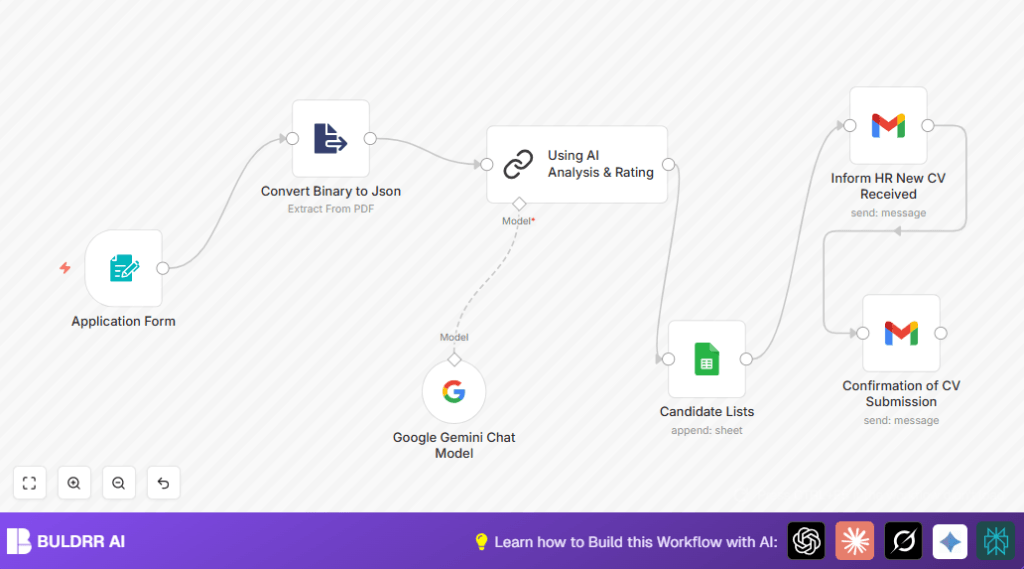

What This Automation Does
This workflow helps you automatically check software engineer CVs fast in n8n. It stops slow manual checking and missed good people.
It takes CVs sent by job candidates. Then it reads text from their PDF resumes.
Next, it sends the resume text to Google Gemini AI to score how well the CV fits the job.
After that, it saves all candidate info plus AI scores into Google Sheets to keep track.
It also sends an email to the candidate to say their CV was received.
HR team gets an email with each candidate’s details and AI score for quick review.
This automation cuts many hours of manual work and helps HR find best candidates faster and fairer.
Inputs, Processing, and Outputs Explained
Inputs
- Candidate fills out a form with name, email, salary wish, LinkedIn link, and uploads a PDF resume.
Processing Steps
- Form Trigger node starts when candidate submits data.
- Extract From File node reads text from uploaded PDF resume.
- Google Gemini Chat Model node sends resume text to AI and asks for a score from 1-10 and a recommendation for the Software Engineer job.
- Chain LLM node cleans and reformats AI response to be clear and short.
- Google Sheets node adds the candidate’s details and AI rating into a spreadsheet.
- Gmail nodes send emails: one to HR with candidate info and AI result, the other to candidate confirming CV receipt.
Outputs
- An updated Google Sheet of all candidates plus AI ratings.
- Email notifications sent to HR and candidates.
- Fast automated rating score for each CV.
Who Should Use This Automation
This is for HR teams or hiring managers who get many software engineer CVs.
It helps those who want to spend less time reading each resume by hand.
It also suits teams wanting unbiased, fast scoring of candidates using Google Gemini AI.
If you want to keep track digitally with Google Sheets and email alerts, this fits well.
Tools and Services Used
- n8n Workflow Automation: To build and run the automation.
- Google Gemini (PaLM) API: For AI resume evaluation.
- Google Sheets API: To store candidate details and AI ratings.
- Gmail with OAuth2: To send emails to candidates and HR.
- PDF Text Extraction Node: To get text from PDF resumes.
For self hosting n8n, users can visit self-host n8n to gain better control and scale.
Beginner Step-by-Step: How to Use This Workflow in n8n
Step 1: Import the Workflow
- Download this workflow from the Download button on this page.
- Inside your n8n editor, click to Import from File.
- Select the downloaded workflow file and import it.
Step 2: Add Credentials and Configuration
- Go to Credentials and add Gmail OAuth2 credentials for sending email.
- Set Google Gemini API credentials for AI analysis.
- Configure Google Sheets node with your spreadsheet ID and sheet name.
- Update email addresses in Gmail nodes to correct recipients (HR and candidates).
- If needed, change Google Sheets folder or table IDs to match your account.
Step 3: Test and Activate
- Test the Form Trigger by submitting a sample candidate application with a PDF resume.
- Check the workflow runs successfully and logs outputs.
- Make sure candidate data is added in Google Sheets and emails are received.
- Turn on the workflow for production by setting its status to active.
Now this automation works fast to process and score CVs automatically.
Customization Ideas
- Change job description or role name in Google Gemini AI prompt to screen different jobs.
- Modify Gmail node recipients to add more HR or hiring managers.
- Expand accepted file types for resumes, like DOCX or TXT, and update extraction nodes.
- Adjust AI rating scales or criteria in prompt for your specific evaluation method.
- Add extra candidate fields like portfolio links or cover letters in the form and map them through nodes.
Troubleshooting Tips
Issue: No text extracted from PDF by Extract From File node.
Fix: Check the node’s binary property name matches the file field from the form.
Issue: Gmail emails fail with authorization error.
Fix: Refresh and check Gmail OAuth2 credentials in n8n settings.
Issue: AI returns unclear or badly formatted rating.
Fix: Update prompts to ask explicitly for plain text output with no markdown.
Pre-Production Checklist
- Test Form Trigger webhook by submitting sample applications.
- Verify PDF text extraction is working and outputs correct data.
- Check Google Gemini API keys are valid and producing ratings.
- Send test emails from Gmail nodes to confirm delivery.
- Ensure Google Sheets gets new rows for each application.
- Run a full test from form submission to HR notification.
- Backup workflow and data before going live.
Deployment Guide
Switch workflow status from inactive to active inside n8n.
Embed the Form Trigger webhook URL in your application form interface.
Watch execution logs in n8n for any errors during runs.
Set up logging on Gmail and Google Sheets nodes to track failures.
Check workflow often during busy hiring times.
Summary of Benefits and Results
✓ Saves many hours by automating CV reading and rating.
✓ Provides fast, unbiased AI scores for software engineer candidates.
✓ Sends emails to HR and candidates automatically.
✓ Keeps all candidate info neatly stored in Google Sheets.
✓ Makes hiring process faster and better managed.
