

What this workflow does
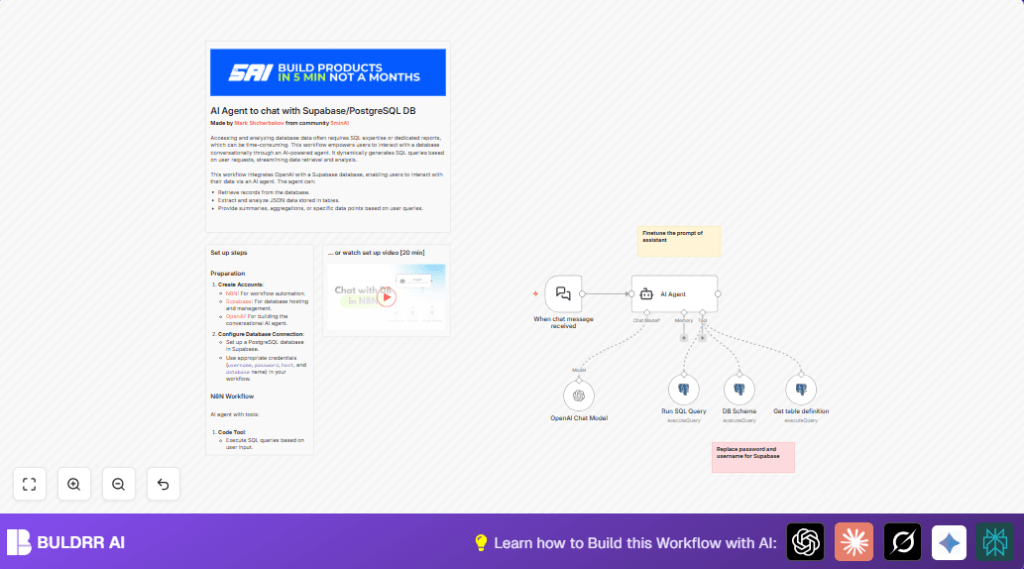
This workflow creates a chat-based AI agent that talks to a Supabase PostgreSQL database using natural language.
The AI reads user messages, writes SQL queries by itself, runs these queries in the database, then returns simple answers based on the results.
This solves the problem of needing to know SQL to get data fast. The user can ask questions in plain language and get answers right away.
Who should use this workflow
This is for people who want information from their database without writing SQL code.
It works well for product managers, business users, or anyone uncomfortable with databases but needs quick data answers.
Tools and services used
- n8n: Automation platform to build and run the workflow.
- Supabase PostgreSQL: Database where the data lives.
- OpenAI API: GPT model to understand user questions and build SQL queries.
Beginner step-by-step: How to use this workflow in n8n
Step 1: Import the workflow
- Click the Download button to get the workflow file.
- In the n8n editor, click on “Import from File” and select the downloaded workflow.
Step 2: Add credentials and API keys
- Go to the Credentials section in n8n.
- Add a PostgreSQL credential using your Supabase database host, name, username, and password.
- Add an OpenAI API credential with your OpenAI API Key.
Step 3: Update workflow settings if needed
- Check nodes that run SQL queries and confirm table names and schema matches your database.
- Update any email addresses, channels, or webhook URLs in the workflow if you connect to other systems.
Step 4: Test the workflow
- Trigger the Webhook node by sending a test chat message.
- See if the AI agent responds with correct data from your database.
Step 5: Activate for production use
- Turn on the workflow switch to make it active.
- Monitor runs with n8n logs for any errors or problems.
- If running on your own server, consider using self-host n8n for better control.
How the workflow works: Inputs, processing, and outputs
Inputs
- User sends a natural language question via chat or webhook.
- The message text contains the user’s data request.
Processing steps
- The AI Agent node uses OpenAI to read the request and create a SQL query.
- The workflow runs the SQL query on Supabase PostgreSQL using configured Postgres nodes.
- Queries include schema lookups to know table structures and columns for accuracy.
- Results are gathered and analyzed by the AI to write user-friendly answers.
Outputs
- The AI replies with simple text answering the user’s question.
- Data is shown clearly, either as numbers, summaries, or JSON-based insights.
- The workflow sends this response back to the user chat interface.
What happens if errors occur
- If database connection fails, check the PostgreSQL credential details and network access.
- If SQL query errors happen, the AI prompt may need updates to create valid SQL.
- If the AI does not reply, verify the OpenAI API key and node configuration.
- Use n8n logs to find where in the workflow problems occur.
Ideas for customization
- Change the AI system message prompt to make replies more formal, short, or detailed.
- Add more Postgres query nodes for special reports like sales trends or user behavior.
- Connect the webhook with chat platforms like Slack for easier user access.
- Store sensitive info like API keys in n8n secrets for better security.
- Expand to other databases or schemas by adjusting SQL query code.
Summary of benefits
✓ The workflow lets users ask database questions by chat without SQL.
✓ Saves time by removing need to wait for engineers to write queries.
✓ Provides quick, accurate, easy-to-read answers from live data.
→ Helps non-technical people make fast data decisions.
